8.Video mode
9.Playback mode: In the standard interface, click to enter preview/play-
back mode and choose the file you want to view.
10.Setting
11.Switch into preview and download interface.
In the preview/playback interface, click the icon to enter the download
screen and then choose to download the files you want to transfer from the
camera to the smartphone.
Note: Be sure to select either “Phone” or “CG360” at the top of the application to
determine where you will be playing back the files from.
12.Click to display/hide the image special effects icon. In special effect
interface, slide the screen to change the perspective of image.
13.Click to save picture directly to smart phone.
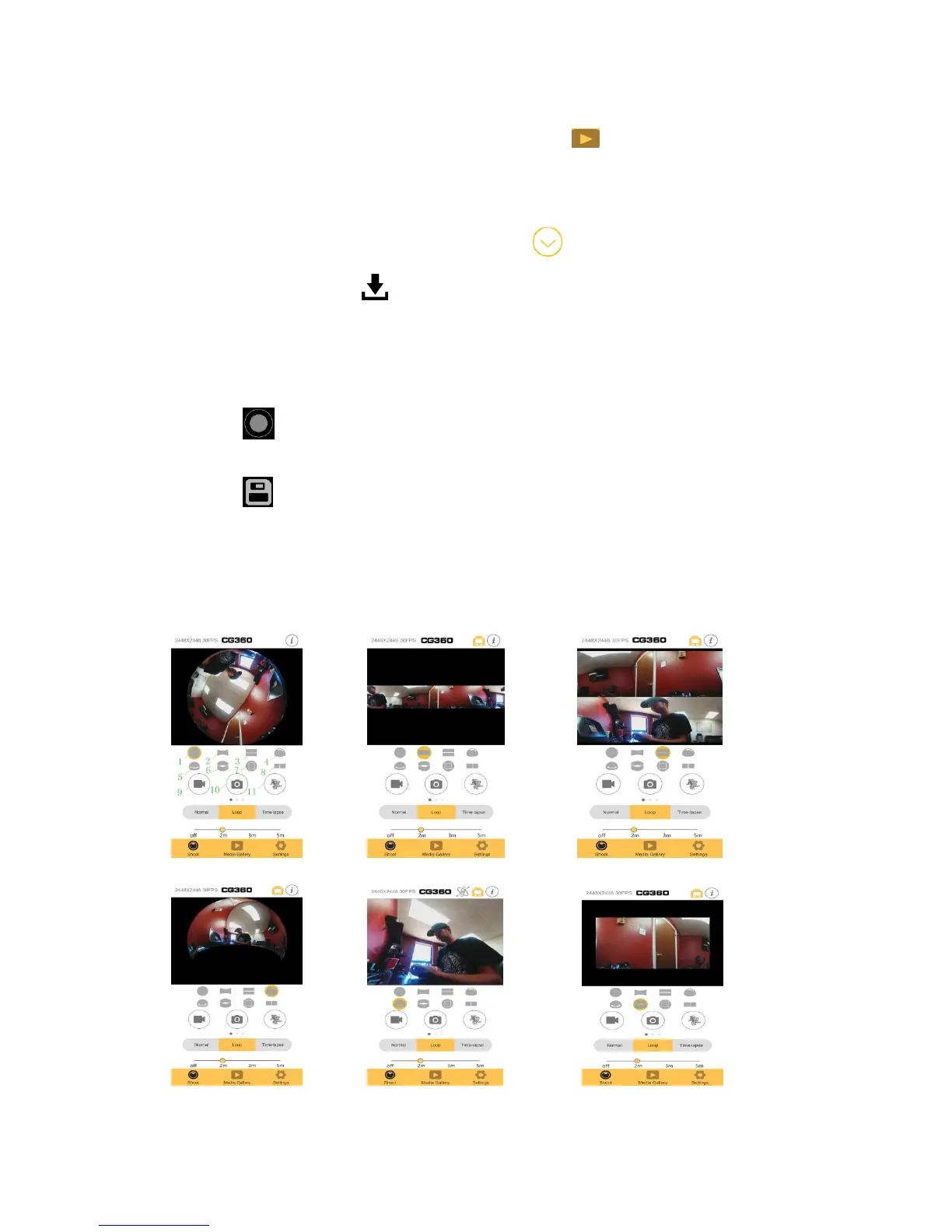
Eight Effects Interface:
1.Fisheye 2.360-degree panorama 3.Split level 4.Asteroid
5.Inner ring 6.3D ring 7.16:9 Standard 8.VR
Fisheye 360 Panorama Split Level
Asteroid Inner Ring 3D Ring


 To Next Page