Need help?
Do you have a question about the Cygnett CHARGEUP BOOST and is the answer not in the manual?
Detailed warnings for safe operation, handling, and charging of the power bank, including fire and explosion risks.
Details on FCC rules and regulations for digital devices to prevent harmful radio interference.
Guidance on proper recycling of electronic equipment to prevent environmental harm.
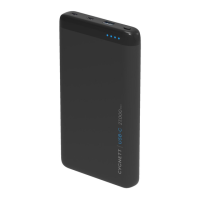
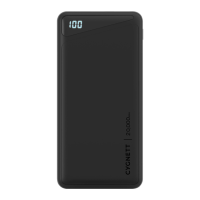
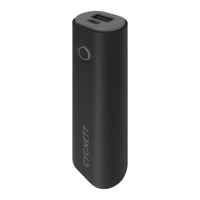
Identifies the power button, LED indicator, USB-A and USB-C ports on the power bank.
Instructions on how to connect and charge external devices using the power bank's outputs.
Steps to recharge the power bank using a compatible charger and cable.
Details on the power bank's name, item numbers, output voltages, currents, and maximum power.
This document outlines the features, usage, and safety guidelines for the Cygnett ChargeUp Boost 2nd Generation 10K power bank. It serves as a comprehensive user manual, ensuring optimal performance and longevity of the device.
The Cygnett ChargeUp Boost 2nd Generation 10K is a portable power bank designed to recharge various electronic devices on the go. Its primary function is to provide a convenient and reliable power source for smartphones, tablets, and other USB-powered gadgets, ensuring users stay connected throughout their day without the need for a wall outlet. The power bank itself can also be recharged, making it a reusable and essential accessory for travel, daily commutes, or emergency situations.
To use the power bank for charging your devices, simply connect a compatible charging cable from your device into one of the available USB-A output ports (C or D) or the USB-C output port (E) on the power bank. Once connected, press the power button (A) located on the side of the power bank. Your device should immediately begin to charge. The power bank is designed to automatically turn off once your device is fully charged or when the cables are removed, helping to conserve its internal battery life. This automatic shut-off feature is a key aspect of its energy efficiency.
To monitor the power bank's remaining charge, press the power button (A) once. The LED battery indicator (B), which is a digital display, will show the current charge level as a percentage, ranging from 0 to 100. This clear indicator allows users to easily determine when the power bank needs to be recharged, preventing unexpected power depletion.
Recharging the power bank itself is a straightforward process. You can use the included USB-C to USB-A cable. Connect the USB-A end of this cable into a compatible USB-A wall charger or computer port, and then insert the USB-C connector into the USB-C input port (E) on the power bank. Alternatively, for faster charging, you can use a USB-C to USB-C cable with a compatible USB-C charger. While the power bank is recharging, the LED battery indicator (B) will flash, visually confirming that the charging process is active and showing the progress of the charge.
The manual emphasizes several crucial safety precautions to ensure the safe and optimal operation of the power bank. Users are strongly advised against disposing of the battery in fire or hot ovens, mechanically crushing or cutting it, as these actions can lead to an explosion. Exposure to extremely high temperatures or very low air pressure can also result in an explosion or the leakage of flammable liquid or gas. These warnings highlight the importance of proper handling and storage to prevent hazardous incidents.
When charging, the power bank may generate heat, which is normal. However, it is critical to always charge the device in a well-ventilated area. Avoid charging it under pillows, blankets, or on flammable surfaces to prevent overheating and potential fire hazards. The power bank should be kept away from direct heat sources, direct sunlight, combustible gases, humidity, water, and other liquids to maintain its integrity and prevent damage.
Users are explicitly warned not to disassemble, open, microwave, incinerate, paint, or insert foreign objects into the power bank. Such actions can damage the internal components, compromise safety features, and potentially lead to dangerous situations. The power bank should also not be subjected to mechanical shock, such as crushing, bending, puncturing, or shredding. Dropping the power bank or placing heavy objects on it should be avoided to prevent internal damage and ensure its continued functionality.
To prevent short circuits, users should not short circuit the power bank or store it in a receptacle where it could come into contact with other metallic or conductive objects. This precaution is vital for preventing electrical hazards and damage to the device. If the power bank has been wet or otherwise damaged, it should not be operated to prevent electric shock, explosion, or injury. In such cases, users should contact the dealer or an authorized agent for assistance.
The manual also stresses the importance of supervising children when they are using the power bank to ensure their safety and prevent misuse. Any changes or modifications to the equipment that are not expressly approved by the responsible party could void the user's authority to operate the equipment. Cygnett explicitly states that it takes no responsibility for damages caused by the incorrect use of its products.
Regarding environmental responsibility, the manual includes a symbol indicating that the product should not be treated as household waste. Instead, it should be sent to an applicable collection point for the recycling of electronic equipment. Proper disposal helps prevent potential negative consequences for the environment and human health. For more information on recycling, users are encouraged to contact their local city office.
The device complies with part 15 of the FCC Rules, meaning it meets standards for electromagnetic interference. It is designed to provide reasonable protection against harmful interference in a residential installation. If the equipment causes harmful interference to radio or television reception, users are advised to try measures such as reorienting the receiving antenna, increasing the separation between the equipment and receiver, connecting the equipment to a different circuit, or consulting a dealer or experienced technician. This ensures that the device operates without causing undue disruption to other electronic devices.
 General
| Battery Capacity | 10, 000mAh |
|---|---|
| Output Ports | 2 x USB-A |
| Input Ports | 1 x Micro-USB |
| Weight | 220g |
| Product Type | Power Bank |
| Input | 5V/2A |
| LED Indicator | Yes |
| Output | 5V/2.1A |

 To Next Page