EasyManua.ls Logo

Cygnett CY2964CHCSA - User Manual

Cygnett CY2964CHCSA
9 pages
Print Icon
To Next Page IconTo Next Page
Loading...
Smart Window & Door Sensor
User Manual
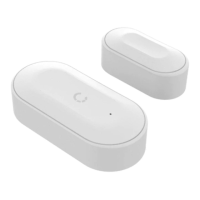
Your Cygnett Smart Window & Door Sensor detects when your window or door is opened or closed. It excels
when it is paired with Cygnett’s range of smart bulbs and smart plugs; set up a scene with the Smart Window &
Door Sensor so when you open a door, the lights or electrical appliances will turn on.
Question and Answer IconNeed help?

Do you have a question about the Cygnett CY2964CHCSA and is the answer not in the manual?

Summary

Welcome and Warnings

Battery Safety Precautions

Handle coin/button cell batteries with care; keep away from children due to serious injury risk if swallowed.

Installation and Setup

Sensor Placement and Orientation

Properly orientate sensors and ensure gap is less than 2cm for accurate detection.

Compliance and Smart Home Screen

Technical Specifications

Details item number, battery type and lifetime, working range, and operating temperature.

Navigating the Smart Home Screen

Overview of the centralised view for managing all smart home devices via the app.

Sensor Operation and Options

Using the Sensor and Activity Log

Accessing the sensor details, understanding the activity log, and clearing history.

Settings and Device Management

Accessing device information, renaming, deleting data, and managing notifications.

Account and Integration Settings

Account Settings Management

Managing account details like password, language, and haptic feedback.

Integration Setup Guides

Instructions for integrating with Amazon Alexa, Google Assistant, and Apple HomeKit.

Troubleshooting and Support

Accessing FAQs and contacting Cygnett Care for assistance.

Overview

The Cygnett Smart Window & Door Sensor is a smart home device designed to detect when a window or door is opened or closed. It integrates with Cygnett's ecosystem of smart bulbs and smart plugs, allowing users to create automated "scenes" where actions like turning on lights or electrical appliances are triggered by the sensor's activity.

Function Description:

The primary function of the Cygnett Smart Window & Door Sensor is to monitor the open/closed status of windows and doors. It operates by using two separate sensor components that detect proximity to each other. When the window or door is closed, the two sensor components are close together, and when opened, they separate. This information is then transmitted to the Cygnett Smart Hub + IR Remote Control, which acts as the central control unit for Cygnett Smart Home devices. The sensor's activity can be viewed in real-time through the Cygnett Smart app, which displays an activity log of open and close events. This log can be cleared by the user.

The device's utility is significantly enhanced when paired with other Cygnett Smart Home products. For example, a user can set up a scene where opening a door automatically turns on a Cygnett smart bulb or a device connected to a Cygnett smart plug. This provides convenience and can contribute to energy efficiency or security. The sensor is intended for indoor use only and is not suitable for wet environments or water contact.

Important Technical Specifications:

  • Item No: CY2964CHCSA
  • Input: CR2032 3V battery
  • Battery Lifetime: >6 months
  • Working Range: 40m to Smart Hub + IR Remote Control (in an open area)
  • Operating Temperature: 0°C to 45°C
  • Wi-Fi Network Support: 2.4GHz Wi-Fi networks only
  • Gap for Open/Closed Detection: The gap between the two sensor components must be less than 2cm to register as closed.
  • Required Accessory: Requires a Cygnett Smart Hub + IR Remote Control to function.

Usage Features:

  • Easy Installation: The sensor comes with adhesive backing for easy mounting on windows or doors and their frames. A small screwdriver is included for accessing the battery compartment.
  • Pairing Process: To pair the device, users need to ensure their Cygnett Smart Hub + IR Remote Control is set up, then remove the battery pull tab from the sensor. Using a provided pin tool, the pairing button on the sensor is pressed and held for 5 seconds until it flashes, indicating pairing mode. The Cygnett Smart app guides the user through selecting the Smart Hub and adding the new device.
  • App Integration: The Cygnett Smart app serves as the central interface for managing the sensor. Users can view the activity log, rename the sensor, and configure settings.
  • Scene Creation: A key feature is the ability to create automated scenes. For instance, a scene can be configured to turn on lights when a door is opened, or to activate an electrical appliance. This requires pairing the sensor with other Cygnett smart devices like smart bulbs or smart plugs.
  • Notifications: Users can opt to receive notifications each time a window or door is opened or closed, enhancing security or awareness.
  • Compatibility: The Cygnett Smart Home ecosystem supports integration with popular voice assistants like Amazon Alexa, Google Assistant, and Apple HomeKit, allowing for broader smart home control.
  • Intuitive User Interface: The Cygnett Smart Home screen in the app provides a centralized view of all smart home devices, allowing users to remotely turn devices on or off and receive live information.

Maintenance Features:

  • Battery Replacement: The sensor is powered by a CR2032 3V coin/button cell battery, which has a lifetime of over 6 months. The battery compartment is secured with a screw to prevent accidental access by young children.
  • Cleaning: Before cleaning, the device should be removed from all power sources. A soft, dry cloth should be used for cleaning, and no cleaning agents should be applied to prevent scratches or damage.
  • Disposal: The product should not be treated as household waste. It must be sent to an applicable collection point for the recycling of electronic equipment, in accordance with environmental and human health guidelines.
  • Troubleshooting: The Cygnett Smart app includes a "Frequently Asked Questions" section for troubleshooting common issues and a "Support Request" option for direct contact with Cygnett Care for assistance.
  • Firmware Updates: While not explicitly detailed as a maintenance feature, smart home devices often receive firmware updates to improve functionality, security, and compatibility. Users should refer to the app or Cygnett support for information on updates.

Cygnett CY2964CHCSA Specifications

General IconGeneral
BrandCygnett
ModelCY2964CHCSA
CategoryAccessories
LanguageEnglish

Related product manuals