The Cygnett Smart Wi-Fi Plug with Power Monitoring is a connected home product designed to offer remote control and power consumption monitoring for your appliances. It integrates into the Cygnett Smart Home ecosystem, which is compatible with Google Home Assistant, Amazon Alexa, and Apple HomeKit, providing a centralized app for managing various smart devices.
Function Description
The primary function of the Smart Wi-Fi Plug is to enable remote control of any appliance plugged into it. This means you can turn your devices on or off from anywhere using the Cygnett Smart app on your smartphone or tablet. Beyond simple on/off control, the plug incorporates power monitoring capabilities, allowing you to track and understand the power consumption of your connected appliances. This feature helps users gain insight into their energy usage, potentially leading to more efficient power management. The device is designed for indoor use only and connects to your home's Wi-Fi network (specifically 2.4GHz Wi-Fi networks).
Usage Features
The Cygnett Smart Wi-Fi Plug offers a range of features to enhance convenience and control:
- Remote Control: The core functionality allows users to switch appliances on or off remotely via the Cygnett Smart app.
- Power Monitoring: The plug provides live readings for power (W), voltage (V), and current (A) flowing to the connected appliance(s). It also records power usage history, showing total kWh consumption over time, which can be downloaded for analysis.
- Scheduling: Users can set schedules for the smart plug to automatically turn on or off at specific times on particular days of the week. This is useful for automating routines, such as turning on a coffee machine in the morning or switching off lights at night.
- Timer Functionality: A countdown timer can be set to turn the smart plug on or off after a specified duration, offering flexibility for short-term automation needs.
- Group Control: For homes with multiple Cygnett Smart devices, the plug can be grouped with other devices (e.g., smart bulbs) into logical areas (e.g., "Hallway Light," "Bedroom Light"). This allows for simultaneous control of multiple devices within a designated zone, simplifying management.
- Sharing: The smart plug's control can be shared with family and friends, granting them access to manage the device through their own Cygnett Smart accounts.
- Integration with Smart Home Ecosystems: The device is certified to work with Google Home Assistant, Amazon Alexa, and Apple HomeKit. This means users can control the smart plug using voice commands through these platforms or integrate it into broader smart home routines. For Apple HomeKit users, the plug can be set up via the Home app on iOS devices, allowing control through the app and Siri voice commands.
- Intuitive App Interface: The Cygnett Smart Home screen provides a centralized view of all connected smart devices. It features quick on/off toggles, device information, and easy access to detailed settings and features. The app allows for naming devices, managing account settings, and accessing support resources.
- Overload Protection System (OPS): The plug includes an Overload Protection System, which is a safety feature designed to protect connected appliances and the plug itself from damage due to excessive current.
Maintenance Features
Maintaining the Cygnett Smart Wi-Fi Plug is straightforward and focuses on ensuring its longevity and safe operation:
- Cleaning: Before any cleaning, it is crucial to remove the device from all power sources. Users should use a soft, dry cloth for cleaning and avoid any cleaning agents to prevent scratches or damage to the device's surface.
- Disposal: The product is marked with a symbol indicating that it should not be treated as household waste. Instead, it should be sent to an applicable collection point for the recycling of electronic equipment. This ensures environmentally responsible disposal and helps prevent potential negative consequences for the environment and human health.
- Firmware Updates: While not explicitly detailed as a user-initiated maintenance feature, smart home devices typically receive firmware updates through the app to improve performance, add new features, and address security vulnerabilities, ensuring the device remains up-to-date and functional.
- Troubleshooting Resources: The Cygnett Smart app provides access to "Frequently Asked Questions" and a "Support Request" option, offering direct links to troubleshooting information and customer support for any issues that may arise. This ensures users have resources available for maintaining the device's optimal performance.
- Account Management: Within the app's "Account Settings," users can manage their password, language preferences, and haptic feedback settings, contributing to a personalized and well-maintained user experience.

 Need help?
 General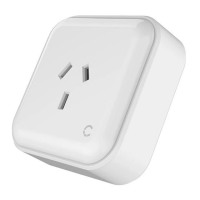

 To Next Page