EasyManua.ls Logo

Cygnett ChargeUp Duo - User Manual

Cygnett ChargeUp Duo
2 pages
Print Icon
To Next Page IconTo Next Page
Loading...
Recharge your ChargeUp Duo Power Bank
You can recharge your ChargeUp Duo by connecting it to a USB wall-charger or USB car-charger through:
1. the USB-C input (B), using a USB-C to USB-A/USB-C cable;
2. the Micro-USB input (C), using a Micro-USB to USB-A cable;
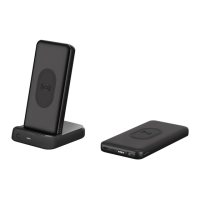
3. the Pin Input (D), by placing it on the Charging Dock (H) with the pins aligned; ensuring that the DC adapter (wall charger) is plugged in and turned on
Charge your device
Using your device’s USB charging cable, connect your device to:
1. the USB-C output (B)
2. the USB-A output (E)
Press the power button (A) once to start charging your device. Your device should indicate that it has begun to charge. The LED charge indicator (F) will now indicate your ChargeUp
Duo’s remaining charge. Repeat steps above to charge a second device on a different output. When you are finished charging your device/s, detach them from your ChargeUp Duo; it
will turn off automatically.
You can also charge your devices by connecting your device to the 2x USB-A outputs (I) found on the back of the Charging Dock (H).
Or, if you would like to wirelessly charge your device*, press the power button (A); the green LED indicator will illuminate, indicating that it is ready to charge your device wirelessly.
Place your device onto the Wireless output surface (G). Your device should now begin to wireless charge.
ChargeUp Duo supports pass-through charging, meaning that you can place your ChargeUp Duo power bank onto the Charging Dock (H) and still be able to wirelessly charge your
device. Please note that charging priority will be given to your device first.
*Compatible with wireless charging enabled devices
LED charge indicator
To check your ChargeUp Duo’s remaining charge, press the power button (A) once. Once your device is fully charged, a solid orange light will display on the LED charge indicator (F).
The LED charge indicator (F) will show the remaining charge in increments between 1-4, of which each increment accounts for a 25% charge level.
ChargeUp Duo
10K Portable Wireless Power Bank + Charging Dock
Please note that changes or modifications not expressly approved by the party responsible for compliance could void the user’s authority to operate the equipment.
Question and Answer IconNeed help?

Do you have a question about the Cygnett ChargeUp Duo and is the answer not in the manual?

Summary

Recharge Your ChargeUp Duo Power Bank

Recharge Ports

Details the USB-C, Micro-USB, and Pin input options for recharging the power bank.

Charge Your Device

Wired Charging Outputs

Explains how to charge devices using the USB-C and USB-A outputs.

Wireless Charging

Instructions for initiating and performing wireless charging with the device.

Pass-Through Charging

Information on simultaneous charging of the power bank and a device.

LED Charge Indicator

Indicator Functionality

Describes how the LED indicator displays the power bank's remaining charge level.

Product Specifications

Power Bank Specifications

Lists the technical details and output/input ratings for the power bank unit.

Charging Dock Specifications

Details the input and output specifications for the charging dock.

Important Safety Instructions

General Safety Precautions

Key warnings and cautions for safe operation, handling, and environment.

Battery Safety and Disposal

Guidance on battery replacement, disposal, and risks associated with damage or extreme conditions.

Overview

ChargeUp Duo: 10K Portable Wireless Power Bank + Charging Dock

The ChargeUp Duo is a versatile and portable power solution designed to keep your devices charged on the go and at home. This innovative product combines a 10,000mAh power bank with a dedicated charging dock, offering multiple ways to power up your gadgets, including wireless charging capabilities.

Function Description

The core function of the ChargeUp Duo is to provide portable power to a wide range of electronic devices. It acts as a power bank, storing electrical energy that can be discharged to charge smartphones, tablets, and other USB-powered devices. Additionally, it features a charging dock that not only recharges the power bank itself but also offers extra USB-A outputs to charge other devices simultaneously. The standout feature is its wireless charging capability, allowing compatible devices to be charged simply by placing them on the designated surface of the power bank.

Usage Features

Recharging the ChargeUp Duo Power Bank: The ChargeUp Duo power bank offers several convenient methods for recharging, ensuring it's always ready when you need it. You can recharge it using a standard USB wall-charger or a USB car-charger.

  1. USB-C Input: Connect a USB-C to USB-A/USB-C cable to the USB-C input port (B) on the power bank.
  2. Micro-USB Input: Alternatively, use a Micro-USB to USB-A cable with the Micro-USB input port (C).
  3. Charging Dock: For the most integrated experience, simply place the power bank onto the Charging Dock (H), ensuring the pins align correctly. The Charging Dock itself needs to be plugged into a power source via its DC adapter (wall charger) and turned on.

Charging Your Devices: The ChargeUp Duo provides multiple output options to charge your devices, catering to various cable types and charging preferences.

  1. USB-C Output: Connect your device's USB charging cable to the USB-C output port (B) on the power bank.
  2. USB-A Output: Connect your device's USB charging cable to the USB-A output port (E) on the power bank.

To initiate charging via the USB ports, press the power button (A) once. Your device should indicate that it has begun to charge, and the LED charge indicator (F) on the power bank will display its remaining charge. The ChargeUp Duo supports charging multiple devices simultaneously; simply repeat the steps for a second device on a different output. Once your devices are fully charged, or you're finished charging, detach them from the ChargeUp Duo, and it will automatically power off.

Charging Devices via the Charging Dock: The Charging Dock (H) itself is not just for recharging the power bank; it also features two additional USB-A outputs (I) on its back. You can connect your devices directly to these ports to charge them while the dock is powered.

Wireless Charging: For compatible devices, the ChargeUp Duo offers a convenient wireless charging option.

  1. Press the power button (A) once. A green LED indicator will illuminate, signifying that the power bank is ready for wireless charging.
  2. Place your wireless charging-enabled device onto the Wireless output surface (G) of the power bank. Your device should then begin to charge wirelessly.

Pass-Through Charging: A highly practical feature of the ChargeUp Duo is its pass-through charging capability. This means you can place the ChargeUp Duo power bank onto the Charging Dock (H) and simultaneously wirelessly charge your device. The system prioritizes charging your device first, ensuring your essential gadgets are powered up efficiently.

LED Charge Indicator: The LED charge indicator (F) provides clear feedback on the power bank's status.

  • To check the remaining charge of the ChargeUp Duo, press the power button (A) once.
  • When your device is fully charged, a solid orange light will appear on the LED charge indicator (F).
  • The LED indicator (F) displays the remaining charge in increments, with each segment representing a 25% charge level, allowing you to easily gauge the available power.

Maintenance Features

Safety Instructions: To ensure safe and optimal use of your ChargeUp Duo, it's crucial to adhere to the following safety guidelines:

  • Heat Management: The power bank will generate heat during charging. Always charge it in a well-ventilated area and avoid placing it under pillows, blankets, or on flammable surfaces.
  • Environmental Protection: Keep the power bank away from extreme heat sources, direct sunlight, combustible gases, excessive humidity, water, or other liquids.
  • Physical Integrity: Do not attempt to disassemble, open, microwave, incinerate, or paint the power bank. Avoid inserting foreign objects into it. The power bank should not be subjected to mechanical shock, such as crushing, bending, puncturing, or shredding. Do not drop it or place heavy objects on it.
  • Short-Circuit Prevention: Prevent short-circuiting the power bank by avoiding storing it in receptacles with other metallic or conductive objects.
  • Damage Protocol: If the power bank becomes wet or is otherwise damaged, do not operate it. Contact the retailer or an authorized agent immediately to prevent electric shock, explosion, or injury.
  • Supervised Use: Children using the power bank should always be supervised.
  • Operating Instructions: Always refer to the operating instructions for information on charging and recommended operating temperatures.

Battery Disposal:

  • Explosion Risk: Replacing the battery with an incorrect type carries a risk of explosion.
  • Responsible Disposal: Dispose of used batteries responsibly. Contact your local e-waste facility or recycling center for proper disposal instructions.
  • Avoid Extreme Conditions: Do not dispose of batteries in fire or hot ovens, or mechanically crush or cut them, as this can lead to an explosion. Exposure to extremely high temperatures or very low air pressure can also result in an explosion or the leakage of flammable liquid or gas.
  • Cable Storage: Do not store the power bank with both connectors of a cable plugged into it, as this may cause a short circuit and prevent it from functioning correctly.

Compliance: Please note that any changes or modifications not expressly approved by the party responsible for compliance could void the user's authority to operate the equipment.

Cygnett ChargeUp Duo Specifications

General IconGeneral
Product TypePower Bank
Battery Capacity10000mAh
Output Ports2
Input PortMicro USB
Input5V/2A
Output Current2.4A
MaterialPlastic
CompatibilityMost USB-powered devices
Dimensions150 x 75 x 15 mm

Related product manuals