IV. GL60 Plus Gimbal Searchlight Installation Tutorial
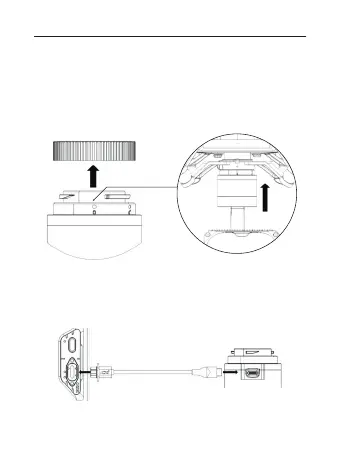
1. Remove the protective cover of the GL60 Plus gimbal
searchlight interface, align it with the No. 2 gimbal port of the
drone, push upwards and gently rotate the GL60 Plus gimbal
interface counter-clockwise to align the two red markers and
lock the gimbal. After installation is complete, check the GL60
Plus Gimbal Searchlight is securely mounted.
2. Connect the OSDK power cable, to the OSDK port of the DJI
M300 RTK and the GL60 Plus Gimbal Searchlight.
(Note: Do not operate with DJI M300 RTK ON. must be OFF)
01 02 03 04 05 06
07 08 09 10 11 12 13 14
15 16 17 18 19 20
21 22
23 24 25 26 27 28 29 30
31 32 33



 To Next Page