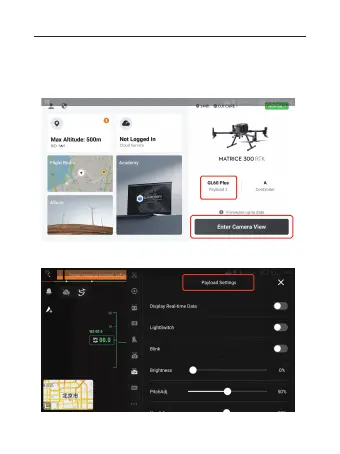
VI. DJI Pilot 2 use tutorial
1.Into the main interface, the lower right corner shows the word
GL60 Plus, indicating the successful identification of the load of
gimbal searchlight, click on “Enter Camera View”.
2. Click the menu bar, click on “Payload Settings”, and enter the
operation interface of GL60 Plus gimbal searchlight.
01 02 03 04 05 06
07 08 09 10 11 12 13 14
15 16 17 18 19 20 21 22
23 24
25 26 27 28 29 30
31 32 33



 To Next Page