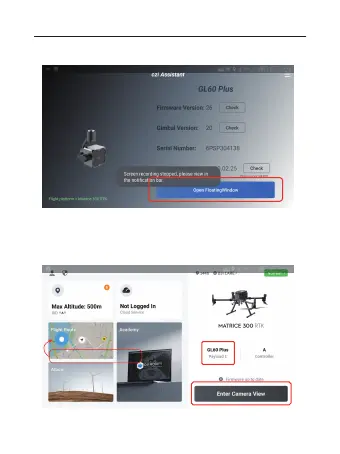
4. The lower right corner shows the word GL60 Plus, indicating the
successful identification of the load of gimbal searchlight. On the
interface, the blue virtual button is the hovering dialogue button. Click
“Enter Camera View” to operate.
3. After clicking the APP icon, enter the interface and click on
“Open Floating Window”.
Hovering dialogue window
Hovering dialogue button
01 02 03 04 05 06
07 08 09 10 11 12 13 14
15 16 17 18 19 20 21 22
23 24 25 26 27 28 29 30
31 32 33



 To Next Page