Need help?
Do you have a question about the D-Link 32-bit PCI Fast Ethernet Network Adapter DFE-520TX and is the answer not in the manual?
Lists minimum configuration requirements for installing the DFE-520TX network adapter.
Details the key features and capabilities of the DFE-520TX Network Adapter.
Instructions for unpacking the DFE-520TX adapter and verifying included items.
Guide on installing the driver software for the DFE-520TX adapter from the CD-ROM.
Step-by-step guide on physically installing the DFE-520TX PCI adapter into the computer.
Information on using Category 5 UTP cable for network connections and cable length limitations.
Explains the function of the Link/Activity LED on the DFE-520TX adapter.
Lists the EMC and safety certifications for the DFE-520TX adapter.
Provides physical dimensions, operating temperature, and humidity specifications for the adapter.
Details the warranty period and terms for the hardware components of the DFE-520TX.
Outlines the warranty period and terms for the software included with the DFE-520TX adapter.
Instructions on how to submit a warranty claim for the DFE-520TX product.
Procedure for obtaining an RMA number for returning a defective DFE-520TX product.
Specifies exclusions and conditions not covered under the D-Link Limited Warranty.
States D-Link's liability limits regarding the product and warranty.
Provides FCC compliance information and measures to correct radio interference.
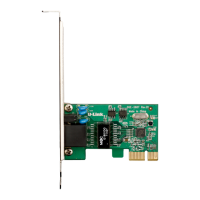
The D-Link DFE-520TX is a 32-bit PCI Fast Ethernet Network Adapter designed to provide reliable and high-performance network connectivity for personal computers. This adapter is a value leader among Fast Ethernet solutions for PCI Bus systems, offering a blend of versatility, performance, and ease of installation.
At its core, the DFE-520TX functions as a network interface card (NIC) that allows a computer to connect to an Ethernet local area network (LAN) at speeds of either 10 Mbps (Ethernet) or 100 Mbps (Fast Ethernet). It achieves this by utilizing an open PCI bus master slot, operating at 33MHz, within the host computer. The adapter supports both half-duplex and full-duplex modes of operation. In half-duplex, it can operate at both 10 Mbps and 100 Mbps. In full-duplex, it supports 10 Mbps and 100 Mbps, effectively doubling the network throughput compared to half-duplex. This capability makes it suitable for various networking environments, from basic home setups to more demanding workstation or server applications.
A key feature of the DFE-520TX is its compliance with IEEE 802.3u Fast Ethernet and IEEE 802.3 Ethernet standards, ensuring broad compatibility with existing network infrastructure. It also incorporates IEEE 802.3x Flow Control Enhancements. This is particularly important when the adapter is connected to a network switch. In full-duplex mode, the MAC (Media Access Control) layer of the adapter implements a PAUSE control function. This means that if a connected switch detects that its internal buffer is nearing overflow, it can send a standard Ethernet packet to the DFE-520TX, instructing it to temporarily pause data transmission. This mechanism helps prevent internal buffer overflow at the switch and subsequent packet loss, leading to more stable and efficient data transfer.
The adapter is designed for ease of use, featuring Plug-and-Play installation. This means that once the physical card is installed in a compatible PCI slot, the computer's operating system, especially if its BIOS is Plug-and-Play compliant, should automatically detect and configure the adapter upon boot-up. This simplifies the setup process, reducing the need for manual configuration. The DFE-520TX also supports Universal Bus (3.3V), further enhancing its compatibility with a wide range of PCI systems.
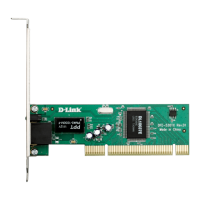
For physical connectivity, the DFE-520TX is equipped with one built-in RJ-45 connector, which is the standard interface for twisted-pair Ethernet cabling. It supports auto-negotiation, allowing it to automatically detect and connect at the highest available speed (10 Mbps or 100 Mbps) and duplex mode (half or full) compatible with the connected network device. This eliminates the need for manual speed and duplex settings, making it more user-friendly.
The DFE-520TX includes a single LED indicator for Link/Activity. This LED serves as a visual diagnostic tool. A steady green light indicates a good network link between the DFE-520TX and the supporting server or switch, confirming that a physical connection has been established. A flashing green light signifies network activity, meaning data is being transmitted or received through the adapter. This simple indicator helps users quickly assess the operational status of their network connection.
The adapter supports ACPI 2.0 (Advanced Configuration and Power Interface), which allows for advanced power management features, contributing to energy efficiency and system stability. It is compatible with a broad range of operating systems, including various versions of Microsoft Windows (Vista, XP, Server 2003, 2000, 95/98/ME, NT, WorkGroup 3.11), Red Hat Linux, Fedora Core, Macintosh OSX, and Netware Server/Client, as well as DOS drivers (ODI, NDIS2, Packet Driver). This extensive driver support ensures that the DFE-520TX can be integrated into diverse computing environments. Users are advised to check the D-Link website for the newest release of drivers to ensure optimal performance and compatibility.
Maintenance of the DFE-520TX primarily involves ensuring proper installation and driver updates. The installation process is guided by an Installation Wizard provided on the accompanying CD-ROM, which simplifies the software setup across different operating systems. Before physical installation, users are cautioned to handle the adapter carefully to avoid static discharge, although the card is generally robust. The physical installation involves shutting down the computer, unplugging it, removing the chassis cover, inserting the card firmly into an available PCI Bus Master expansion slot, securing it with a bracket screw, replacing the cover, and reconnecting power.
For network cabling, the DFE-520TX requires Category 5 (or better) UTP cable for 100Mbps connections and Category 3, 5 (or better) UTP cable for 10Mbps connections. The maximum length for any single cable segment is 100 meters, adhering to both 100BASE-TX Fast Ethernet and 10BASE-T Ethernet cabling rules. It's important to note that the maximum cable run between any two stations in a collision domain is 205 meters.
Troubleshooting is straightforward, focusing on a few key areas. If network problems arise, users should verify that the correct driver is loaded, that the appropriate grade of network cable is used, and that the supporting network hub or switch is properly qualified for the application. The Link/Activity LED provides immediate feedback on the connection status. In rare cases, if a newly installed adapter experiences an Interrupt Number conflict due to a Plug-and-Play BIOS fault, the user may need to manually assign a non-conflicting Interrupt Number using the CMOS Setup utility.
The DFE-520TX is designed to be a reliable and efficient solution for upgrading or adding Fast Ethernet connectivity to PCI-enabled computers, offering a balance of performance, compatibility, and user-friendliness.
 General
| Interface Type | PCI |
|---|---|
| Data Transfer Rate | 100 Mbps |
| Network Standard | IEEE 802.3u |
| Connector Type | RJ-45 |
| Device Type | Network Adapter |
| Data Link Protocol | Ethernet, Fast Ethernet |
| Ethernet Speed | 10/100 Mbps |
| MAC Address Storage | EEPROM |
| Operating System Compatibility | Windows 95/98/2000/ME/NT |
| Ports | 1 x RJ45 |
| Compliance | FCC, CE |
| LED Indicators | Link/Activity |

 To Next Page