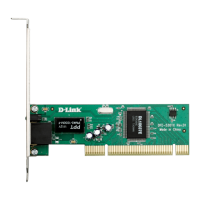
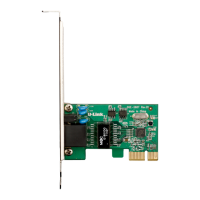
The D-Link DFE-530TX+ is a 10/100Mbps Fast Ethernet 32-bit PCI Adapter designed for desktops, workstations, and servers. This network adapter facilitates high-speed network connectivity for your computer, allowing it to communicate with other devices on a local area network (LAN) or the internet. It supports both 10BASE-T and 100BASE-TX networks, automatically adjusting to the highest supported transfer rates up to 200Mbps in full duplex mode. This auto-negotiation feature ensures optimal performance by selecting the best communication parameters (Ethernet type and duplex mode) between the adapter and the connected switch.
One of the key usage features of the DFE-530TX+ is its Wake-On-LAN (WOL) Management Support. WOL is an Advanced Configuration and Power Interface (ACPI) function that allows a powered-down (sleeping) computer to be remotely powered ON from another station on the network. This is particularly useful for off-hours tasks such as automated software installations, upgrades, disk backups, and virus scans, helping to save time and energy. To utilize the WOL feature, both the network interface card (NIC) and the computer's motherboard must be ACPI compliant. When the computer is in a powered-down state, the WOL-enabled NIC monitors LAN traffic for valid Wake-up frames. Upon receiving such a frame, the NIC sends a signal to the motherboard to power ON the computer. The DFE-530TX+ supports various wake-up frames, including Magic Packet, LinkChg, and Microsoft wake-up frames.
The adapter also supports optional advanced networking features like Boot ROM with PXE support, which enables network booting of supported operating systems. This can be beneficial in environments where diskless workstations or centralized operating system deployment is desired.
Installation of the DFE-530TX+ is designed to be user-friendly, supporting Plug and Play functionality. However, it is important to install the driver software from the D-Link CD before physically inserting the adapter into your computer's PCI slot. The installation process involves turning off the computer, removing the power cable, opening the case, and inserting the adapter into an available PCI slot. If the WOL feature is to be used, a dedicated WOL cable must be connected between the adapter and the motherboard. After physical installation, Windows® operating systems (including 7, Vista, XP, and 2000) will automatically detect and install the necessary drivers. For Windows 2000 users, a Found New Hardware Wizard will guide them through the driver installation process. Verification of proper installation can be done through the Device Manager, where the D-Link DFE-530TX+ PCI Fast Ethernet Adapter should be listed under Network Adapters.
The DFE-530TX+ incorporates IEEE 802.3x compliant flow control for full-duplex operation. This feature provides traffic management functions, especially when connected to a switch. In a full-duplex setup, if the switch's data buffer is nearing overflow, it transmits a Pause frame to the DFE-530TX+. This pause prevents the buffer from overflowing, ensuring that data is not lost and improving network throughput. This enhancement helps the network achieve optimal performance by avoiding collisions and preventing data loss.
For maintenance and troubleshooting, the device includes diagnostic LEDs: a Link LED and an Activity LED. A steady green Link LED indicates a good connection to your Ethernet device, while a blinking Activity LED signifies that data is being transmitted or received. The Speed LED, when lit, indicates a 100Mbps connection; if unlit, the connection speed is 10Mbps. These visual indicators are helpful for quickly assessing the network status and identifying potential connectivity issues.
Troubleshooting common issues is addressed in the manual. For instance, if the adapter is not recognized, users are advised to ensure it is properly seated in the PCI slot and that any previously loaded drivers are completely removed. If the WOL cable causes issues, it's important to ensure that the correct WOL cable is used for the specific D-Link card, as swapping cables between different cards can lead to system malfunctions. The manual also guides users on how to check their IP address using the ipconfig command in the Command Prompt, which is crucial for verifying network configuration. If a static IP address is required, the manual provides detailed steps on how to assign one through the Internet Protocol (TCP/IP) Properties in the network connection settings.
The DFE-530TX+ is designed to be highly compatible with various operating systems, including Windows® 7, Vista®, XP, 2000, Linux 2.2.x and above, Netware 5.x/6.x, and Mac OS 10.2.x, making it a versatile solution for different computing environments. Its utilization of the Bus Master Mode of the PCI bus allows for direct transfers of Ethernet packet content between computer memory and the adapter's controller, minimizing network demands on the CPU. This reduces the CPU's role in network operations, freeing it to service other tasks, which results in improved overall computing performance and superior network throughput by reducing latency during transmissions and receptions.



 To Next Page


 General