101D-Link COVR-3902 User Manual
Section 4 - Quick VPN
Quick VPN Server Setup Instructions
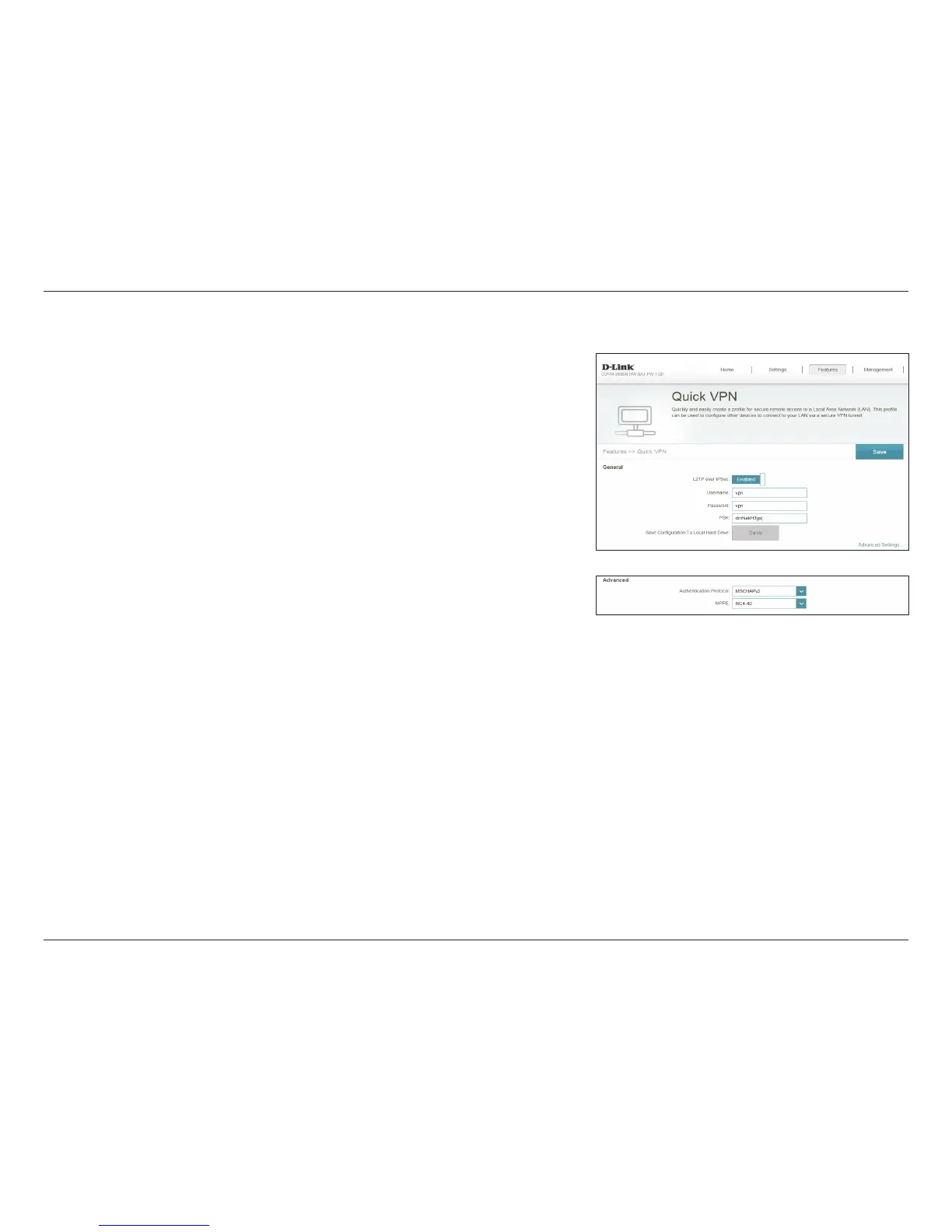
Congure the following options:
When you are done conguring VPN settings, refer to the following sections for more
information on how to set up VPN clients.
L2TP over IPsec: Enable or disable the Quick VPN server.
If L2TP over IPsec is enabled, the following options are available:
Username: Enter a username between 1 and 20 characters.
Password: Enter a username between 1 and 20 characters.
PSK: Enter a passkey between 6 and 64 characters.
Save
Conguration To
Local Hard Drive:
Click this button to save the current Quick VPN settings to your local
hard drive.
For Apple iOS devices and OS X: From a computer browser click
this button to export a prole to simplify setup. E-mail this le as an
attachment to your Apple mobile device or open the le in OS X.
Advanced Settings - Address Autoconguration Settings
Authentication
Protocol:
Choose the authentication protocol type: MSCHAPv2, PAP, or CHAP.
MSCHAPv2 is the default.
MPPE: Select the encryption cipher strength: None, RC4-40, or RC4-128.
RC4-128 is the default.
Click Save when you are done.


 To Next Page
 Loading...