67D-Link COVR-C1203 User Manual
Section 3 - Conguration
Upgrade
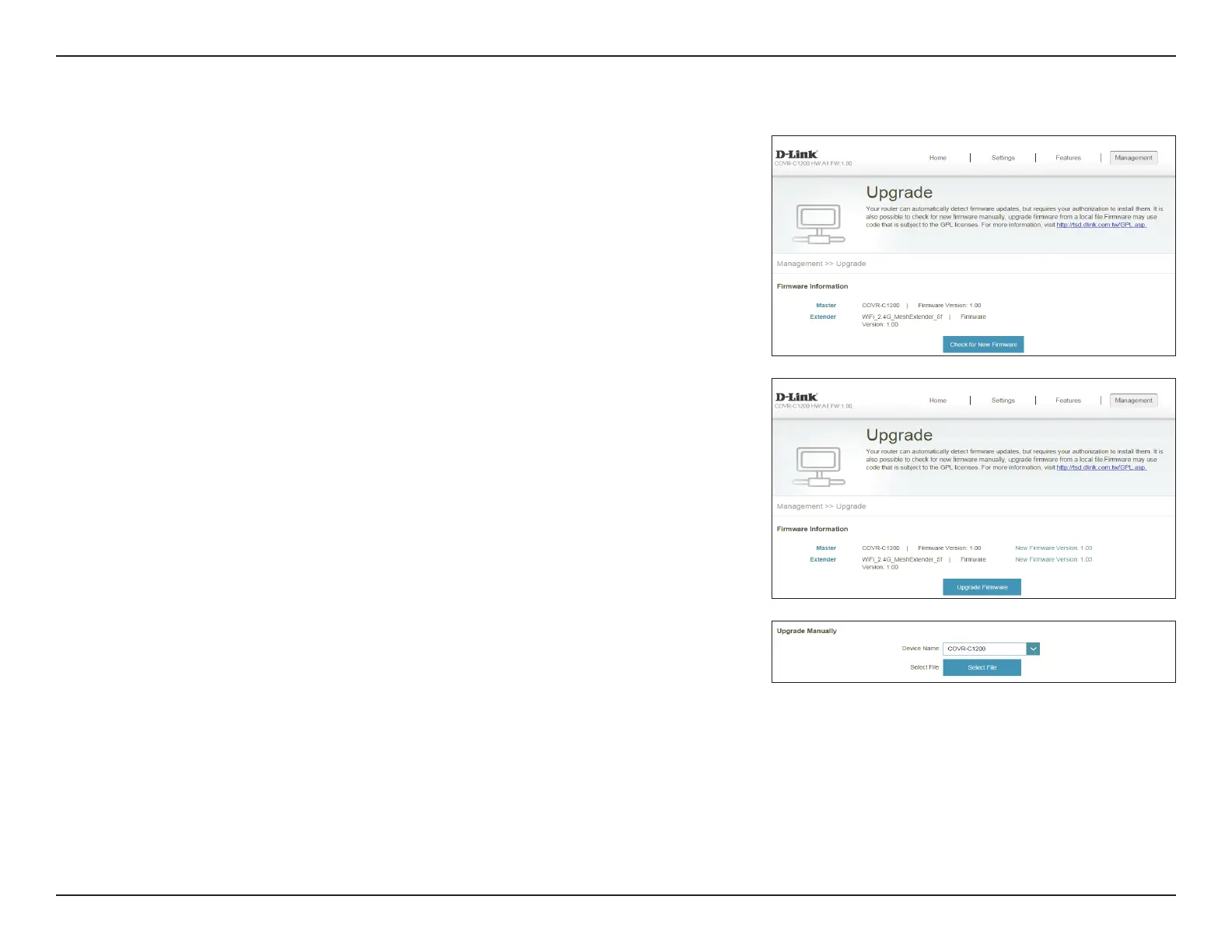
This page will allow you to upgrade the extender’s rmware, either
automatically or manually. To manually upgrade the rmware, you must rst
download the newest rmware le from http://support.dlink.com.
In the Management menu on the bar on the top of the page, click Upgrade.
Firmware Information
Current Firmware
Version/Date:
Displays the current rmware version and date for Covr Point A (master)
and any additional Covr Points unit (extender).
Check for New
Firmware:
Click this button to prompt the extender to automatically check for a new
rmware version. If a newer version is found, click Upgrade Firmware
to download and install the new rmware.
Upgrade Manually
Upgrade
Firmware:
If you wish to upgrade manually, rst download the rmware le you
wish to upgrade to. Next, select a device from the drop-down menu to
upgrade rmware for. Then, click the Select File button and browse to
the rmware le you want to install. With the le selected, click Upload
to begin the upgrade process.






 To Next Page