29D-Link COVR-1102 User Manual
Section 3 - Conguration
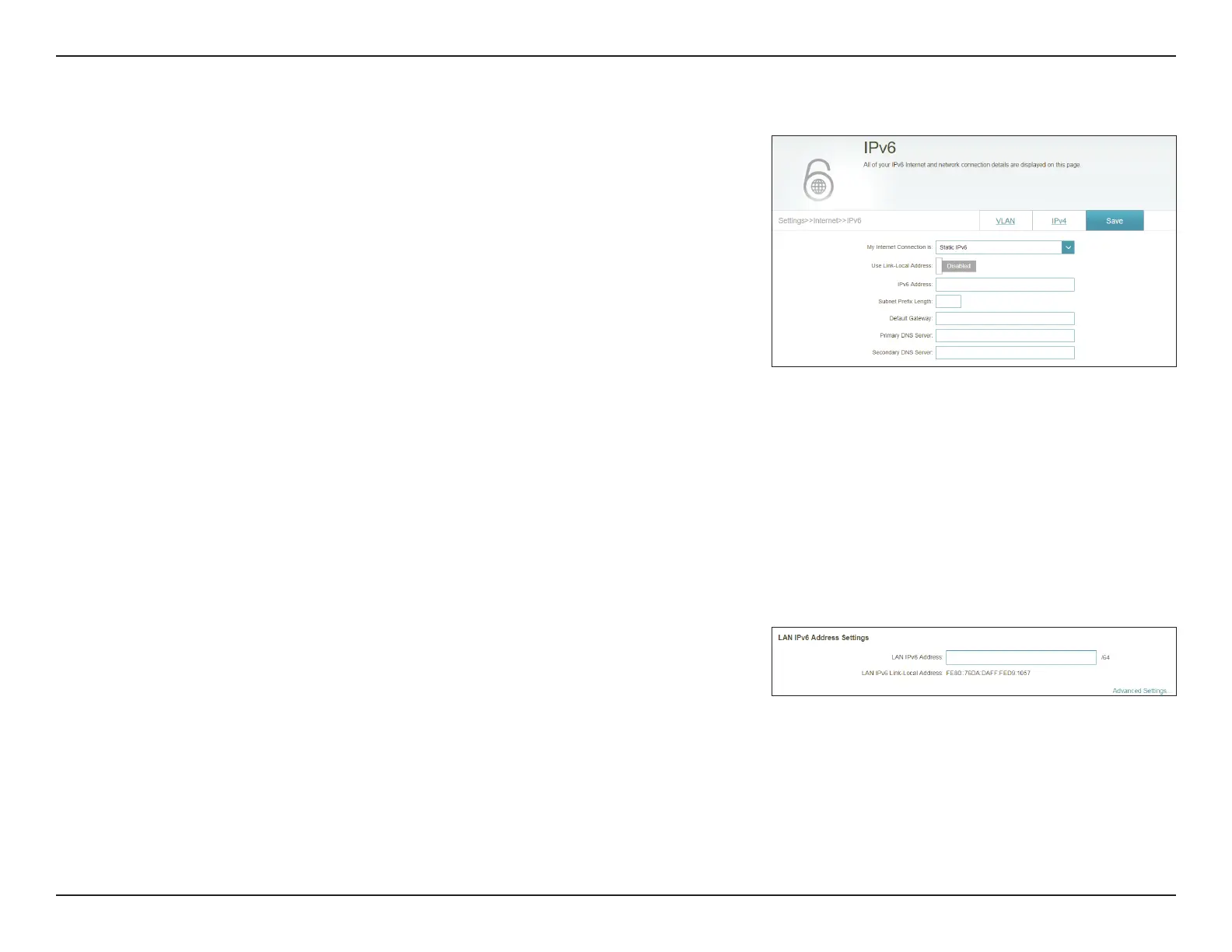
Static IPv6
Select Static IP if your IPv6 information is provided by your Internet Service
Provider (ISP).
Use Link-Local
Address:
Enable or disable link-local address use. Enabling this feature will use
your local IPv6 address as the static IP. Disable this feature to manually
enter your static IPv6 address and subnet prex length.
IPv6 Address: If Use Link-Local Address is disabled, enter the address supplied
by your ISP.
Subnet Prex
Length:
If Use Link-Local Address is disabled, enter the subnet prex length
supplied by your ISP.
Default Gateway: Enter the default gateway for your IPv6 connection.
Primary DNS
Server:
Enter the primary DNS server address.
Secondary DNS
Server:
Enter the secondary DNS server address.
LAN IPv6 Address Settings
LAN IPv6 Address: Enter the LAN (local) IPv6 address for the master COVR Point.
LAN IPv6 Link-
Local Address:
Displays the master COVR Point's LAN link-local address.






 To Next Page