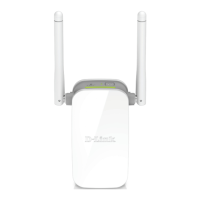
DAP-1330
5
TECHNICAL SUPPORT
Iran
Unit 5, 5th Floor, No. 20, 17th Alley , Bokharest
St. , Argentine Sq. ,
Tehran IRAN
Postal Code : 1513833817
Tel: +98-21-88880918,19
+98-21-88706653,54
General Inquiries: info.ir@dlinkmea.com
Tech Support: support.ir@dlinkmea.com
Morocco
M.I.T.C
Route de Nouaceur angle RS et CT 1029
Bureau N° 312 ET 337
Casablanca , Maroc
Phone : +212 663 72 73 24
Email: support.na@dlinkmea.com
Lebanon RMA center
Dbayeh/Lebanon
PO Box:901589
Tel: +961 4 54 49 71 Ext:14
Fax: +961 4 54 49 71 Ext:12
Email: taoun@dlinkmea.com
Bahrain
Technical Support: +973 1 3332904
Kuwait:
Technical Support: + 965 22453939 / +965
22453949
Türkiye
Büyükdere Cad. Ferro Plaza No:155
D: 1 K: 1 Zincirlikuyu / Istanbul
Tel: +90 (212) 289-56-59
Email: info.tr@dlink.com.tr
לארשי
רטנס ןולטמ
20 םימישגמה 'חר
7060 ד"ת ,49348 ת"פ ,ןולטמ תירק
03-9215173 :לט
073-7962797 :לט
info@dlink.co.il :יללכ ל"אוד
support@dlink.co.il :הכימת ל"אוד
This purpose of this product is to create a constant network connection for your devices.
As such, it does not have a standby mode or use a power management mode. If you wish
to power down this product, please simply unplug it from the power outlet.


 To Next Page
 Loading...