10D-Link DHP-600AV/DHP-601AV User Manual
Section 2 - Installation
Hardware Installation
Power
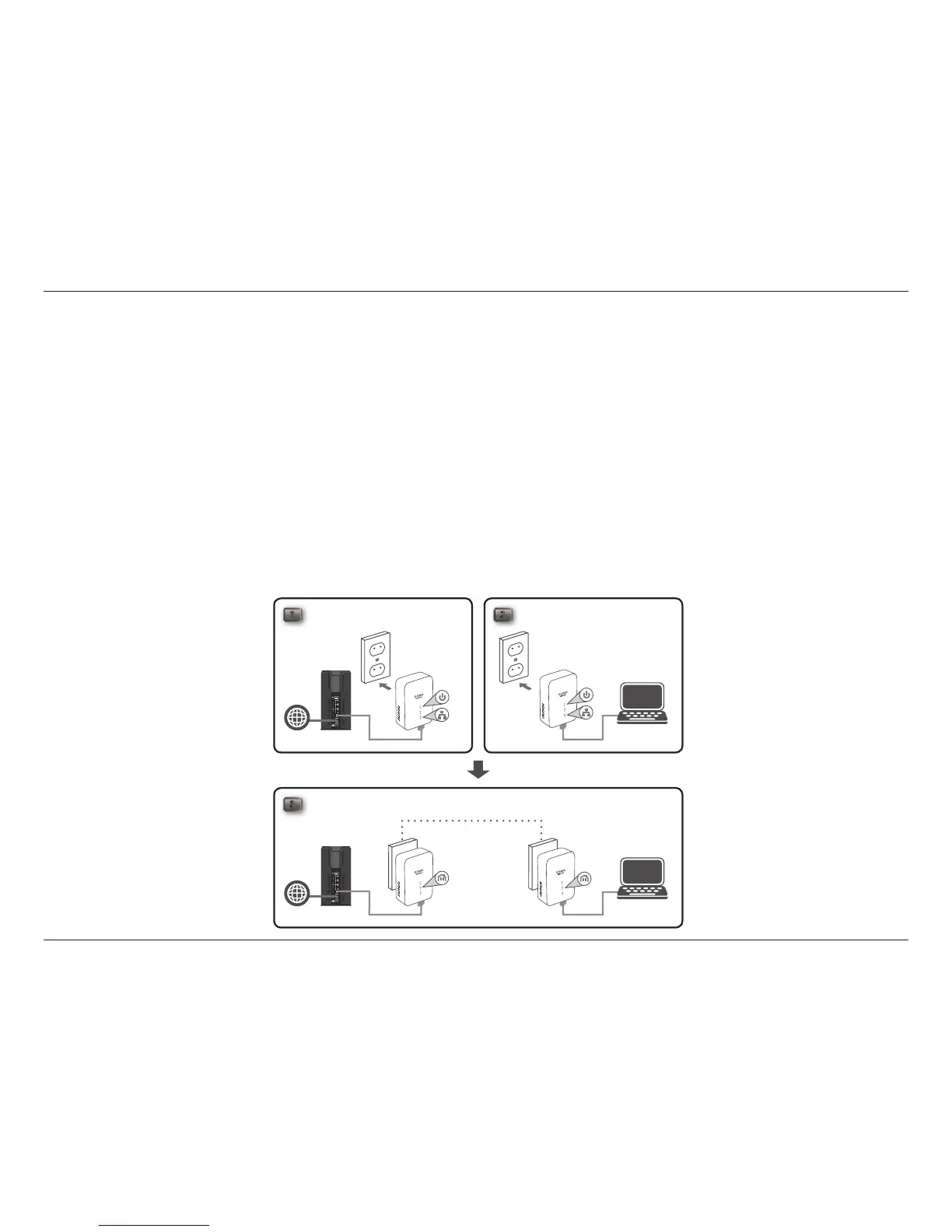
Plug each of the DHP-600AV adapters into an AC wall outlet, one near your router and one at the location you wish
to extend your network to.
Note: Power supply is conrmed when the Power LED on the DHP-600AV is lit.
Connect the Ethernet Cable
Connect the included Ethernet cable to the Ethernet port located on the bottom of the DHP-600AV and attach the
other end of the Ethernet cable to the router. A lit Ethernet LED indicates a connection between your PC and the
DHP-600AV. Then connect the Ethernet cable from the second DHP-600AV to a PC.
For DHP-601AV:
3
ROOM A ROOM B
DHP-600AVDHP-600AVRouterInternet
PC
1 2
ROOM A ROOM B
DHP-600AVDHP-600AVRouterInternet
PC



 To Next Page