DIR-822 Quick Installation Guide
Configuring Guest Wireless Network
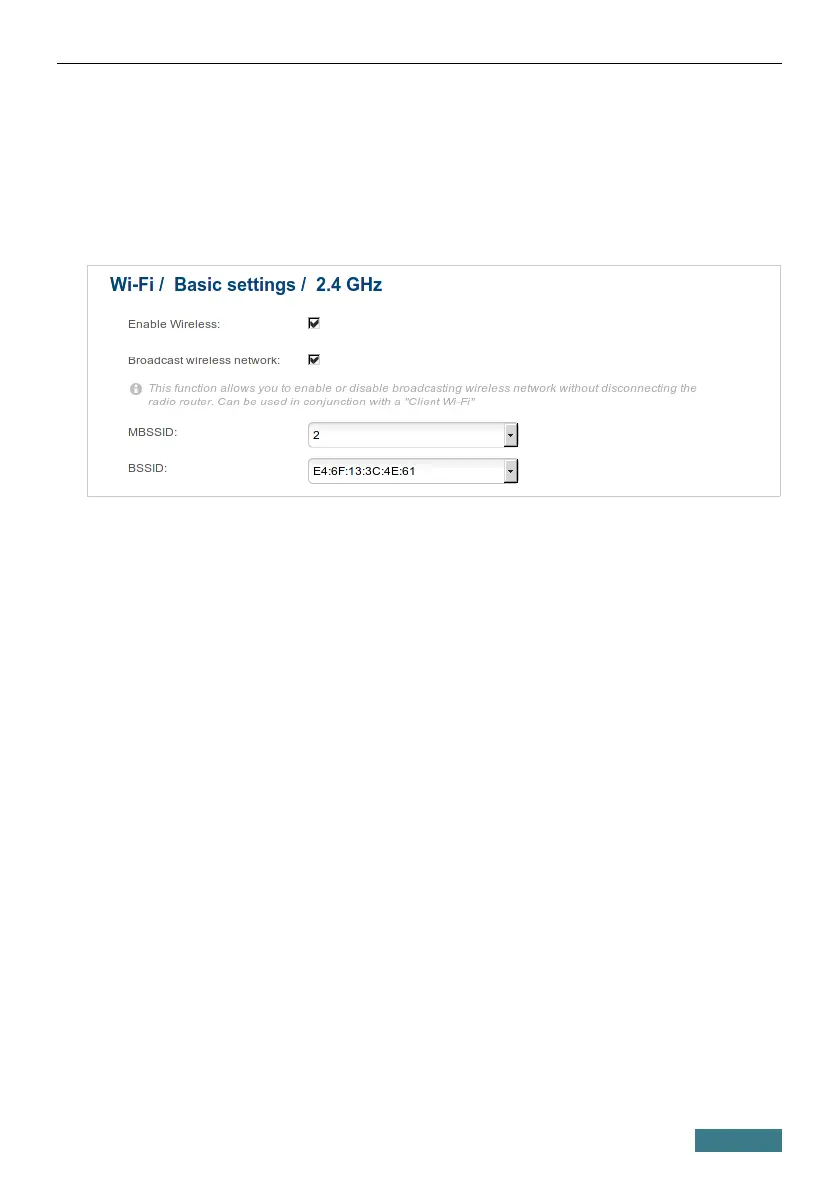
1. Go to the Wi-Fi / Basic settings page of the band for which you
configure the guest network.
2. Select 2 from the MBSSID drop-down list.
3. Click the Apply button.
4. From the BSSID drop-down list, select the created part of the network
(the second value in the list).
5. Select the Enable guest network checkbox.
6. If needed, specify a new name for the guest network in the Network
name (SSID) field.
7. Click the Apply button.
8. Go to the Wi-Fi / Security settings page of the band for which you
configure the guest network.
9. From the BSSID drop-down list, select the guest network (the second
value in the list).
10. Select the WPA2-PSK value from the Network Authentication drop-
down list.
32



 To Next Page