11D-Link Media Converter Series
Section 3 - Management
DIP Switches
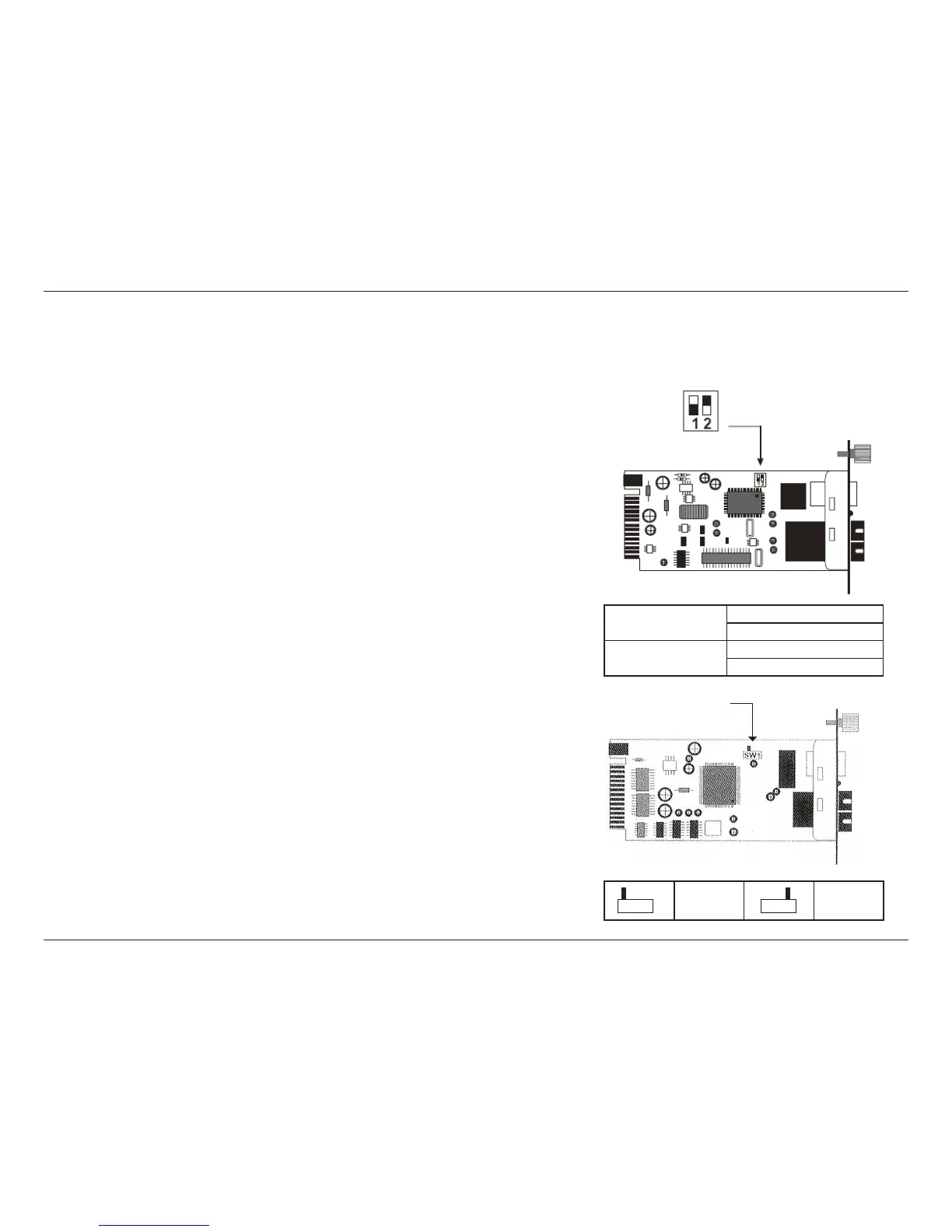
The 1000 Mbps media converters are equipped with a two-pin on-board DIP switch for controlling the Link Loss Return (LLR) and Fiber Mode
functions.
Switch 1: Fiber-Mode On -> Forced Mode
O -> Auto Negotation Mode
Switch 2: LLR On -> LLR enable
O -> LLR disable
Half Duplex Full Duplex
(default)
Switch 1 - Fiber Mode: This switch allows you to set the ber optic mode to Forced
(On) or Auto-Negotiation (O). Forced allows you to manually set the duplex mode
to half or full while Auto-Negotiation lets the media converter decide which duplex
mode to use based on the receiving transmission. Make sure that the device at the
opposite end is using the same mode. When using two or more media converters at
the same time, the ber mode must be set to Forced. This switch is set to o (Auto-
Negotation) by default.
Switch 2 - LLR: This switch lets you enable or disable the LLR function on the media
converter. When you are using more than one converter at the same time, LLR should
only be enabled on one converter. This is to prevent the devices from creating a
feedback loop. This switch is set to o (LLR disabled) by default.
The 10/100 Mbps media converters have a single DIP switch for setting the duplex
mode on the media converter's ber port. This can be set to Half-Duplex or Full-
Duplex. This switch is set to Full-Duplex by default.


 To Next Page