12D-Link DNS-343 Quick Install Guide
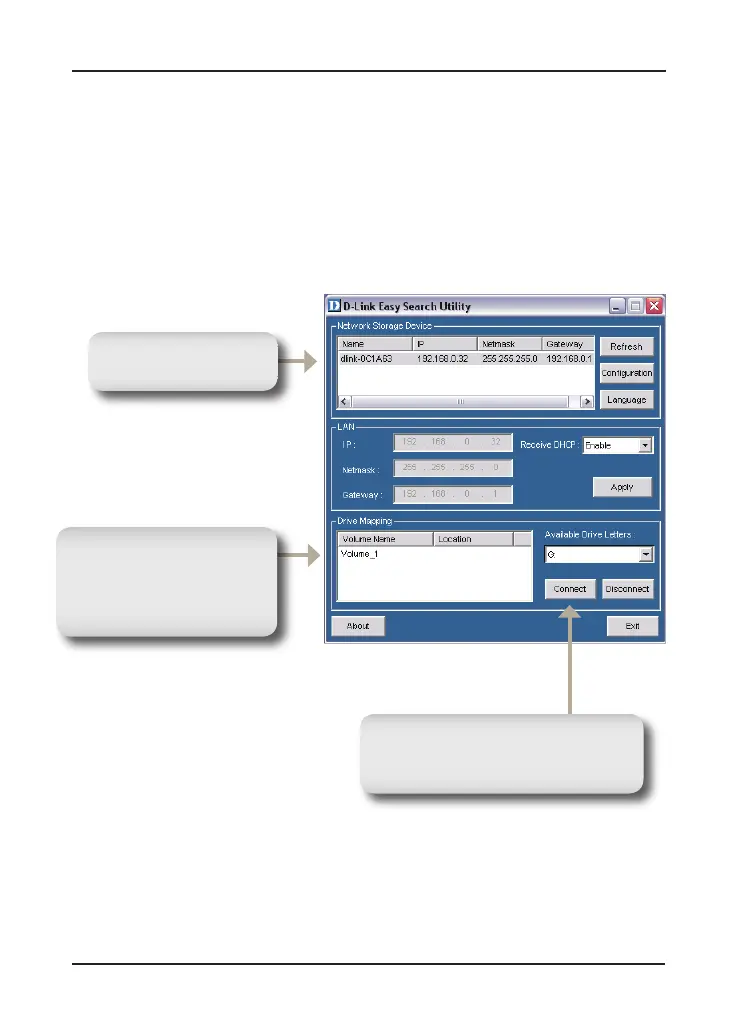
Mapping a Drive
Mapping a Drive
Select an available
DNS-343.
Available volumes will
be displayed under Drive
Mapping. Highlight the
drive you want to map.
Select an available drive letter from
the drop-down menu and click
Connect.
The Easy Search Utility makes it simple to map drives to your computer. To
get started, insert the DNS-343 CD into your CD-ROM and launch the Easy
Search Utility.
Once connected, your mapped drives(s) will appear in My Computer as
network drives.











 To Next Page