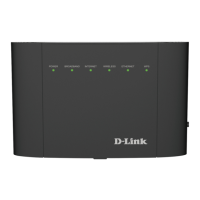
The D-Link DSL-3890 Wireless AC2300 Dual-Band Gigabit ADSL2+/VDSL2 Modem Router is a versatile networking device designed for home and office environments. It combines the functionality of a DSL modem and a high-performance wireless router, allowing users to share their DSL Internet connection over blazing-fast Wireless AC. The device is equipped with a USB port for file sharing and four Gigabit Ethernet 10/100/1000 ports for wired connections.
Function Description:
The DSL-3890 serves as a central hub for your network, connecting to your Internet Service Provider (ISP) via a DSL line (ADSL2+/VDSL2) or an Ethernet WAN port. It then distributes this Internet connection wirelessly using 802.11ac Wave 2 technology and through its Gigabit Ethernet LAN ports. The router supports D-Link AutoZoning, which enhances wireless coverage by communicating with other AutoZoning-capable repeaters in your home network, ensuring seamless connectivity as you move between rooms. This technology automatically switches wireless devices to the access point, router, or repeater with the strongest signal for optimal Wi-Fi performance.
Important Technical Specifications:
- Device Interfaces:
- 802.11ac/n/g/b Wireless LAN
- One RJ-11 Broadband port (DSL)
- One Gigabit WAN port
- Four Gigabit Ethernet LAN ports
- One USB 3.0 port
- Antenna Type: Four external dual-band antennas.
- ADSL/ADSL2/ADSL2+ Features: Supports PTM, G.inp, G.vector, ITU G.992.1, ITU G.992.3, and ITU G.992.5.
- VDSL Standards: Supports ITU-T G.993.1 and ITU-T G.993.2, including profiles 8a, 8b, 8c, 8d, 12a, 12b, 17a, 30a, and 35b.
- Wireless Signal Rate:
- 2.4 GHz: Up to 800 Mbps
- 5 GHz: Up to 1,732 Mbps
- Standards: IEEE 802.11ac, IEEE 802.11n, IEEE 802.11g, IEEE 802.11d, IEEE 802.3, IEEE 802.3u, IEEE 802.3ab, IEEE 802.3x.
- Minimum System Requirements: Windows XP SP3 or Mac OS X 10.4 or higher, Microsoft Internet Explorer 8 or higher, Edge 20.10 or higher, Firefox 20 or higher, Chrome 17 or higher, Safari 4 or higher, or other Java-enabled browser. Requires an Ethernet or Wireless network interface and an active subscription with an Internet Service Provider (ISP).
- Dimensions: 258.8 x 184.1 x 45.5 mm (10.1 x 7.2 x 1.8 in).
- Weight: 643.6 g (22.7 oz).
- Power: Input: 12 V / 2.0A. Included AC Adapter: 100-240VAC, 50/60 Hz.
- Temperature: Operating: 0 to 40 °C (32 to 104 °F), Storage: -20 to 65 °C (-4 to 149 °F).
- Humidity: 5% to 95% non-condensing.
- Certifications: CE, Wi-Fi Certified, RCM.
Usage Features:
- Faster Wireless Networking: Features 802.11ac Wave 2 for improved bandwidth, range, and speed, supporting up to 2600 Mbps. Operates on both 2.4 GHz and 5 GHz bands for efficient traffic separation.
- Backward Compatibility: Fully compatible with 802.11n, 802.11g, and 802.11a wireless devices.
- USB Sharing Technology: Allows users to plug in a USB storage drive (FAT32 or NTFS-formatted) into the USB 3.0 port on the front panel to access and share files, stream videos, view photos, or listen to music from laptops or mobile devices over the network using the Samba file sharing protocol. DLNA Media Server functionality is also supported.
- User-friendly Setup Wizard: An easy-to-use web-based interface guides users through the initial configuration process, including WAN access type (ADSL, VDSL, Ethernet), ISP settings, Wi-Fi SSID and password creation, and admin password setup.
- Advanced Network Management:
- Filtering: Content filtering based on IP address, MAC address, URL, and/or domain name.
- Scheduling: Firewall, wireless, and port forwarding features can be scheduled to be active during specific times.
- QoS Engine: Prioritizes specific clients to receive higher bandwidth for activities like video streaming or online gaming.
- Port Forwarding: Allows specific ports or port ranges to be opened for devices on the network, useful for certain applications.
- DMZ (Exposed Host): Configures a single host on the LAN to be exposed to the Internet, bypassing NAT protection for applications that require it.
- IP/MAC/Web Filtering: Manages LAN users' access to the Internet, allowing or restricting access based on IP addresses, MAC addresses, or website keywords.
- Static Route: Defines custom routes to control data traffic movement within the network.
- Dynamic DNS (DDNS): Connects to a server using a domain name even if the ISP assigns dynamic IP addresses.
- IGMP Snooping: Enables or disables Internet Group Management Protocol snooping to build multicast tables.
- Wireless Security: Supports WPA2 (Wi-Fi Protected Access 2) and WPA (Wi-Fi Protected Access) with AES or TKIP encryption, and WPA-PSK/WPA2-PSK using a passphrase.
- Guest Zone: Creates separate wireless networks for guests on both 2.4 GHz and 5 GHz bands, isolating them from the main network.
- WPS Button: Simplifies the process of connecting wireless devices securely to the router.
- Wi-Fi Button: Enables or disables Wi-Fi functionality.
- LED Indicators: Provide visual status of power, broadband connection, Internet activity, wireless network status, Ethernet port activity, and WPS process.
Maintenance Features:
- System Settings: Allows users to save the current configuration, load a previously saved configuration, reset the router to factory default settings, or reboot the device.
- Firmware Upgrade: Facilitates upgrading the router's firmware by downloading the relevant file from D-Link's support website and uploading it through the web interface.
- Log Info: Keeps a running log of events, including system activity, debug information, attacks, and notices. Logs can be saved to a local hard drive or sent to a Syslog server.
- Diagnostics: Provides tools like Ping and Tracert to test the router's connection to the Internet and troubleshoot connectivity issues.
- Admin Password Management: Allows changing the administrator password for enhanced security.
- Time & Schedule: Configures the internal system clock, sets the time zone, and enables/disables daylight saving time. Schedules can be created for various features.
- MTU Configuration: Provides the ability to adjust the Maximum Transmission Unit (MTU) to optimize performance and resolve connectivity issues with certain websites or email services.

 Need help?
 General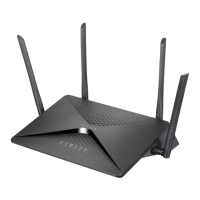

 To Next Page