32
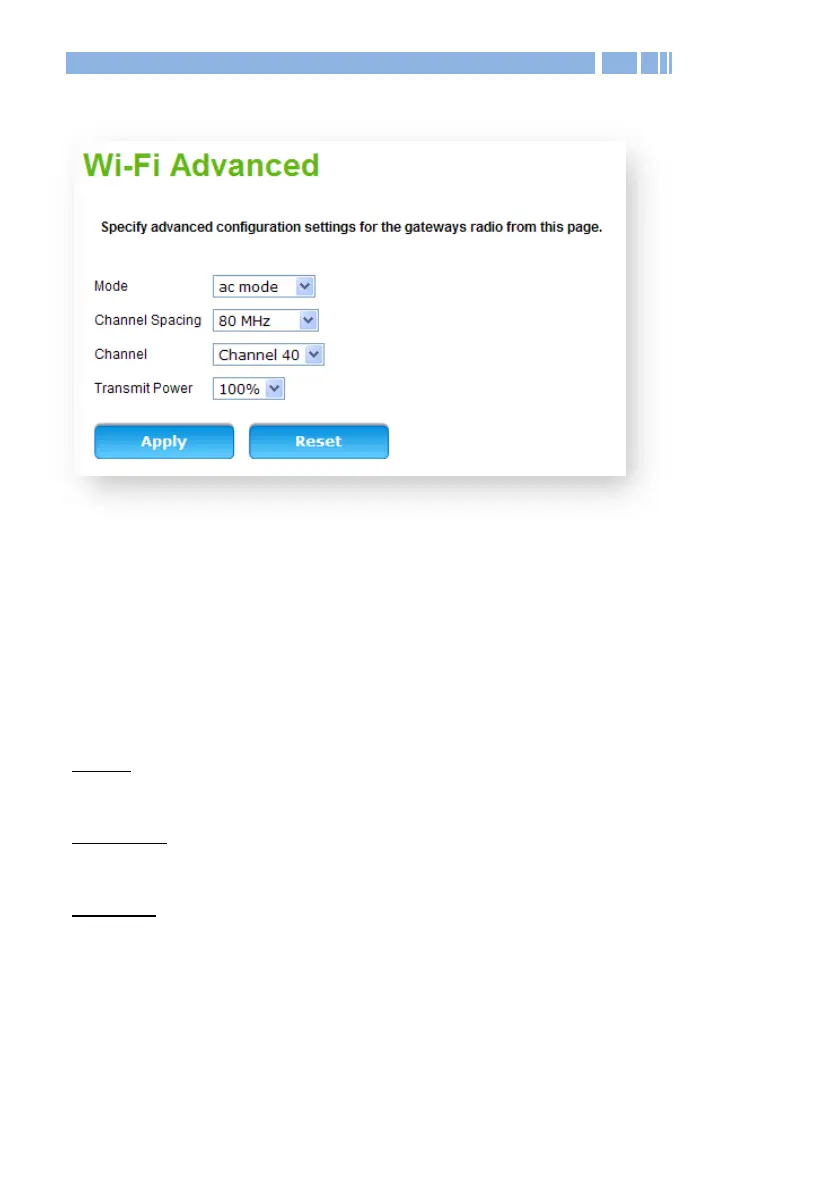
Wi-Fi Wi-Fi Advanced Wi-Fi 5 GHz
This section allows you to configure and manage advanced settings of
your wireless network in 802.11a/n/ac modes. In most cases, however,
the default wireless settings will be sufficient.
Mode: Select the 802.11 modulation technique.
The available modes for the 5 GHz setting are:
a only: Establishes the Wi-Fi network in 802.11a mode. Only
802.11a-compatible devices can connect to DWR-966 via Wi-Fi.
a/n mode: Select this mode to allow devices supporting 802.11a or
802.11n to connect to the DWR-966.
ac mode: Establishes the Wi-Fi network in 802.11ac mode. Only
802.11ac-compatible devices can connect to DWR-966 via Wi-Fi.
Channel Spacing: The channel bandwidth occupied. For high-noise
environments, a lower channel spacing is recommended, however, the
maxima available throughput will be bounded.










 To Next Page