31
OTHER CONVENIENT FEATURES
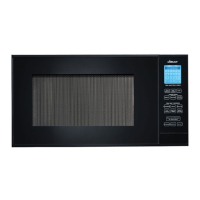
KITCHEN TIMER
Use this feature as a general purpose timer. You can enter any time up to 99 minutes and 99 seconds. If you
want to cancel the timer during the count down phase, simply press STOP/CLEAR and the display will return
to the Home Page.
•Suppose you want to time a three minute long distance phone call:
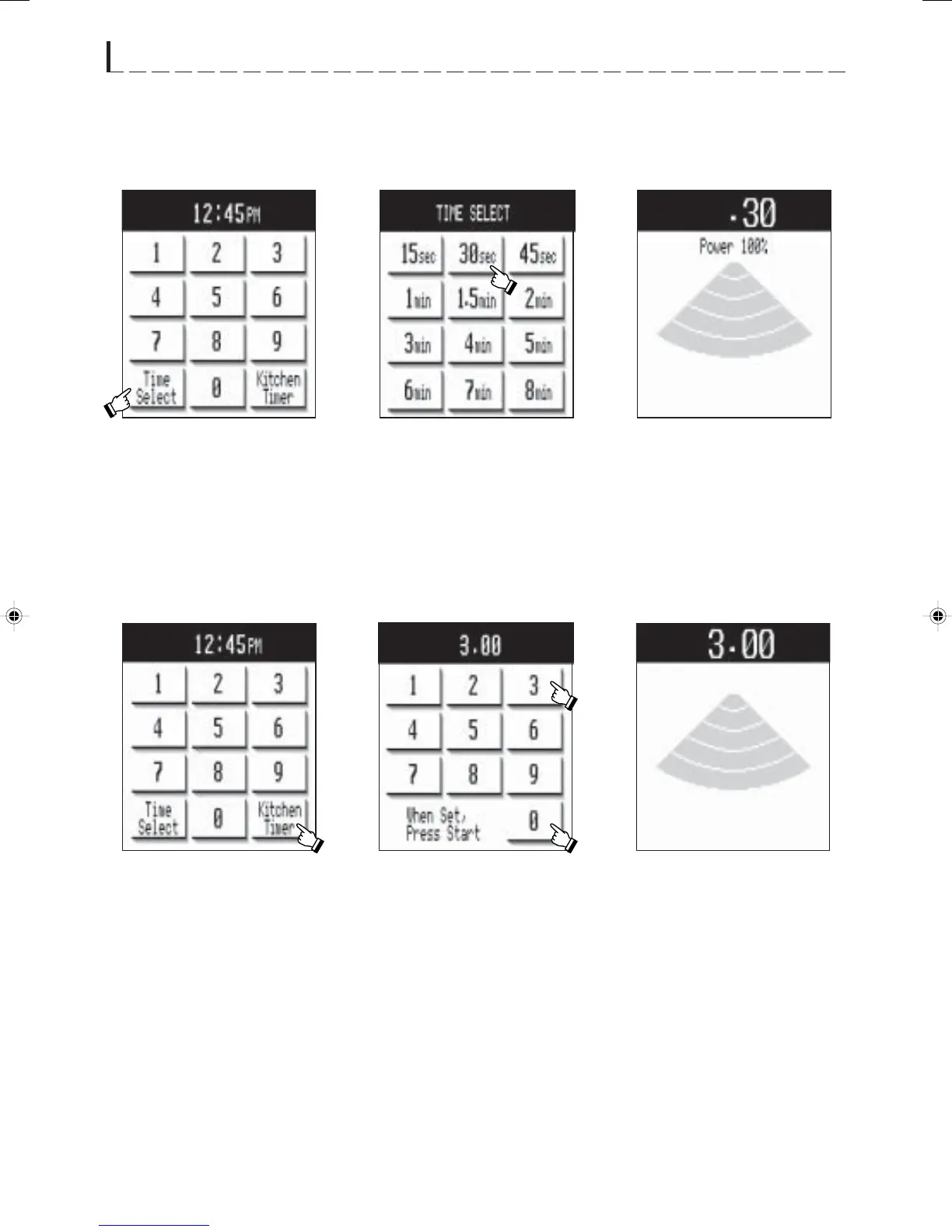
TIME SELECT
Touch Time Select on the screen to access a new screen with 12 common cooking times at 100% power. Touch
desired time and the oven starts automatically.
• Suppose you want to melt butter for 30 seconds.
1 Touch Kitchen Timer. 3 The Kitchen Timer will
start counting down.
NOTE:
Even if all sound is off, the oven will beep when the Kitchen Timer ends.
2 Enter desired time by
touching numbers : 3, 0, 0.
Press START pad.
2 Touch desired time: 30 seconds.1 Touch Time Select. 3 The oven will start
automatically.
1.DC/DMT2420 #323 11/14/02, 11:41 AM31


 To Next Page