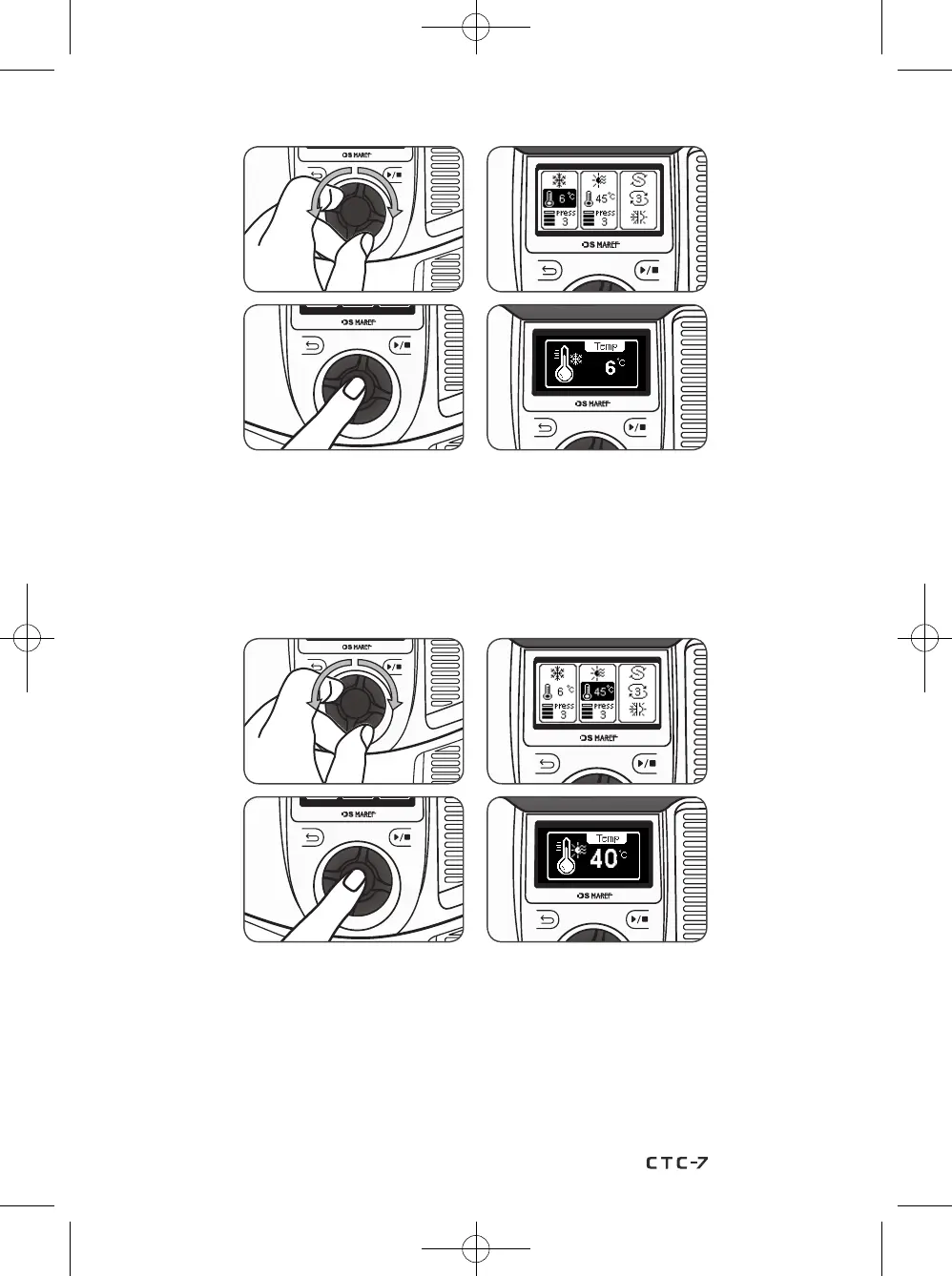
3-1) On the Cold setting screen, rotate the knob wheel counterclockwise or clockwise to select
from ’Temperature’ and ‘Pressure Level’. Select the item (‘Temperature’, ‘Pressure Level’)
to be set and press the knob wheel, and a pop-up screen will appear.
Rotate the knob wheel counterclockwise or clockwise to adjust the levels.
Press the knob wheel to save the settings, and press the Back button to return to the
RCT therapy standby screen without saving the settings.
3-2) On the Heat setting screen, rotate the knob wheel counterclockwise or clockwise to select
from ’Temperature’ and ‘Pressure Level’. Select the item (‘Temperature’, ‘Pressure Level’)
to be set and press the knob wheel, and the pop-up screen will appear.
Rotate the knob wheel counterclockwise or clockwise to adjust the levels.
Press the knob wheel to save the settings, and press the Back button to return to the
RCT therapy standby screen without saving the settings.
29


 To Next Page