
 Need help?
Do you have a question about the DAEWOO ELECTRONICS AVS1302 HDMI and is the answer not in the manual?
Steps to connect the external power adapter to the karaoke machine.
Instructions for connecting the karaoke machine to a TV via HDMI cable.
How to turn the internal monitor on and off for the karaoke machine.
Detailed steps for inserting, selecting, and playing songs from a CD.
Instructions on setting repeat playback for songs, folders, or all tracks.
Guide to playing music files from a USB memory stick.
How to record karaoke performances to a USB memory stick.
Steps to connect and play music wirelessly via Bluetooth.
Connecting external audio sources via the 3.5mm AUX IN socket.
How to program a sequence of tracks for playback.
Details on selecting different light modes for the unit.
Guidelines for cleaning and general maintenance of the karaoke machine.
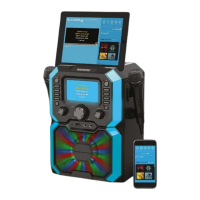
The Daewoo Bluetooth Karaoke Machine, available in black or white, is designed for home entertainment, offering a comprehensive karaoke experience. This device allows users to sing along to their favorite tracks, display lyrics, and even record their performances. It comes with a user manual that provides detailed instructions for operation, safety, and maintenance.
The karaoke machine integrates multiple playback options, including CD/Karaoke CD, USB memory stick, Bluetooth, and Auxiliary Input. It features an internal monitor for displaying lyrics, which can also be mirrored to a television via an HDMI connection. Two microphone jacks are available, allowing for duets or group performances. The device also includes LED decorative lights that can synchronize with the music or display random patterns, enhancing the party atmosphere.
The machine is powered via an external mains adaptor. Once connected, the POWER/MODE button (4) is used to switch the unit on and select different operating modes (CD, USB, Bluetooth, AUX). An LED Power Indicator (3) illuminates when the unit is powered up. To switch off the unit, press and hold the POWER/MODE button (4) until the LED Power Indicator (3) goes out.
The internal Monitor (1) can be switched on and off using the Monitor on/off button (5). This screen displays important information such as the current mode, track number, and lyrics during karaoke playback.
To play a CD, lift the CD Compartment (2) door. The monitor will display "OPEN." Insert a CD with the label side uppermost and close the compartment. The monitor will show "CD READING" while searching the disc, then display the total number of tracks. If no disc is present, "NO DISC" will appear. The machine supports standard audio CDs, MP3+G, and CD+G Karaoke CDs. CD+G discs display audio backing tracks and lyrics, while MP3+G utilizes smaller file sizes for similar functionality. Playback is initiated by pressing the PAIR/PLAY/PAUSE ►/II button (19). Pressing it again pauses playback. Lyrics will appear on the Monitor (1) when playing a Karaoke disc. Songs can be skipped using the SKIP◄◄◄ (15) and SKIP►►► (16) buttons.
Two microphone jacks (24 and 25) are available for connecting microphones (36). Each microphone has an ON/OFF switch. The MIC VOL control (11) adjusts the volume level for both microphones simultaneously. An ECHO effect can be added using the ECHO + (7) and ECHO – (8) buttons, with depth adjustable from 00 to 08, displayed on the Monitor (1). This effect also applies to both microphones. The A.V.C On/Off button (6) can be used to lower lead vocals on discs with separated vocals, making it easier to sing along. A.V.C (Automatic Volume Control) affects both microphones.
During playback, the REPEAT/PROG button (14) allows users to repeat the current song (monitor shows 1), repeat the selected folder (monitor shows CD), or repeat all songs on the disc (monitor shows CA). Pressing it again cancels the repeat function.
A USB memory stick (not supplied) can be inserted into the USB Port (23) to play karaoke tracks. Select USB mode using the POWER/MODE button (4). "USB READING" will appear on the Monitor (1) while the drive is searched. Playback controls are similar to CD mode. The USB Record function allows recording performances from CD, Bluetooth, or AUX modes onto a USB stick. Press the REC button (13) to start recording; the REC Indicator (12) will illuminate. Press the STOP button (17) to end recording. Recordings can be played back by selecting USB mode and choosing the desired track. The recording function supports CD, CD-R, CD-RW, and CD+G formats but not MP3.
To use Bluetooth, repeatedly press the POWER/MODE button (4) until "BLUETOOTH" appears on the Monitor (1). Enable Bluetooth on your external device (phone, tablet, etc.) and search for "AVS1302." Once paired, a chime will sound, and the Bluetooth Indicator (18) will light continuously. The PAIR/PLAY/PAUSE ►/II button (19) controls playback from the connected device. The MASTER VOL control (21) adjusts the volume, or device controls can be used. The PAIR/PLAY/PAUSE ►/II button (19) can also be used to pair or unpair a Bluetooth device.
Connect an external audio source via a 3.5mm jack lead (not supplied) into the 3.5mm AUX IN Jack Socket (22). Select AUX mode using the POWER/MODE button (4); "AUX" will appear on the Monitor (1). Volume is adjusted via the MASTER VOL control (21) or the external device.
In STOP mode (with a CD or USB stick inserted but not playing), press the REPEAT/PROG button (14). "PROG SET 01" will appear, indicating the first track is ready for programming. Use the SKIP (15) and SKIP (16) buttons to select tracks, then press REPEAT/PROG (14) to confirm. Up to 20 tracks can be programmed. Press PAIR/PLAY/PAUSE ►/II (19) to start playback of the programmed tracks. To clear the program, press the STOP button (17) twice or switch off the unit. If more than 20 tracks are attempted, "FULL" will appear. This function is available only in CD and USB mode.
The LIGHT MODE button (10) cycles through three light modes for the LED Decorative Lights (26 and 9):
An HDMI cable (not included) can be used to connect the HDMI Audio & Video Out Socket (31) on the rear of the unit to a TV's HDMI input. Switch on the TV and select the correct HDMI input channel. When using a TV, the audio BALANCE control (20) on the front of the machine can be adjusted. If the TV is not used, ensure the balance control is central.
Always disconnect the karaoke machine from the mains power supply before cleaning. Clean the exterior with a clean, soft, dry cloth. Avoid harsh or abrasive cleaners, furniture wax, or polish sprays. Do not submerge the karaoke machine or its power supply in water or any other liquids.
The manual emphasizes reading all operating instructions carefully, paying particular attention to safety. Ensure the unit is intact and free from transit damage before plugging it in. Verify that the voltage indicated on the data plate matches the local network supply. Always use the appliance on a solid, level, non-flammable surface. Maintain at least 100mm (4 inches) clearance around the machine for ventilation. Do not cover ventilation openings with items like newspapers or curtains. Keep naked flame sources, such as candles, away from the machine. Do not position the machine near heat sources like radiators or other electronic equipment. Protect the machine from dripping or splashing liquids, and do not place liquid-filled objects on it. Do not immerse the appliance or its supply in water. Do not leave the appliance unattended, especially when connected to the mains. Always remove the mains supply from the socket when not in use. Close supervision is required when children are near the appliance. The appliance can be used by children aged 8 and above, and persons with reduced capabilities, if supervised and instructed on safe use. Children should not play with the appliance or perform cleaning/maintenance without supervision. Do not use the appliance outdoors. Unplug the power supply after use, before cleaning, and during repairs. Grasp the supply, not the cord. Repairs should only be performed by qualified personnel. Do not operate the appliance with a damaged plug or cord, after a malfunction, or if it has been dropped or damaged. Regularly check the mains supply for damage. If damaged, do not use the product. If the power cable is damaged, it must be replaced by the manufacturer or a qualified after-sales service. Do not allow the power cable to hang over sharp edges or contact hot surfaces. Do not run the power cable under carpets or rugs. This product is intended for household use only, not industrial purposes. Only use accessories or attachments supplied or recommended by the supplier. Do not push objects into any openings to prevent damage or electric shock.
The packaging materials (box, film, polystyrene) should be disposed of responsibly through appropriate recycling facilities. Waste electrical goods should not be disposed of with normal household waste. The symbol indicates that the product should be taken to a suitable facility for disposal. Users are advised to check with their Local Authority or retailer for recycling advice or visit www.recycle-more.co.uk to find nearby recycling sites.
 General
| Category | Karaoke System |
|---|---|
| Brand | DAEWOO ELECTRONICS |
| Model | AVS1302 HDMI |
| HDMI | Yes |
| Connectivity | HDMI |

 To Next Page