EasyManua.ls Logo

Daewoo ACTUATE SDA2618 - Using the Auto Menu Programs; Auto Menu Program Details

Daewoo ACTUATE SDA2618
26 pages
Print Icon
To Next Page IconTo Next Page
To Previous Page IconTo Previous Page
Loading...
14
26L Air Fryer Microwave
Model No. SDA2618
User Manual
IMPORTANT RETAIN THESE INSTRUCTIONS FOR FUTURE REFERENCE
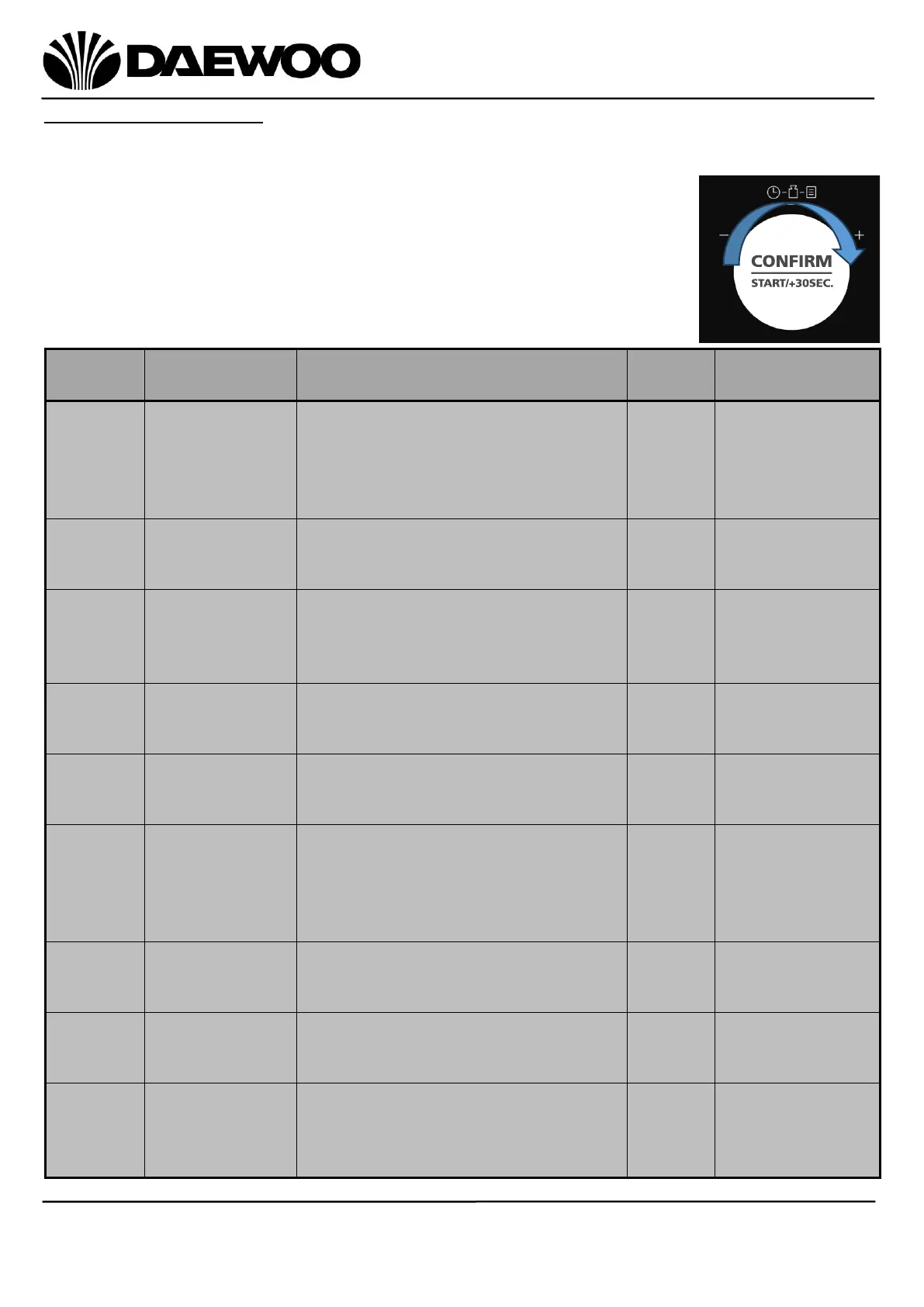
Using the Auto Menu
This function has nine pre-set cooking programs. You do not need to set either
cooking times or power levels. The following table shows details of the pre-set
programs:
1. In standby mode, rotate the Control Knob clockwise to
select one of the pre-set programs in the table below.
2. Press the Control Knob to confirm.
3. Rotate the Control Knob to set the weight or portion.
4. Press the Control Knob to start cooking.
Auto
Menu
Description
Weight
Time
Power
A01
Reheat
150g
250g
350g
450g
600g
1:30
2:30
3:30
4:30
6:00
Microwave
A02
Potato
1 (about 230g)
2
3
5:20
8:30
11:30
Microwave
A03
Meat
150g
300g
450g
600g
3:00
4:40
6:30
8:30
Microwave
A04
Vegetable
150g
350g
500g
3:00
4:30
6:00
Microwave
A05
Pasta
50g (with cold water 450g)
100g (with cold water 800g)
150g (with cold water 1200g)

18:00
20:00
22:00
Microwave
A06
Fish
150g
250g
350g
450g
650g
3:10
4:40
5:40
7:00
9:40
Microwave
A07
Soup
200ml
400ml
600ml
2:10
4:00
5:40
Microwave
A08
Pizza
200g
300g
400g
8:00
9:00
11:00
Air Fry
A09
Chicken
500g
750g
1000g
1200g
40:00
45:00
50:00
55:00
Air Fry

Related product manuals