12
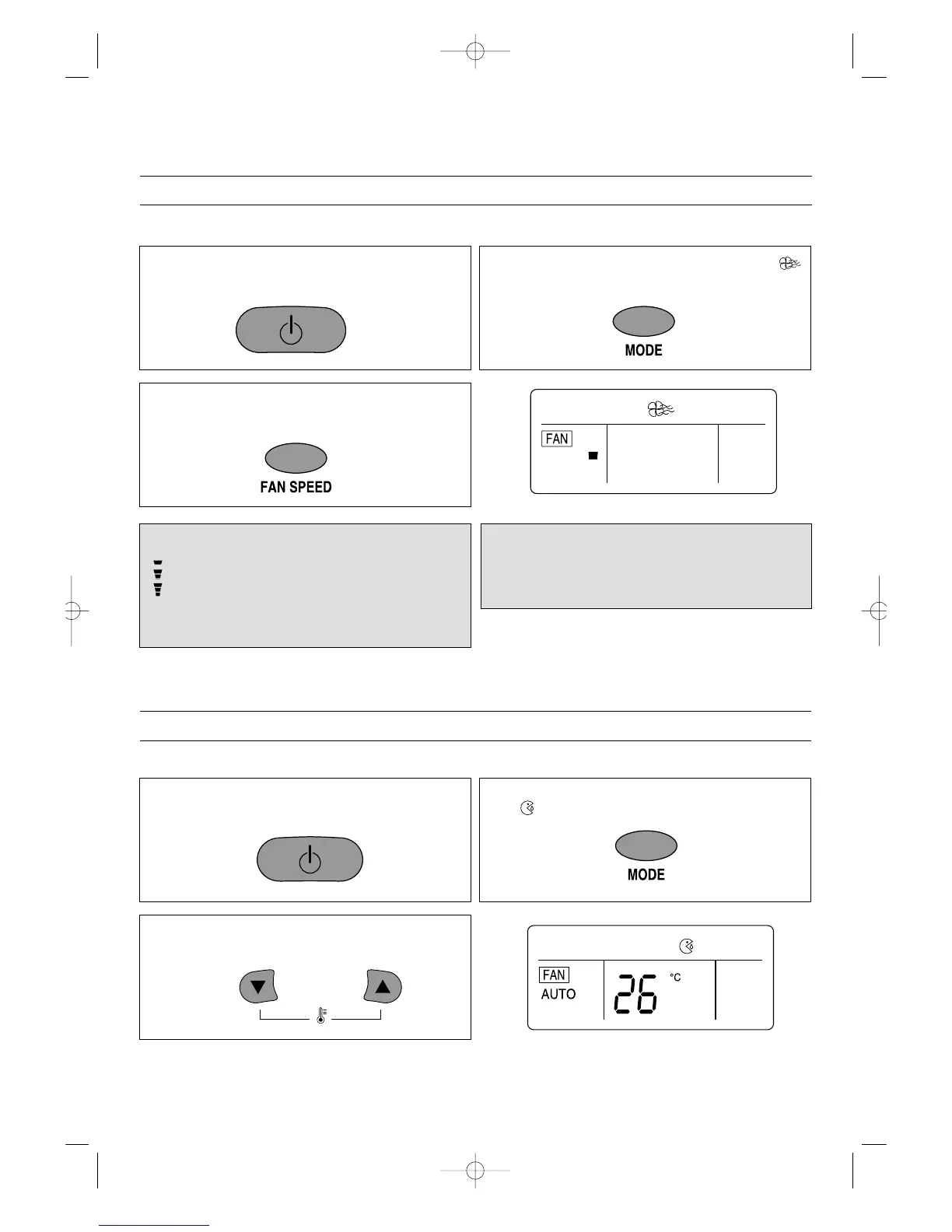
1.Press the ON/OFF button on the remote control to
turn the unit on; the On LED will light on the indoor
unit and “ON” will light in the remote display.
2.Press the MODE button until the Fan indicator
appears in the display.
No allowance setting temperature
3.To select a fan speed, press the FAN SPEED button
until the desired speed appears in the display (see be-
low).
FAN SPEEDS
“” The fan will operate on low speed.
“” The fan will operate on medium speed.
“” The fan will operate on high speed.
“NATURAL” The fan will randomly cycle through the
speeds simulating a breeze.
NOTE:
• If “NATURAL” is selected, the NATURAL” indicator on
the indoor unit will light.
TO SET FAN ONLY MODE
To operate only the fan so the unit will circulate the air, proceed as follows:
TO SET DEHUMIDIFIER MODE
Select this mode when there is high humidity. To select, follow the procedures below.
1.Press the ON/OFF button on the remote control to
turn the unit on; the On LED will light on the indoor
unit and “ON” will light in the remote display.
2.Press the MODE button until the Dehumidifier indica-
tor appears in the display.
3.
Using the TEMP.
▼
or
▲
buttons, set the desired tem-
perature. The desired temperature can be changed up
to 32°C and down to 18°C.
DSB-122L/122LH(영어) 01.8.17 5:28 PM 페이지12


 To Next Page