1122
Basic Operation
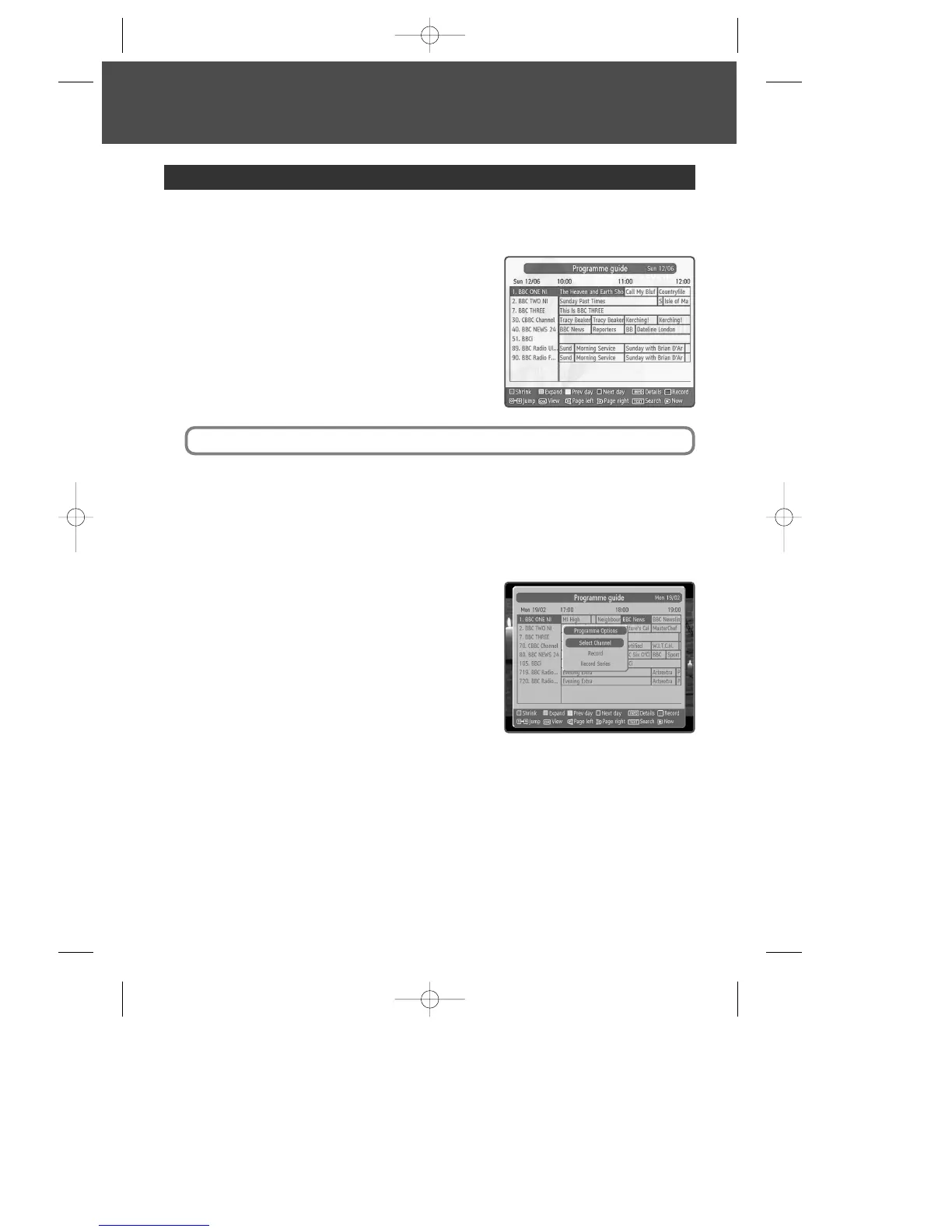
The TV Guide shows a full list of available channels and programmes.
To view the Guide :
1
Press [EPG].
2
Press […/†] to scroll through the list of channels.
3
To scroll through the programmes press [œ/√].
To scroll forwards and backwards, one day at a time,
press the blue and the yellow colour buttons.
To review information about the highlighted channel,
press [INFO].
4
To go up or down to next page, press [CH+/–].
5
To view the highlighted channel, press [OK] and select ‘Select Channel’.
6
To exit the TV Guide without changing channel, press [MENU] or [EPG].
To record in the Guide :
1
Press [EPG].
2
Press […/†] to scroll through the list of channels.
3
To scroll through the programmes press [œ/√].
To scroll forwards and backwards, one day at a time,
press the blue and the yellow colour buttons.
4
To go up or down to next page, press [CH+/–].
5
To see programme options, press [OK].
6
To record selected programme, select ‘Record’.
7
To record all constituent programmes, select ‘Record Series’.
Using the TV Guide (EPG)
To add the selected programme to your Timer, press the [REC] button.
DWBP-B3L1KA-AGN 2007.10.1 4:58 PM ˘ ` 12 mac001 1200DPI 90LPI


 To Next Page