2233
Using the Main & Setup Menu’s
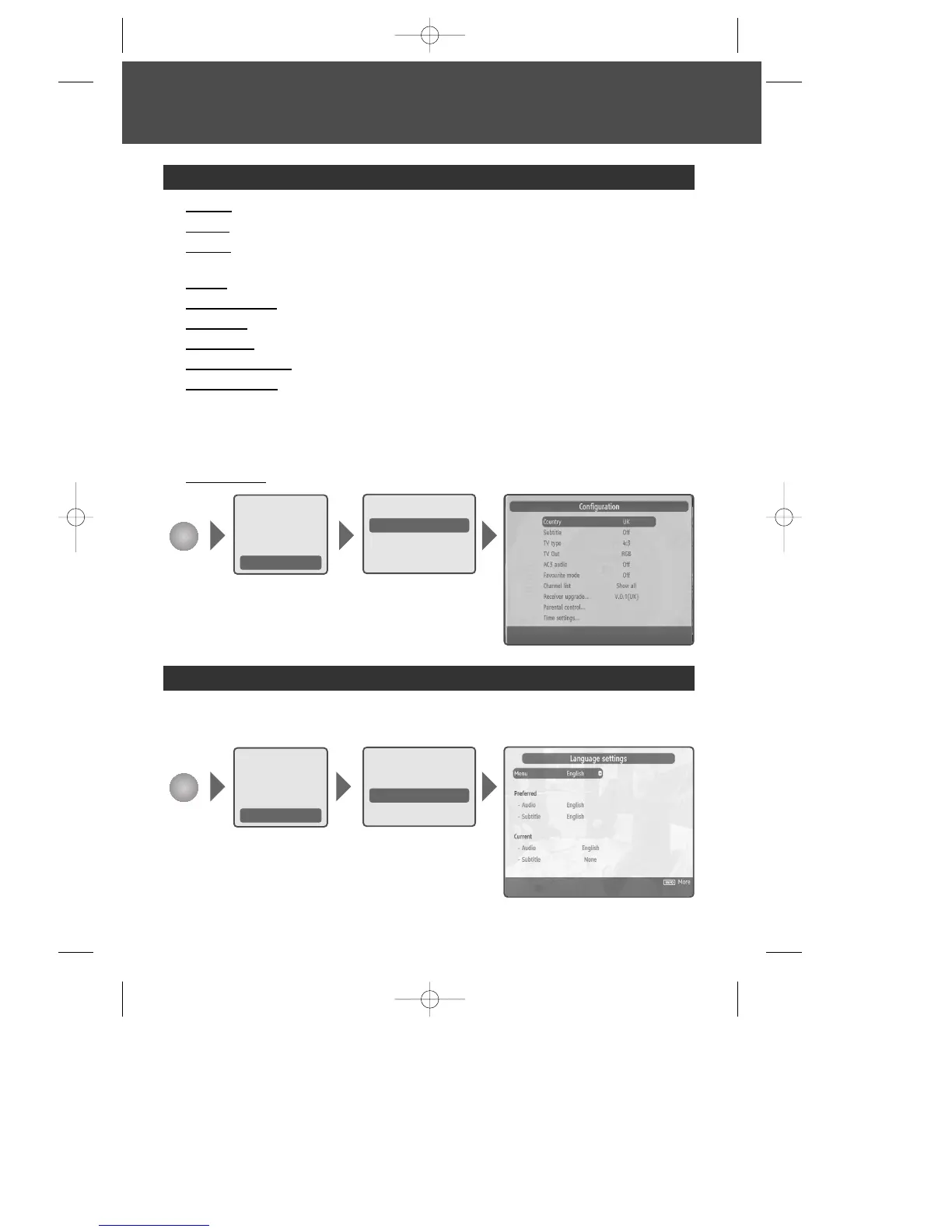
You can set the Language for Menu, Audio and Subtitle. You can also view this by
pressing the [AUDIO] button.
Setup - Language
MENU
1 Country : sets country. Broadcasting RF band is different for each country.
2 Subtitle : sets subtitle on/off.
3 TV type : lets you change how programmes are displayed on your TV (widescreen
16:9 or normal 4:3).
4 TV Out : sets TV output option either RGB or CVBS.
5 Favourite mode : sets favourite mode. (Off, list 1~5)
6 AC3 audio : sets digital audio on/off.
7 Channel list : sets channel list. (Show all, TV only, Radio only, text only)
8 Receiver Upgrade : confirms current software version.
9 Parental control : sets parental control for each programme and changes your
Password.
Enter password using numerical [0 -9] buttons when prompted.
Note: The Default Password is 0000. If you have forgotten your Password, please
contact your local product distributor.
10 Time Settings
: sets local time.
Setup - Configuration
MENU
Recordings
Configuration
Language
Installation
Channel list
Programme guide
Timers
Recordings library
Setup
Recordings
Configuration
Language
Installation
Channel list
Programme guide
Timers
Recordings library
Setup
DWBP-B3L1KA-AGN 2007.10.1 4:58 PM ˘ ` 23 mac001 1200DPI 90LPI


 To Next Page