2244
Using the Main & Setup Menu’s
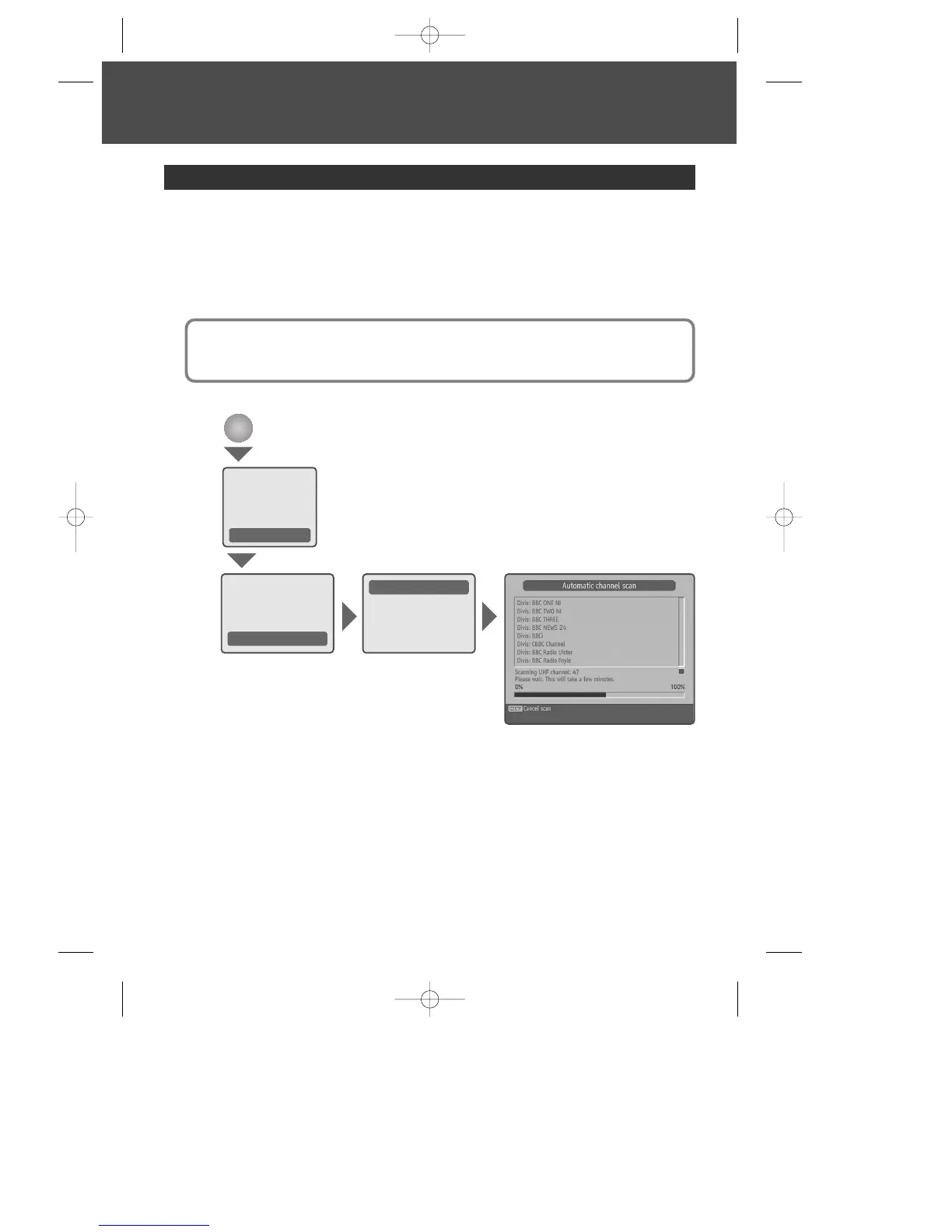
1 Automatic channel scan - If your product is connected to the aerial and television, you
can automatically search channels without entering any other information.
2 Manual channel scan - You can search channels manually by pressing the [numerical]
buttons.
3 Format disk - can format (erase) the disk drive if necessary.
4 First time installation - restores the product to the default settings.
Installation
MENU
Warning :
• Please note that once you set to the default settings, all data such as channel list and
user configured data are deleted.
Recordings
Configuration
Language
Installation
Automatic channel scan
Manual channel scan
Format disk
First time installation
Channel list
Programme guide
Timers
Recordings library
Setup
DWBP-B3L1KA-AGN 2007.10.1 4:58 PM ˘ ` 24 mac001 1200DPI 90LPI


 To Next Page