EasyManua.ls Logo

Daewoo KOR-804M - Page 17

Daewoo KOR-804M
57 pages
Print Icon
To Next Page IconTo Next Page
To Previous Page IconTo Previous Page
Loading...
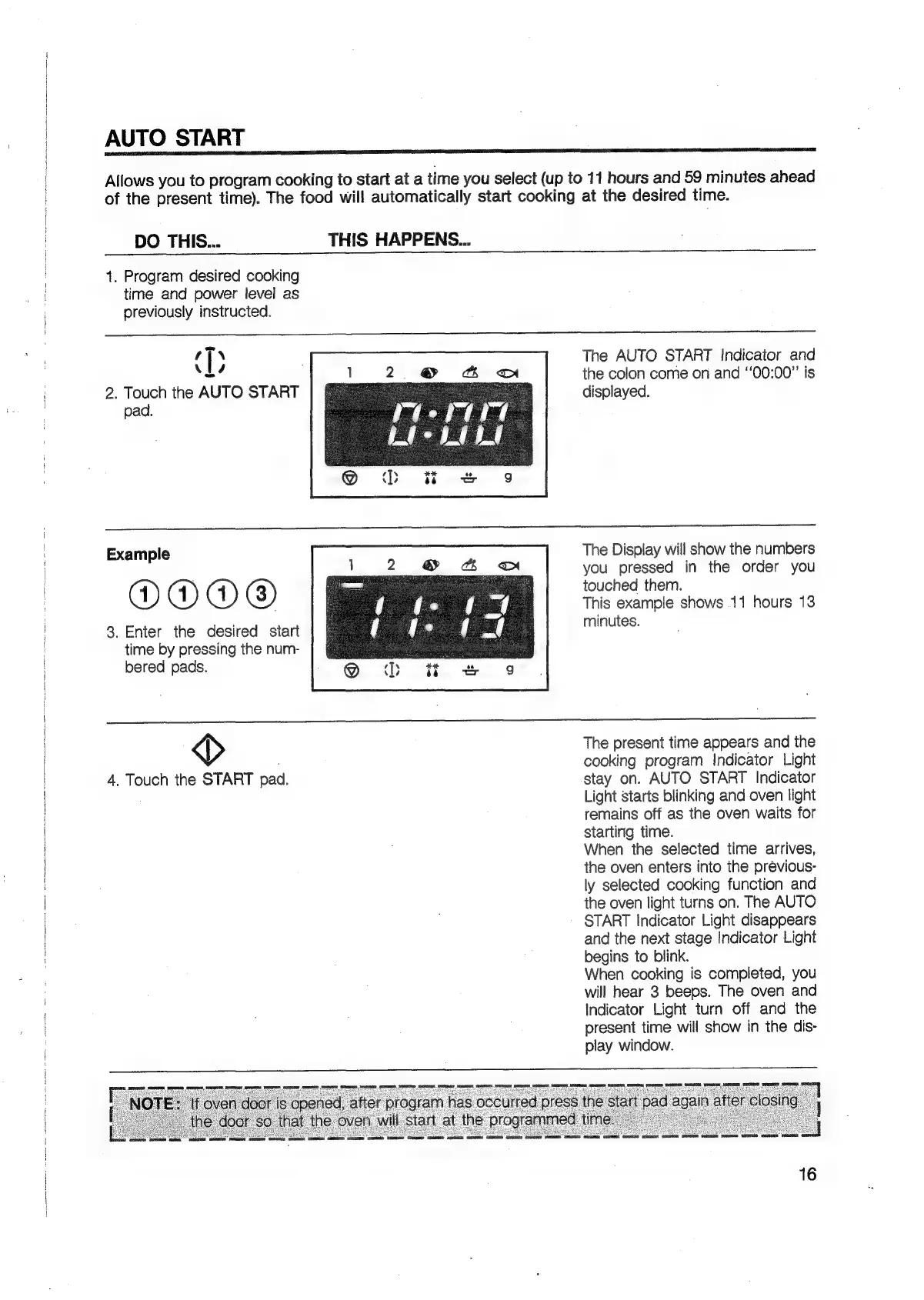
AUTO
START
Allows
you
to
program
cooking
to
start
at
a
time
you
select
(up
to
11
hours
and
59
minutes
ahead
of
the
present
time).
The
food
will
automatically
start
cooking
at
the
desired
time.
DO
THIS...
THIS
HAPPENS...
+.
Program
desired
cooking
time
and
power
level
as
previously
instructed.
t
T
\
vs
2.
Touch
the
AUTO
START
pad.
The
AUTO
START
Indicator
and
the
colon
come
on
and
‘‘00:00”’
is
displayed.
The
Display
will
show
the
numbers
you
pressed
in
the
order
you
touched
them.
This
example
shows
11
hours
13
Example
DOO
®
3.
Enter
the
desired
start
minutes.
time
by
pressing
the
num-
bered
pads.
>
The
present
time
appears
and
the
cooking
program
Indicator
Light
4.
Touch
the
START
pad.
stay
on.
AUTO
START
Indicator
Light
starts
blinking
and
oven
light
remains
off
as
the
oven
waits
for
starting
time.
When
the
selected
time
arrives,
the
oven
enters
into
the
previous-
ly
selected
cooking
function
and
the
oven
light
turns
on.
The
AUTO
START
Indicator
Light
disappears
and
the
next
stage
Indicator
Light
begins
to
blink.
When
cooking
is
completed,
you
will
hear
3
beeps.
The
oven
and
Indicator
Light
turn
off
and
the
present
time
will
show
in
the
dis-
play
window.
16

Related product manuals