User’s Manual
27
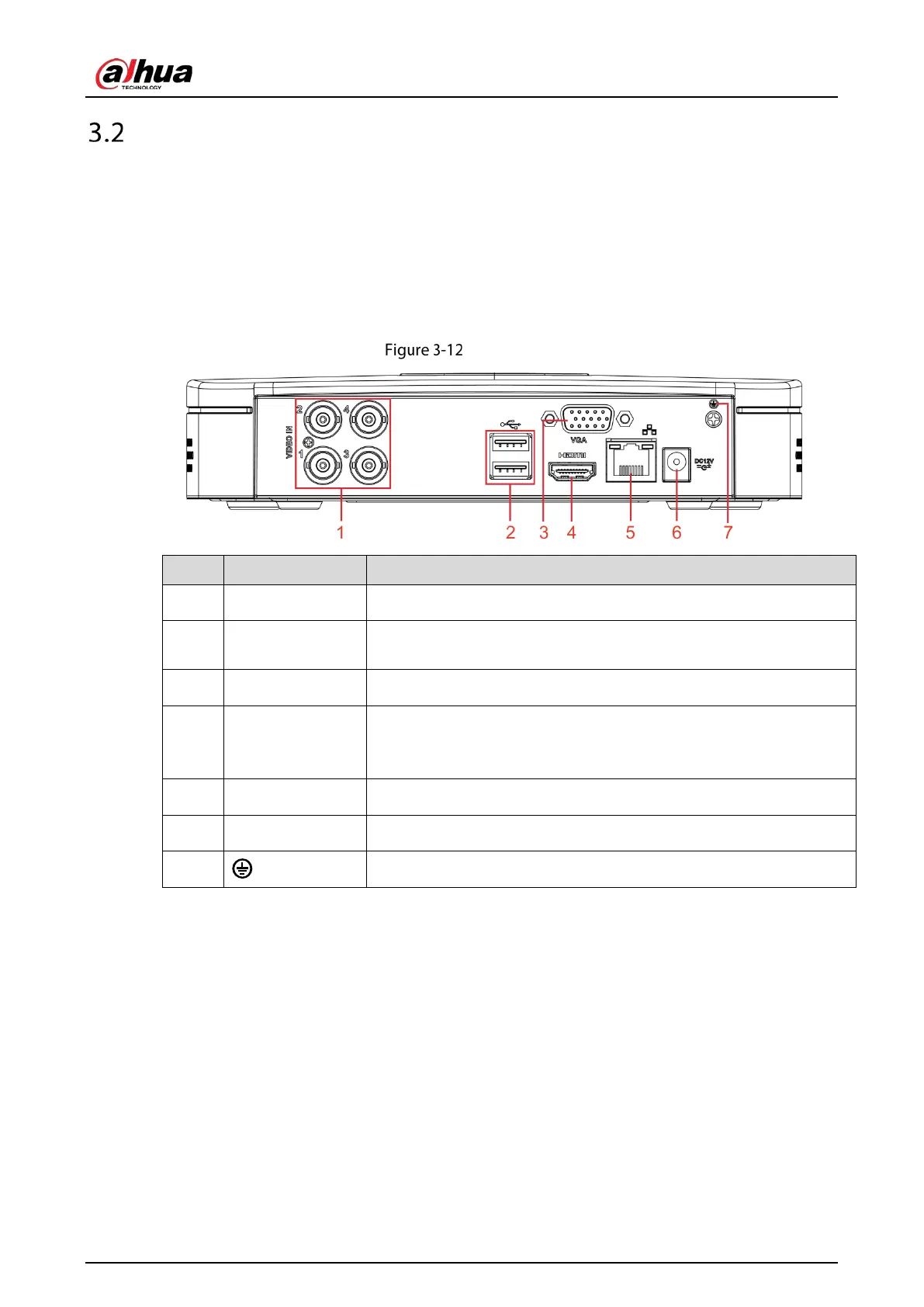
Rear Panel
3.2.1 DH-XVR5108C-X/DH-XVR5104C-4KL-X/DH-XVR5104C-X/DH-
XVR4104C-X/DH-XVR4108C-X/DH-XVR5104C-X1/DH-XVR4104C-
X1/DH-XVR4108C-X1
Rear panel
1 Video input port Connects to analog camera to input video signal.
2 USB port
Connects to external devices such as USB storage device, keyboard and
mouse.
3 VGA port Outputs analog video data to the connected display with VGA port.
4 HDMI port
High definition audio and video signal output port.
The port outputs the uncompressed high definition video and multi-
channel audio data to the connected display with HDMI port.
5 Network port Connects to Ethernet port.
6 Power input port Inputs 12 VDC power.
7
Ground terminal.
3.2.2 DH-XVR7104E-4KL-X/DH-XVR7108E-4KL-X/DH-XVR7104E-4KL-
B-X/DH-XVR7108E-4KL-B-X



 To Next Page
 Loading...