User’s Manual
69
Serve Address
In the
box, enter the IP address or domain name of the
corresponding NTP server.
Click
, the Device starts syncing with the server
immediately.
Port The system supports TCP protocol only and the default setting is 123.
Interval
In the
box, enter the amount of time that you want the Device to
sync time with the NTP server. The value ranges from 0 to 65535.
5.1.4.4 Configuring Network Settings
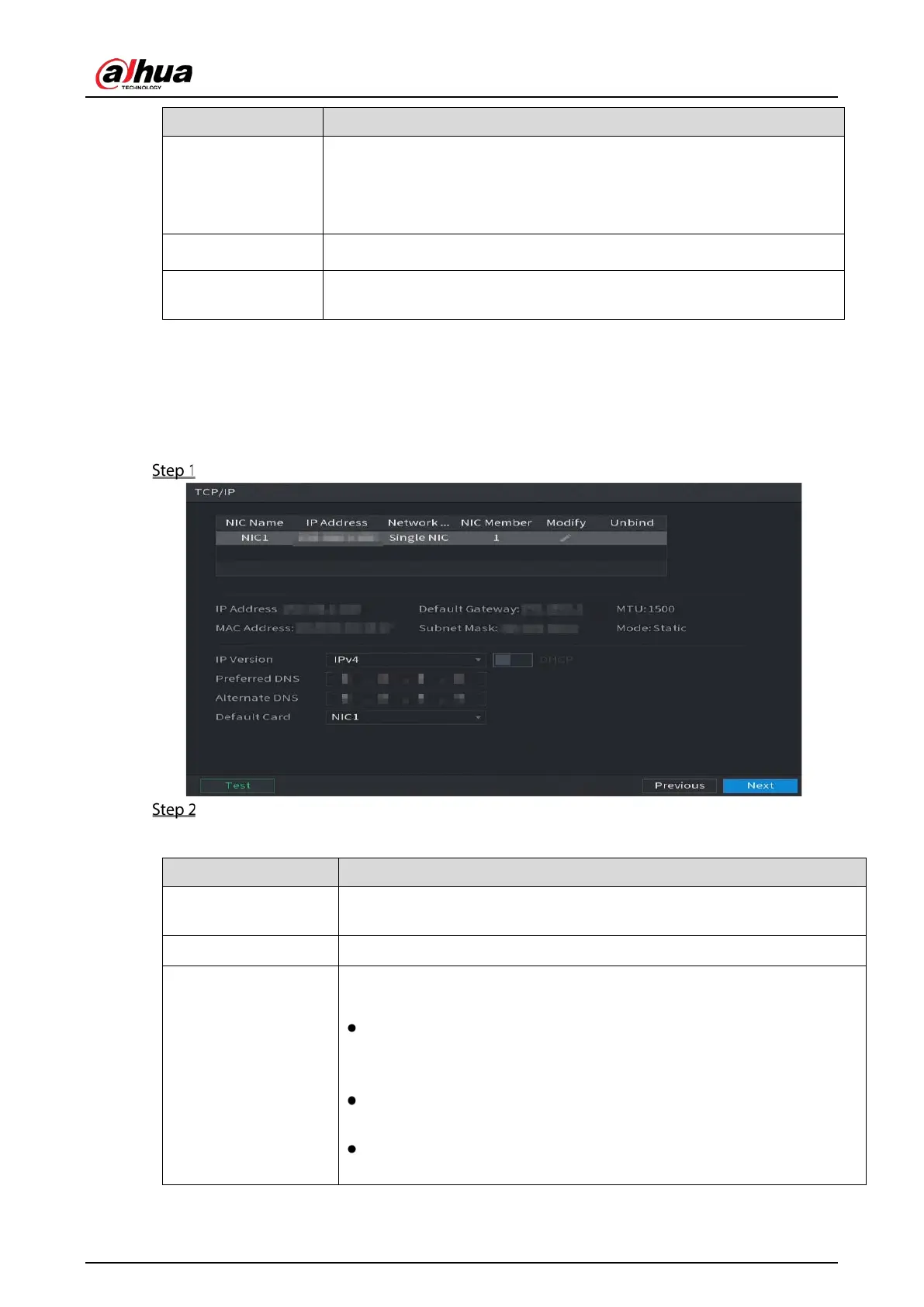
You can configure the basic network settings such as net mode, IP version, and IP address of the Device.
You can also configure network settings by selecting
Main Menu > NETWORK > TCP/IP.
After you have configured the date and time settings, on the Date &Time interface, click Next.
Configure the settings for network parameters.
Table 5-4 Network parameters
IP Version
In the
list, you can select
or
. Both versions are
supported for access.
MAC Address Displays the MAC address of the Device.
DHCP
Enable the DHCP function. The IP address, subnet mask and default
gateway are not available for configuration once DHCP is enabled.
If DHCP is effective, the obtained information will display in the
box,
box and
box. If not, all
values show 0.0.0.0.
If you want manually configure the IP information, disable the DHCP
function first.
If PPPoE connection is successful, the IP address, subnet mask, default
gateway, and DHCP are not available for configuration.


 To Next Page
 Loading...