This document is a user reference guide for the Daikin Altherma low-temperature monobloc heat pump system, covering models EBLQ05+07CAV3, EDLQ05+07CAV3, EKCB07CAV3, EK2CB07CAV3, EKMBUHCA3V3, and EKMBUHCA9W1. It provides detailed step-by-step instructions and background information for both basic and advanced usage.
Function Description
The Daikin Altherma low-temperature monobloc system is designed to provide space heating and/or cooling, and domestic hot water (DHW) production, depending on the specific system layout and installed components.
Space Heating/Cooling Control:
The system can heat up a space and, if a heating/cooling heat pump model is installed, cool down a space. Users can select between heating, cooling, or automatic operation modes. In automatic mode, the system changes operation based on outdoor temperature and, optionally, indoor temperature and monthly restrictions. Temperature control can be managed via a room thermostat (either internal or external) or by directly controlling the leaving water temperature.
Domestic Hot Water (DHW) Control:
If a DHW tank is installed, the system can produce domestic hot water. Different DHW tank modes are available:
- Reheat mode: The DHW tank continuously heats up to a set temperature.
- Scheduled mode: The DHW tank produces hot water according to a predefined schedule, typically at night when space heating demand is lower.
- Scheduled + reheat mode: Combines scheduled heating with a reheat function that activates if the tank temperature drops below a preset hysteresis value, ensuring a minimum amount of hot water is always available.
Energy Saving Features:
The system includes several features to optimize energy consumption:
- Quiet mode: Decreases the sound of the outdoor unit, though this also reduces heating/cooling capacity. Multiple quiet mode levels are available.
- Holiday mode: Allows users to deviate from normal schedules during holidays without changing them, offering options for "stay at home" or "go away" scenarios to save energy or prevent freezing.
- Preset values and schedules: Users can define preset temperature values (Comfort, Eco) and program weekly schedules for room temperature, leaving water temperature, DHW tank temperature, booster heater allowance, quiet mode, DHW pump operation, and electricity prices.
- Weather-dependent operation: The leaving water temperature setpoint can be automatically adjusted based on the outdoor temperature to optimize efficiency.
- Electricity price schedule timer: Allows setting different electricity price levels (High, Medium, Low) for various time intervals to take advantage of off-peak rates.
- Incentive per kWh renewable energy: The system can account for incentives when calculating energy prices, potentially optimizing total operation cost despite higher running costs.
Important Technical Specifications
The manual lists several installer settings that provide insight into the system's technical configuration:
Space Heating/Cooling Settings [A.2.1]:
- Unit control method: 2 (RT)
- User interface location: 1 (Room)
- Number of LWT zones: 1 (1 LWT zone)
- Pump operation mode: 2 (Request)
- Glycol present: 0 (No)
Outdoor Unit [A.2.2]:
- DHW pump: 0 (No)
- External sensor (outdoor): 0 (No)
Control Box [A.2.2.E]:
- Backup heater steps: 0
- BUH type: 1 (1P,(1/1+2))
- Preferential kWh rate: 0 (No)
- DHW operation: 0 (No)
- Contact type main: 1 (Thermo)
- Contact type add.: 1 (Thermo)
Option Box [A.2.2.F]:
- Ext. backup heat src: 0 (No)
- Alarm output: 0 (No)
- External kWh meter 1/2: 0 (No)
- External sensor (indoor): 0 (No)
- PCC by digital inputs: 0 (No)
Capacities [A.2.3]:
- Booster heater: 3 kW
- BUH: step 1/2: Depends on model
Leaving Water Temperature Settings:
- LWT setpoint mode: 1 (WD) for both main and additional zones.
- Delta T source: 5°C for both heating and cooling.
- Modulated LWT: 1 (Yes)
- Emitter type: 0 (Quick)
Domestic Hot Water Control [A.4]:
- Type: 1 (R+S)
- Maximum setpoint: 60°C
Refrigerant:
- Type: R410A
- Global warming potential (GWP) value: 2087.5
- The system contains fluorinated greenhouse gases.
Usage Features
The system is operated via a user interface with buttons and a display.
User Interface at a Glance:
- Buttons:
- Home Pages (a): Switches between home pages (Room, LWT main, LWT add, Tank) or returns to the default home page from the menu structure.
- Malfunction Information (b): Displays more information if a malfunction icon is present.
- ON/OFF (c): Turns ON or OFF controls (room temperature, leaving water temperature, DHW tank temperature).
- Menu Structure/Back (d): Opens the menu structure or goes up a level/back one step in the menu.
- Navigating/Changing Settings (e): Navigates the cursor, changes settings, or selects a mode.
- OK (f): Confirms selections.
Basic Usage:
- Home pages: Provide quick access to read out and change daily settings.
- Menu structure: Used for reading out and configuring settings not meant for daily usage. Breadcrumbs help locate the current position within the menu.
- Turning ON/OFF controls: Controls like room temperature, leaving water temperature, and DHW tank temperature can be turned ON or OFF.
Advanced Usage:
- User permission level: Can be switched between "End user" (default) and "Advanced end user" to access more information and settings.
- Quiet mode: Configurable to different levels (Least quiet, Medium quiet, Most quiet) or completely deactivated. Can be manually activated or programmed via a schedule.
- Holiday mode: Configurable for "stay at home" or "go away" scenarios, allowing specific settings for heating/cooling and DHW operation during a holiday period.
- Reading out information: Access to sensor information (room, tank, outdoor, LWT), energy metering (produced energy, consumed electricity/gas), error/warning history, user permission level, actuators status/mode, operation modes, running hours, and version information.
- Configuring date, time, units of measurement, contrast, and backlight: Allows personalization of display settings.
- Configuring user profile and home pages: Users can select a "Basic" or "Detailed" user profile, which affects the amount of information and functionality available on home pages. Specific home pages can also be enabled or hidden.
- Preset values and schedules: Detailed programming of schedules for various controls (room temperature, LWT, DHW tank, booster heater, quiet mode, DHW pump, electricity price) using preset values (Comfort, Eco, Storage comfort, Storage eco).
- Weather dependent operation: Allows setting parameters for weather-dependent heating and cooling curves.
Maintenance Features
Overview:
- The installer is responsible for performing yearly maintenance.
- The user should keep the area around the unit clean and clean the user interface with a soft damp cloth (no detergents).
- Regularly check if the water pressure is above 1 bar.
Troubleshooting:
- The user interface displays a malfunction icon if a problem occurs. Pressing the malfunction button provides more information.
- The system provides error and warning history logs.
- Common symptoms and corrective actions are provided:
- Feeling too cold (hot) in living room: Increase/decrease desired room temperature or preset value, adjust room temperature schedule, or increase desired leaving water temperature.
- Water at the tap is too cold: Activate DHW tank booster mode, overrule scheduled temperature, or increase DHW tank temperature preset value/adjust DHW tank schedule.
- Heat pump failure: If auto emergency is activated, the backup heater and booster heater automatically take over. If not, manual recovery is needed, and the user interface will prompt for confirmation.
- In case of a refrigerant leak, turn off combustible heating devices, ventilate the room, and contact the dealer.
- For any other problems, the user should contact their installer. The contact/helpdesk number can be found via the user interface.
Relocation:
- If any parts of the system (user interface, indoor unit, outdoor unit, DHW tank) need to be relocated, the user must contact their installer.
Disposal:
- The system must NOT be dismantled by the user. Dismantling, refrigerant treatment, oil, and other parts must be handled by an authorized installer according to applicable legislation.
- Units must be treated at a specialized treatment facility for reuse, recycling, and recovery.
- Batteries and electrical/electronic products must NOT be mixed with unsorted household waste and should be disposed of at specialized treatment facilities.

 Need help?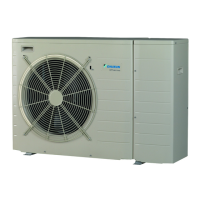



 To Next Page

 General