BRC1E52B7 Installation manual
4PW72364-1 – 11.2011
14
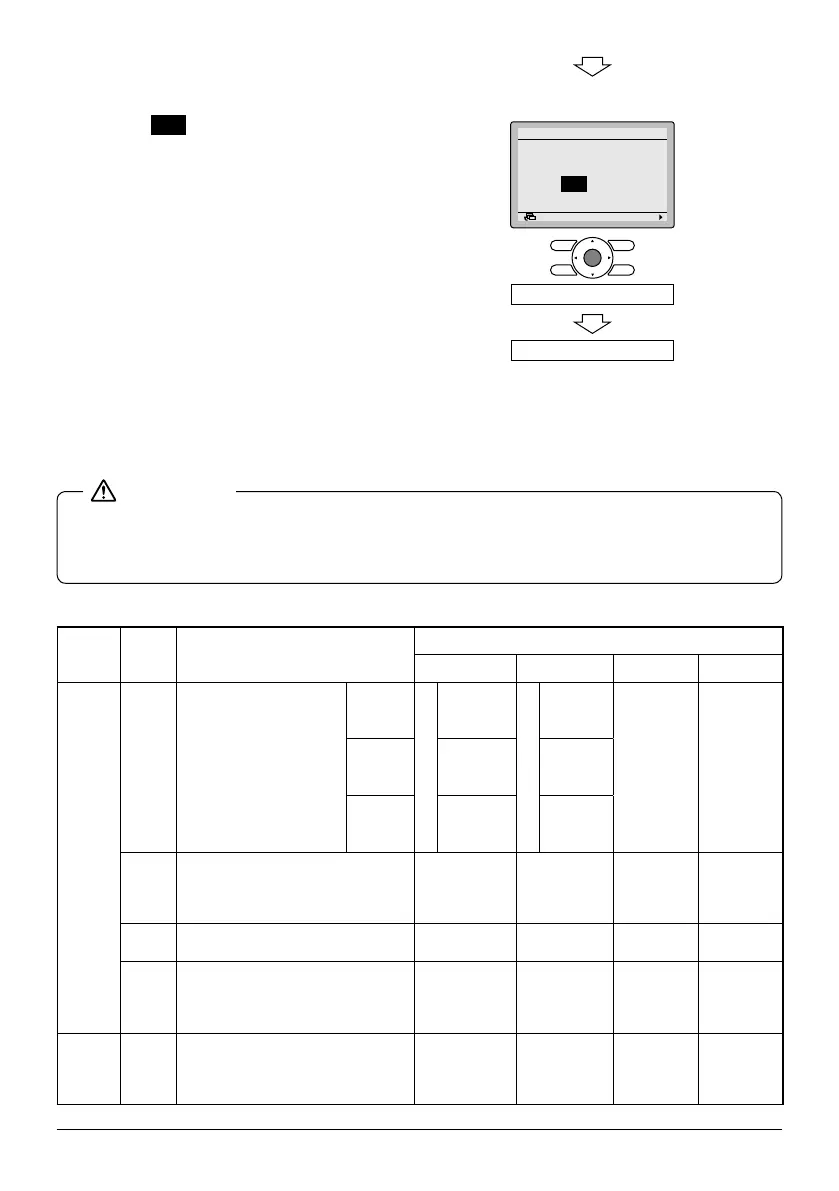
6-6 Press Menu/Enter button. Setting
conrmation screen is displayed.
6-7 Select Yes and press Menu/
Enter button. Setting details are
saved and Field settings screen
returns.
6-8 In the case of multiple setting
changes, repeat "
6-3" to "6-7".
6-9 After all setting changes are
completed, press Cancel button
twice.
6-10 Backlight goes out, and
"Checking the connection
Please stand by" is displayed
during initialization. After the
initialization, the basic screen
returns.
● When an optional accessory is installed on the indoor unit, settings of the indoor unit may be
changed. See the manual of the optional accessory.
● For eld setting details of the outdoor unit, see installation manual attached to the outdoor unit.
Mode
No.
Note) 1
FIRST
CODE
NO.
Description of setting
SECOND CODE NO. Note) 2
01 02 03 04
10 (20)
0
Filter Contamination -
Heavy/Light
(Setting for spacing time
of display time to clean
air lter)
(Setting for when lter
contamination is heavy,
and spacing time of
display time to clean air
lter is to be halved)
Ultra
long life
lter
Light
±10.000 hrs.
Heavy
±5.000 hrs.
— —
Long life
lter
±2.500 hrs. ±1.250 hrs.
Standard
lter
±200 hrs. ±100 hrs.
1
Long-life lter type (setting of lter
sign indication time).
(Change setting when ultra-long
lter is installed)
Long-life
lter
Ultra-long
life lter
— —
2
Thermostat sensor in remote
controller
Use Not use — —
3
Spacing time of display time to
clean air lter count (setting for
when the lter sign is not to be
displayed)
Display
Do not
display
— —
11 (21) 0
Setting number of connected Sky Air
simultaneous operation system
indoor units (setting for simultane-
ous operations system)
Pair Twin Triple Double twin
<Settingconrmationscreen>
6-6
6-7
Return Setting
Save the settings?
Field settings
Yes No
Press Menu/Enter button.
Setting conrmation



 To Next Page