BRC1E52B7 Installation manual
4PW72364-1 – 11.2011
16
7. Test operation method (in the case of
SkyAir)
* In the case of VRV, see the manual attached to the outdoor unit.
Also see installation manuals attached to the indoor unit and the outdoor
unit.
● Check that wiring work of the indoor unit and the outdoor unit is completed.
● Check that switch box cover of the indoor unit and the outdoor unit is closed.
● After refrigerant piping, drain piping and electric wiring are completed, clean inside of the indoor unit
and decorative panel.
● Perform the test operation according to following procedure.
7-1 Make sure to turn on the power supply
more than 6 hours before operation
start with front panel closed to protect
compressor.
7-2 Conrm that stop valves of both liquid
and gas are opened.
<Make sure that outer panel and
piping cover is closed before
operation (danger of electric
shock). >
* After air purge by vacuum pump,
refrigerant pressure may not rise
even though the stop valve is
opened. The reason is that refriger-
ant system of the outdoor unit is
blocked by electrical expansion valve
or the like. Operation is no problem.
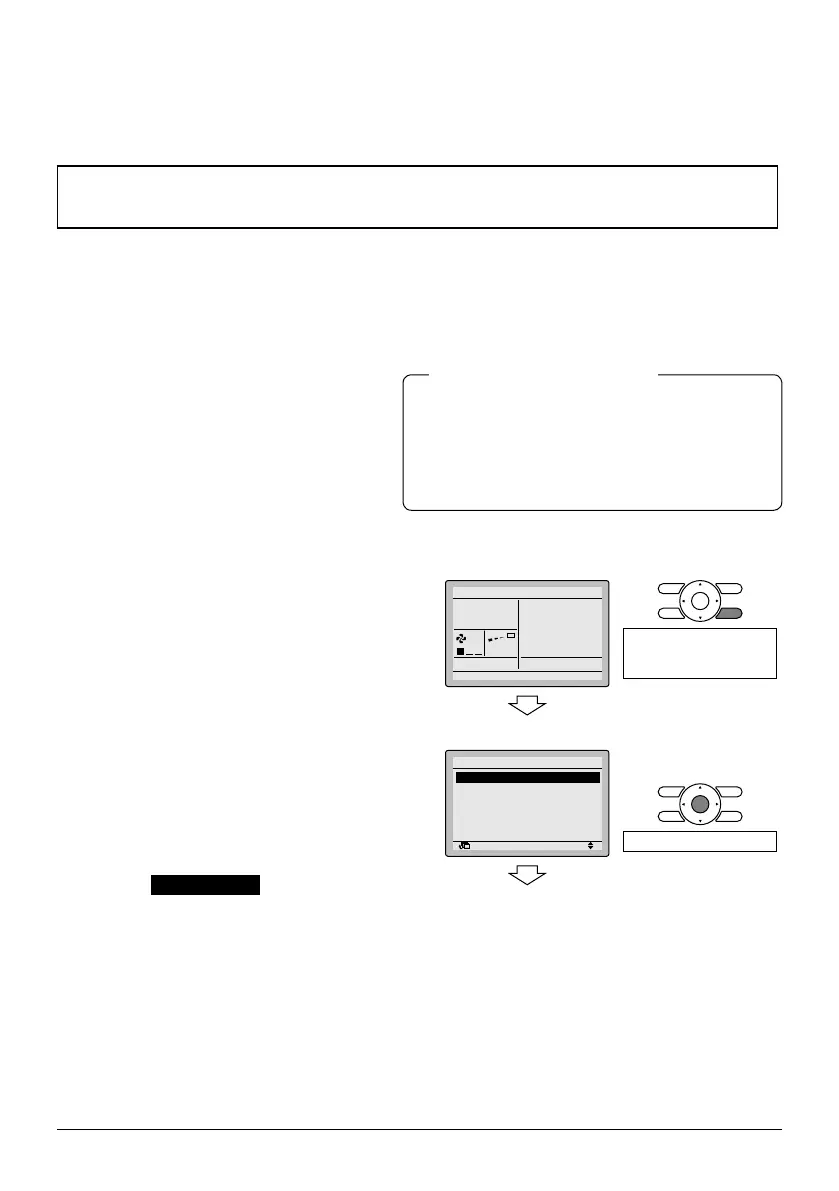
7-3 Set the operation mode to cooling by
using the remote controller.
7-4 Press and hold Cancel button for
4 seconds or longer. Service Settings
menu is displayed.
7-5 Select Test operation in the Service
Settings menu, and press Menu/Enter
button. Basic screen returns and "Test
operation" is displayed.
● The backlight will be lit for approximately
30 seconds by pressing any operation button.
● Operate the buttons during the backlight lit.
However, On/Off can be operated concur-
rently with the backlight lit.
Notes for backlight
<Basic screen>
7-3
7-4
Cool
Set to
Cool
28°C
Press and hold Cancel
button for 4 seconds or
longer during backlight lit.
<Service Setting menu screen>
7-5
Return Setting
Service Settings 1/3
Test Operation
Maintenance Contact
Field Settings
Demand
Min Setpoints Differential
Group Address
Press Menu/Enter button.



 To Next Page