BRC1E52B7 Installation manual
4PW72364-1 – 11.2011
20
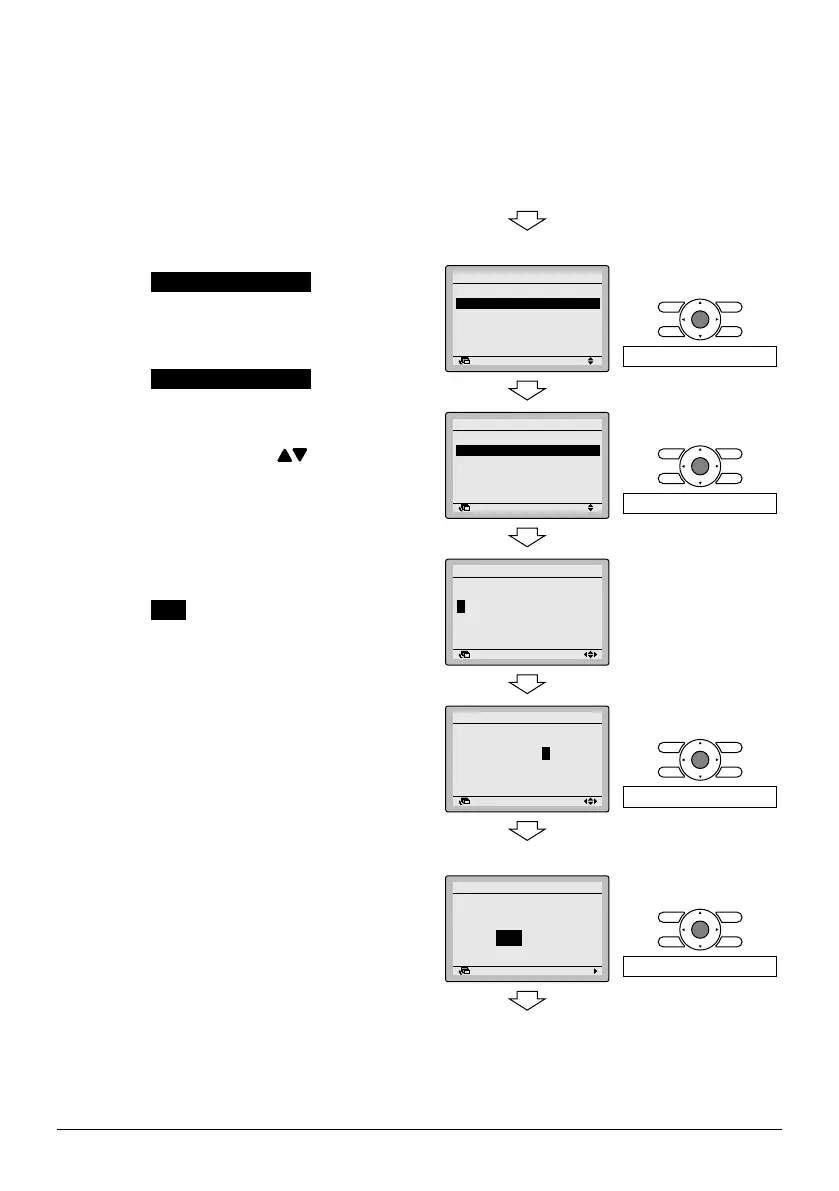
9. Registration method of the Maintenance
Contact
● Registration of the service contact.
9-1 Press and hold Cancel button for
4 seconds or longer in the basic
screen.
Service Settings menu is displayed.
9-2 Select Maintenance Contact in the
Service Settings menu, and press
Menu/Enter button. "Maintenance
Contact" menu screen is displayed.
9-3 Select Maintenance Contact
, and
press Menu/Enter button.
9-4 Enter the telephone number.
Numeric varies by using (Up/
Down) button. Enter from the left end,
and blank digit should be left as " - ".
9-5 Press Menu/Enter button.
Setting conrmation screen is
displayed.
9-6 Select Yes and press Menu/Enter
button.
Setting details are determined and
Service Settings menu screen returns.
9-7 Press Cancel button once.
The basic screen returns.
9-1 <Basic screen>
<Service Settings menu screen>
9-2
Return Setting
Service Settings
Test Operation
Maintenance Contact
Field Settings
Demand
Min Setpoints Differential
Group Address
1/3
Press Menu/Enter button.
9-3
Return Setting
Maintenance Contact
None
Maintenance Contact
Press Menu/Enter button.
9-4
Return Setting
Maintenance Contact
––––––––––––––––
1/2
9-5
Return Setting
Maintenance Contact
0123
–
456
–
7890
–––
1/2
Press Menu/Enter button.
<Settingconrmationscreen>
9-6
Return Setting
Save the settings?
Maintenance Contact
Yes No
Press Menu/Enter button.
<Service Settings menu screen>



 To Next Page