25
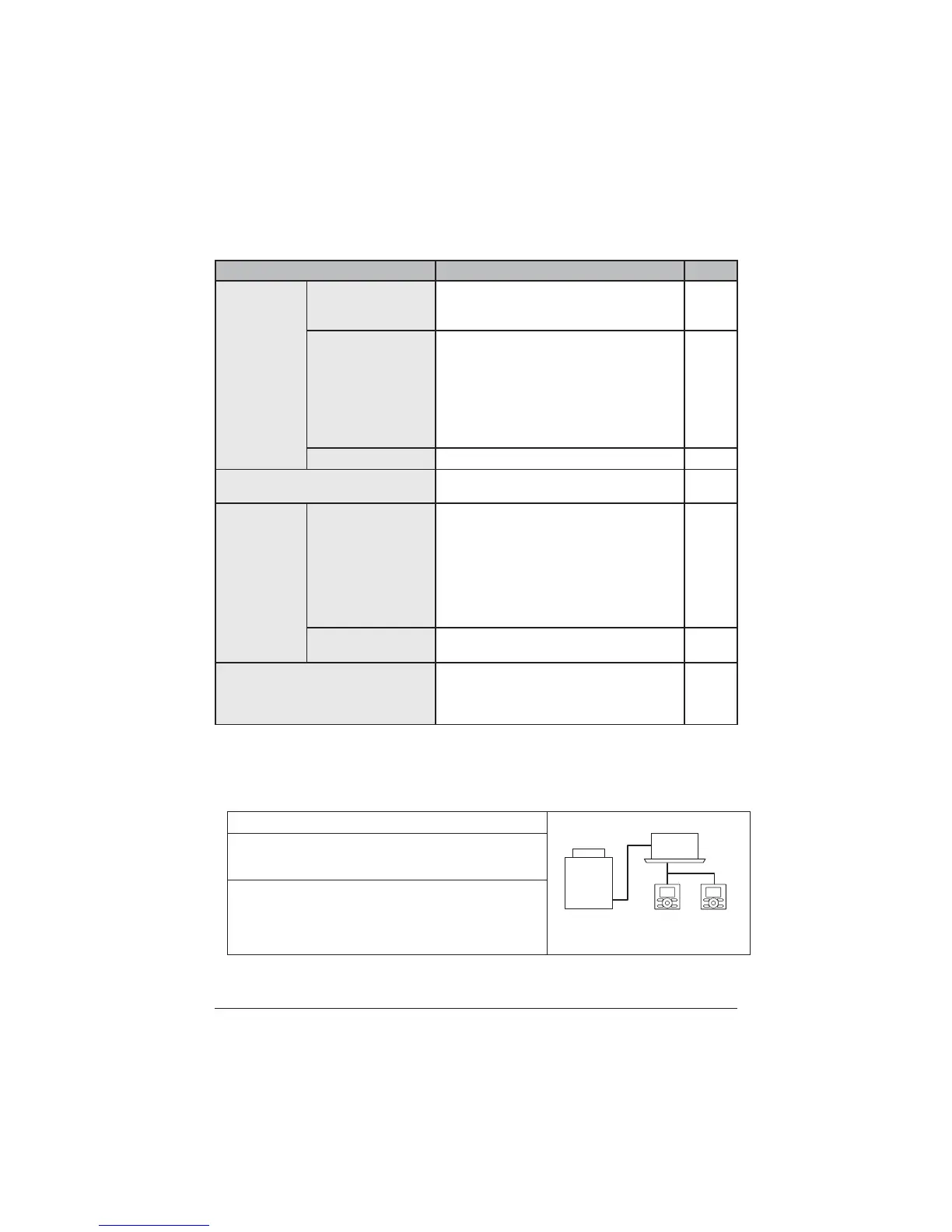
Setting and display items Description
Reference page
&RQ¿JXUDWLRQ
Draft prevention (only
if the sensing sensor is
installed)
The draft prevention function can be en-
abled or disabled.
50
Display
Used to set to standard or detailed display
mode.
Display
Standard or detailed display
Detailed display settings
Selectable from the display room tempera-
WXUHRXWGRRUDLUWHPSHUDWXUHV\VWHPRU
None.
51
Contrast Adjustment
Used to make LCD contrast adjustment.
53
Current Settings
Used to display a list of current settings
for available items.
54
Clock &
Calendar
Date & Time
8VHGWRFRQ¿JXUHGDWHDQGWLPHVHWWLQJV
and corrections.
The default time display is 24H.
7KHFORFNZLOOPDLQWDLQDFFXUDF\WRZLWKLQ
±30 seconds per month.
,IWKHUHLVDSRZHUIDLOXUHIRUDSHULRGQRW
H[FHHGLQJKRXUVWKHFORFNZLOOFRQWLQXH
ZRUNLQJZLWKWKHEXLOWLQEDFNXSSRZHUVXSSO\
55
12H/24H Clock
The time can be displayed in either a 12 hour
or 24 hour time format.
57
Language
The displayed language can be selected from
WKHIROORZLQJODQJXDJH(QJOLVK'HXWVFK
Français/Italiano/Español/Português/
1HGHUODQGV3\FFƸɢɣ(ȜȜȘȞȚțȐɌUNoH3ROVNL
58
1RWH$YDLODEOHVHWWLQJLWHPVYDU\ZLWKWKHPRGHOFRQQHFWHG
Only the available setting items appear in the menu.
2. This function cannot be used at the time of group control.
,QFDVHRIWKHVLPXOWDQHRXVRSHUDWLRQV\VWHPWKHV\VWHPLVFRQWUROOHGE\WKHVHQVLQJ
sensor mounted in the master indoor unit.
Menu Items of Sub Remote Controller
2 remote controllers
in control
Outdoor unit
Indoor unit
,IUHPRWHFRQWUROOHUVDUHLQFRQWURORIDVLQJOHLQGRRUXQLW
WKHIROORZLQJPHQXLWHPVDUHQRWVHWLQWKHVXEUHPRWH
controller. Set them in the main remote controller.
$LU)ORZ'LUHFWLRQ
Energy Saving Options
Schedule
Setback
Filter Auto Clean



 To Next Page