40
Off Timer
1
Return Setting
Off Timer
Electricity consumption
Energy Saving Options
2/2
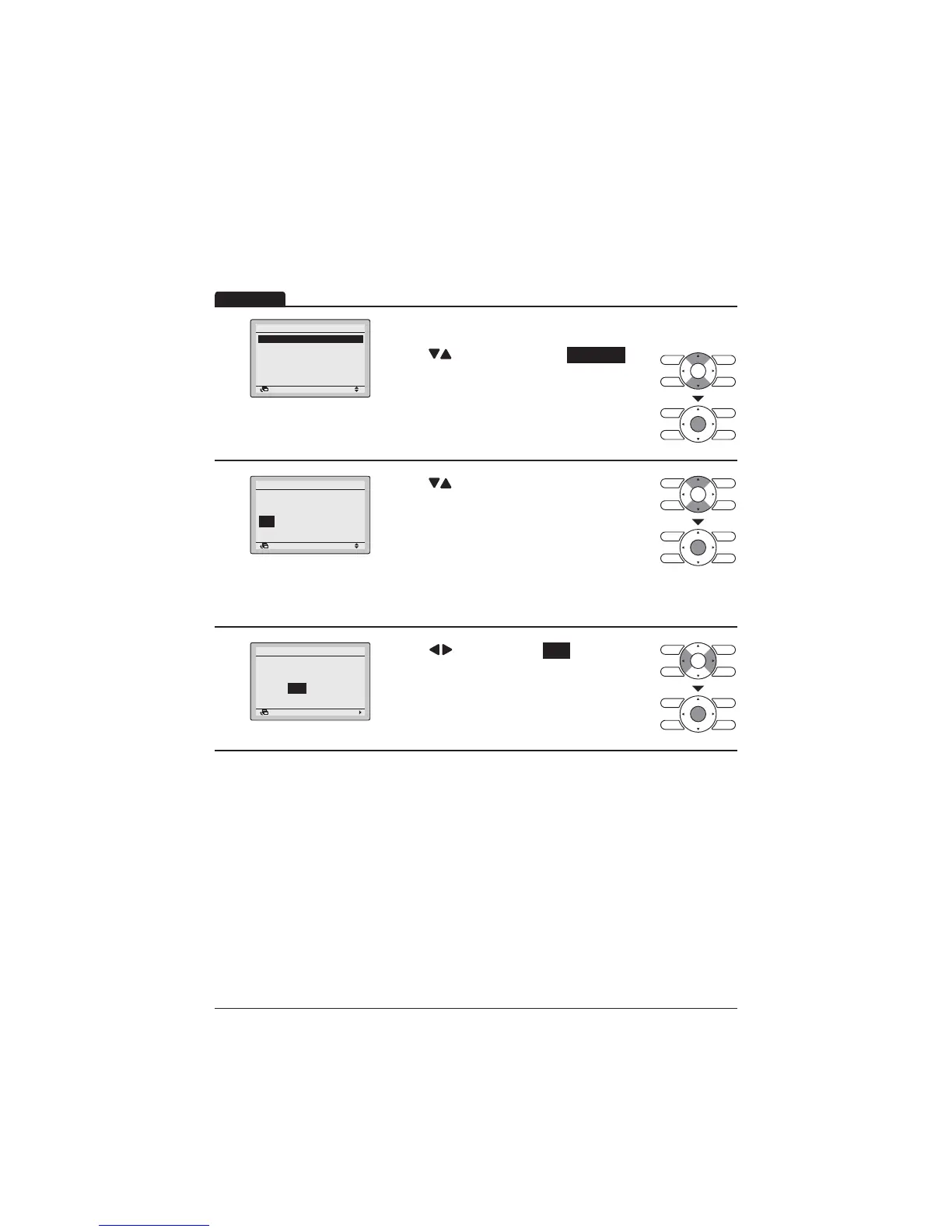
Display the Energy Saving Options screen. (Refer
to page 34.)
Press "
" buttons to select the Off Timer .
Press Menu/Enter button to display the Off Timer
screen.
2
Return Setting
After you turn on the unit,
it will automatically
turn off in
60
minutes.
Off Timer
Press " " buttons to set the time from operation
start until the unit automatically stops.
Selections can be made in increments of
10 minutes from 30 to 180 minutes.
+ROGLQJGRZQWKHEXWWRQFDXVHVWKHQXPEHUWR
change continuously.
Select the desired time and press Menu/Enter
button.
7KHFRQ¿UPDWLRQVFUHHQZLOODSSHDU
3
Return Setting
Save the settings?
Off Timer
Yes No
Press " " button to select Yes .
3UHVV0HQX(QWHUEXWWRQWRFRQ¿UPWKH2II7LPHU
settings and return to the Basic screen.
Operation



 To Next Page