55
Clock & Calendar
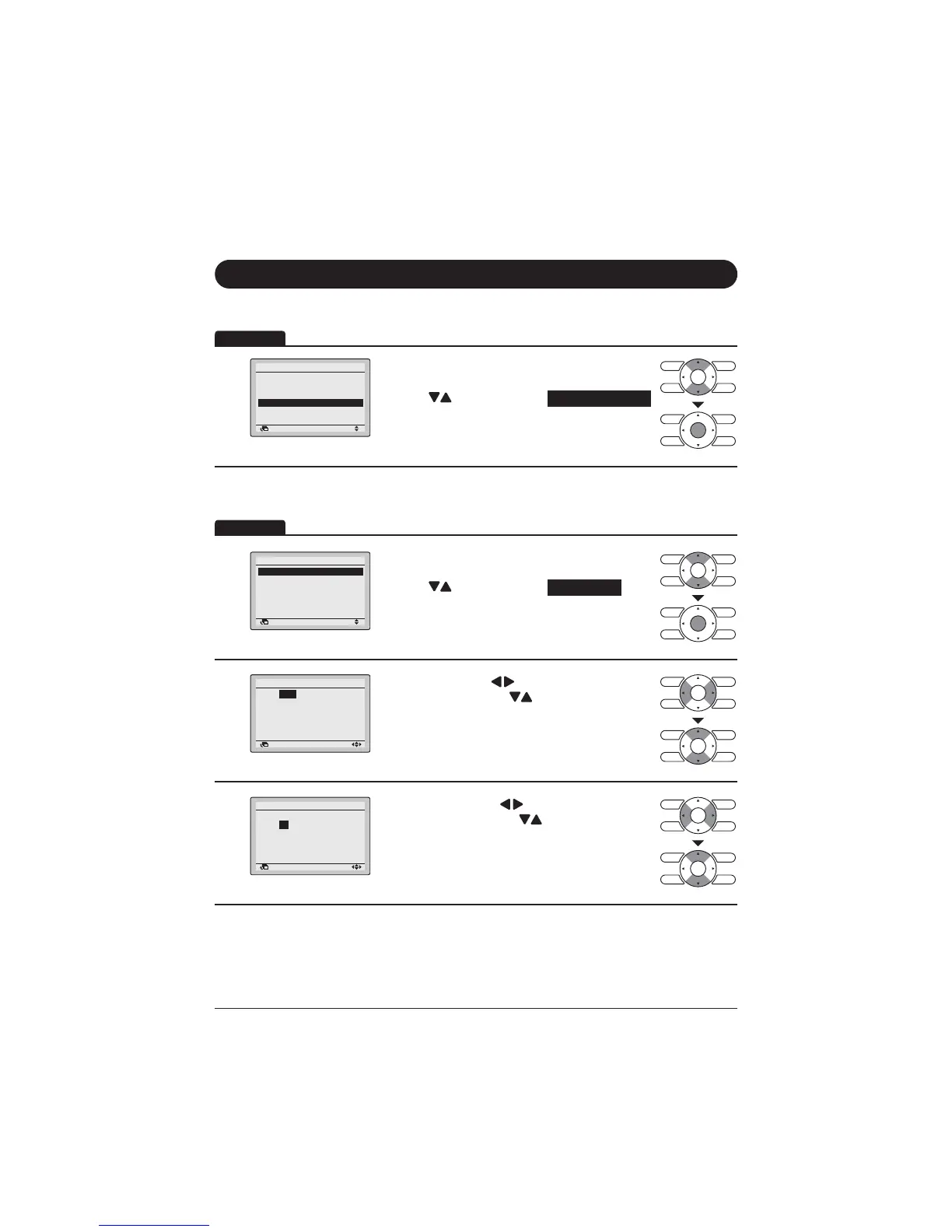
Display Method for Clock & Calendar Screen
1
Retur etti
ai e u
ai te a ce ormatio
Co i uratio
Curre t etti s
Cloc Cale dar
auae
22
Display the Main Menu screen. (Refer to
page 27.)
Press "
" buttons to select Clock & Calendar .
Press Menu/Enter button to display the Clock &
Calendar screen.
Date & time
1
Clock & Calendar
Date & Time
12H/24H Clock
Return Setting
Display the Clock & Calendar screen. (Refer to
above.)
Press "
" buttons to select Date & Time .
Press Menu/Enter button to display the Date &
Time screen.
2
ate Time
ear
onth
ay
Tuesday
Return etting
6HOHFW<HDUZLWK " buttons.
&KDQJHWKH\HDUZLWK
" buttons.
+ROGLQJGRZQWKHEXWWRQFDXVHVWKHQXPEHUWR
change continuously.
3
Date ime
ear 2013
oth
0
Day 01
o day
0:00
Retur etti
6HOHFW0RQWKZLWK " buttons.
&KDQJHWKHPRQWKZLWK " buttons.
+ROGLQJGRZQWKHEXWWRQFDXVHVWKHQXPEHUWR
change continuously.
Operation
Operation



 To Next Page