47
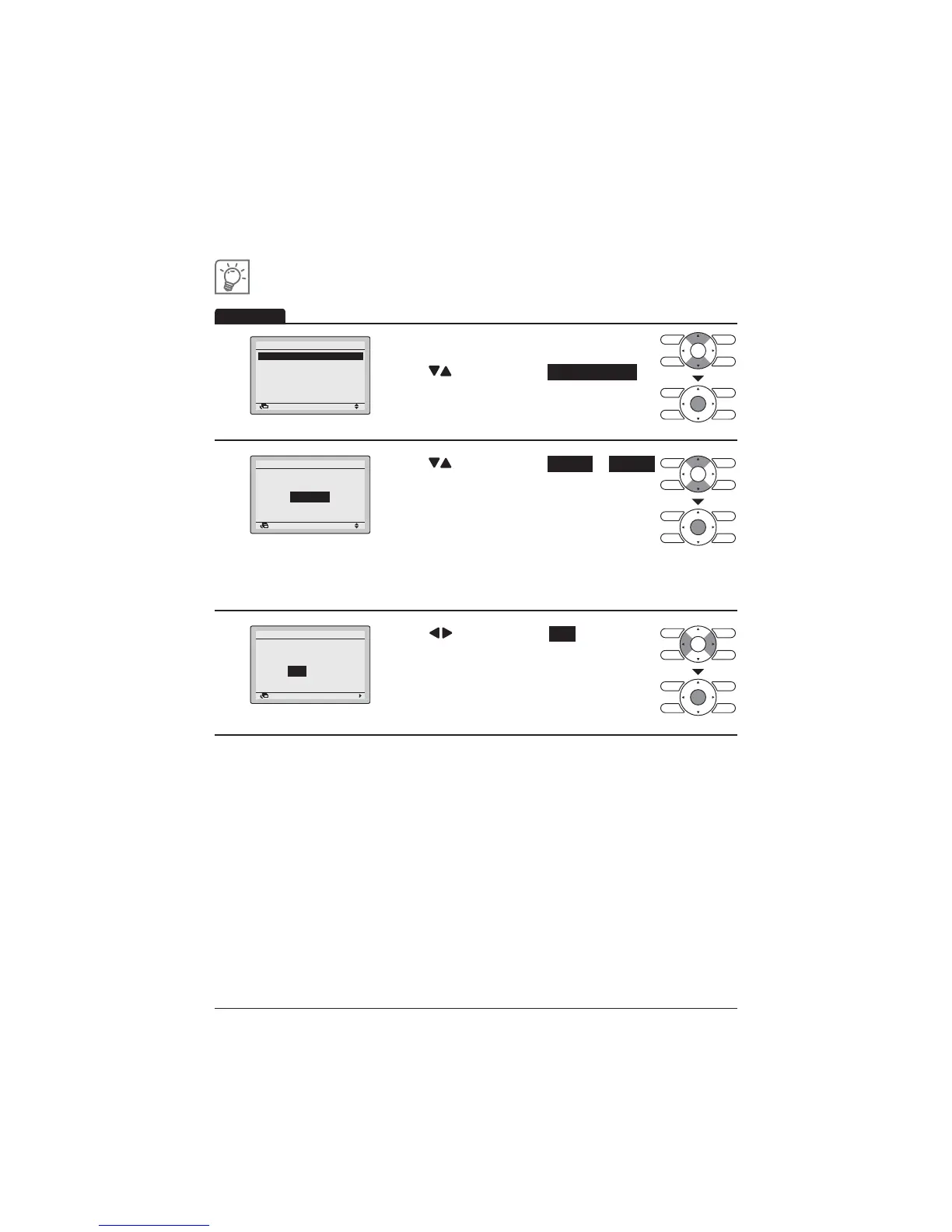
Enabling or disabling the schedule
1
Setting
Schedule
Enable/Disable
Schedule nr set
Holidays
Settings
2/2
Return
Display the Schedule screen.
(Refer to page 42.)
Press "
" buttons to select Enable/Disable .
Press Menu/Enter button to display the Enable/
Disable screen.
2
Return Setting
Enable/Disable
Schedule
Disable
Press " " buttons to select Enable or Disable
on the Enable/Disable screen.
Press Menu/Enter button after selecting the item.
7KHFRQ¿UPDWLRQVFUHHQZLOODSSHDU
127(7KH6FKHGXOHQXPEHUVHOHFWHGLVHQDEOHG
To change the schedule number see "Schedule Nr
Set" on page 43.
3
Return Setting
Save the settings?
Schedule
Yes No
Press " " buttons to select Yes .
3UHVV0HQX(QWHUEXWWRQWRFRQ¿UPWKHHQDEOH
disable setting for the schedule and return to the
Basic screen.
Operation



 To Next Page