24 English
Menu Options
3
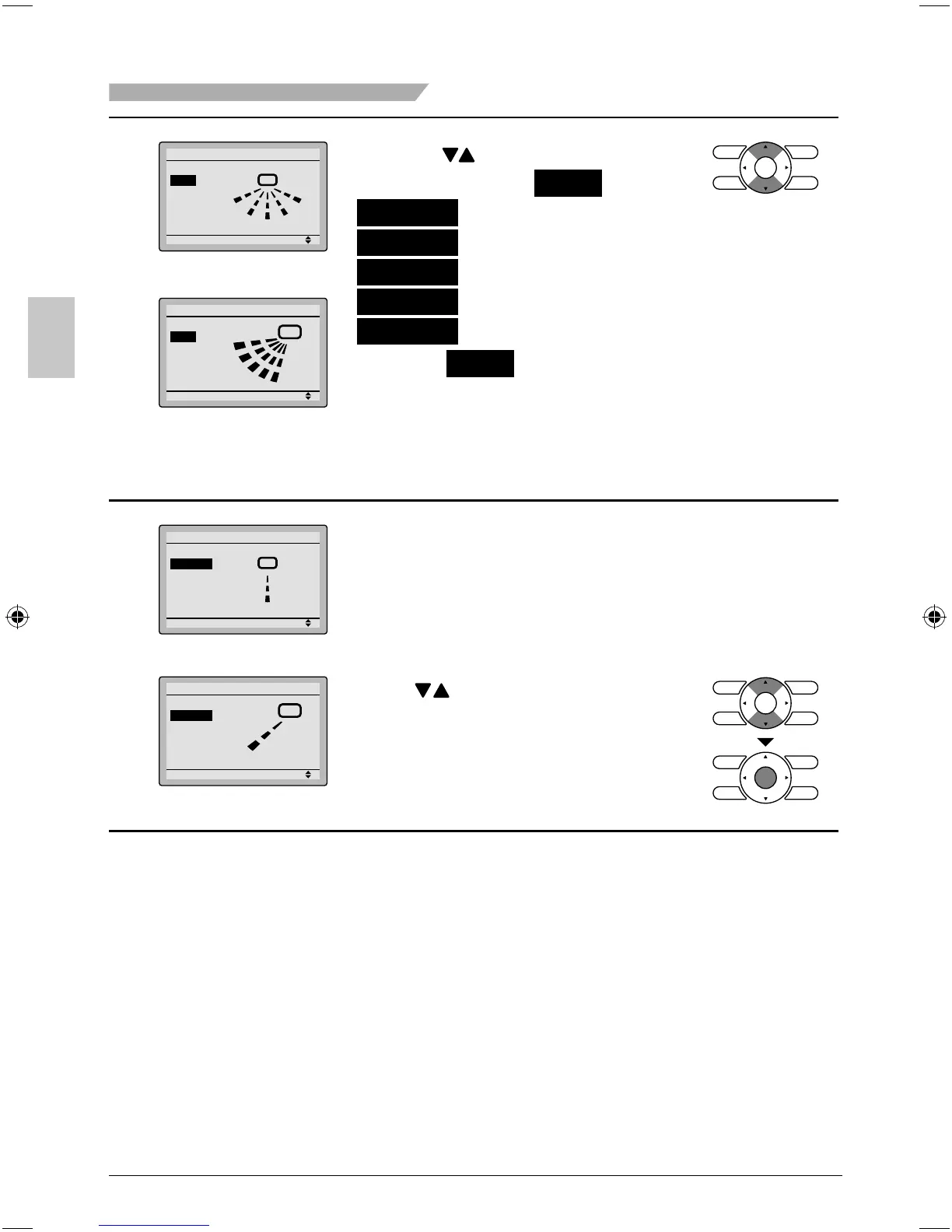
Setting
Swing
Air Flow Direction
Left/right direction
Setting
Air Flow Direction
Swing
Up/down direction
Pressing ● buttons changes the
setting to (in order) Swing ,
Position 0 ,
Position 1 ,
Position 2 ,
Position 3 , and
Position 4 .
Selecting ● Swing will cause the air
fl ow direction louver to oscillate
back and forth.
For the swing setting only, all
positions will be displayed.
4
Setting
Air Flow Direction
Position 2
Left/right direction
Cool
Heat
20°C
15°C
Setting
Position 2
Air Flow Direction
Up/down direction
When you select positions 0 to 4, ●
the louver will stay in a fi xed
position.
The illustration is an example of the display *
when position 2 is selected.
Press ● buttons to select the
desired air fl ow direction.
Press Menu/OK button to return to
the basic screen.
01_EN_3P243520-2C.indd 2401_EN_3P243520-2C.indd 24 8/27/2009 1:48:47 PM8/27/2009 1:48:47 PM



 To Next Page