English 39
Current Settings
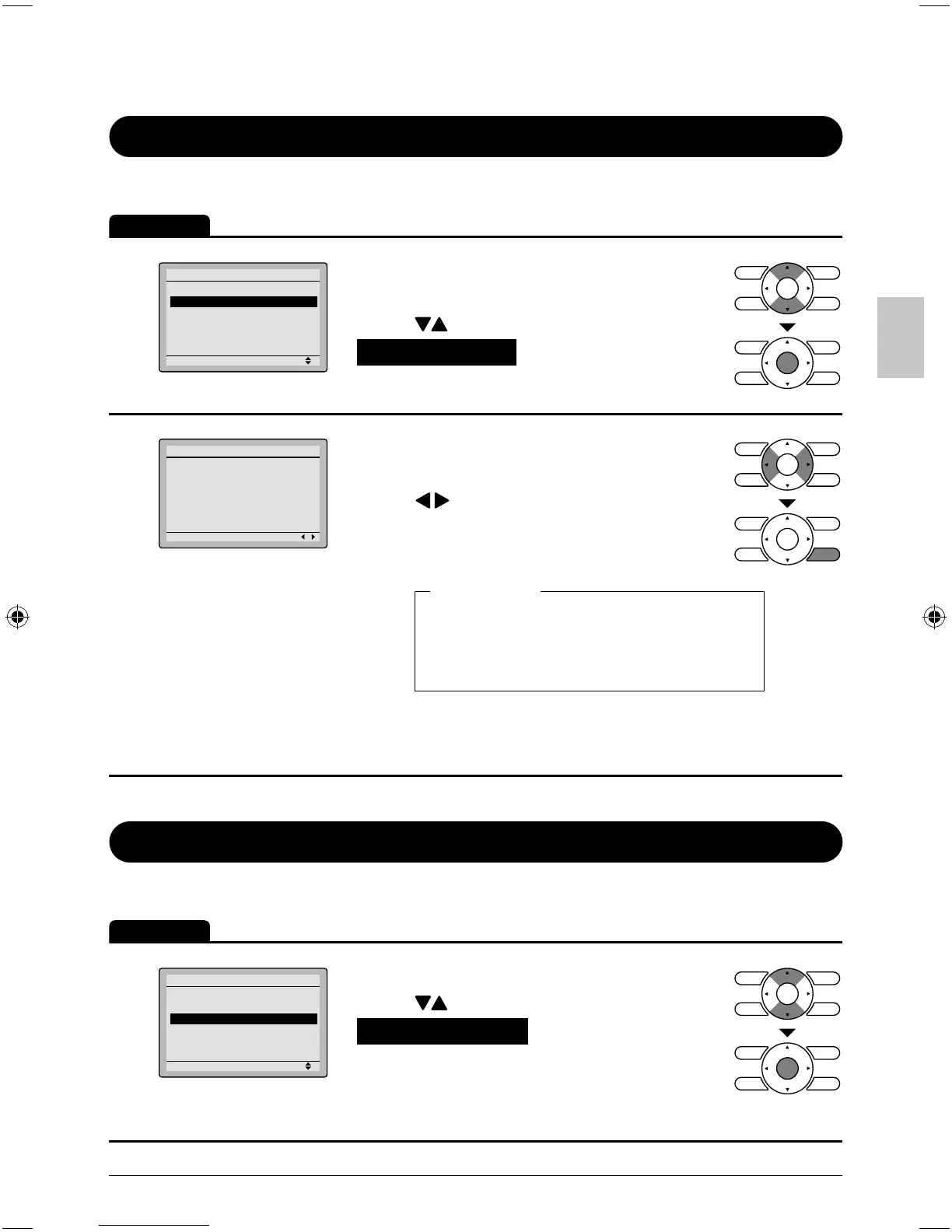
Manipulating the current settings
Operation
1
Setting
Main Menu
Configuration
Current Settings
Clock & Calendar
Daylight Saving Time
Language
2/2
Display the main menu screen. ●
(See page 22.)
Press ● buttons to select
Current Settings on the main menu
screen and press Menu/OK button.
2
Setting
Current Setting
1/2
Air Flow Direction Swing
Ventilation Rate Low
Ventilation Mode Auto
Schedule Enable
Off Timer Disable
Display Standard
A list showing the current setting status ●
will appear.
Press buttons to go to the next item.
Pressing the Cancel button takes you ●
back to the main menu screen.
Air Flow Direction Off Timer
Ventilation Rate Display
Ventilation Mode Display item
Schedule
Display items
Display items may differ depending on the model. *
Only the items that can be set are displayed.
Clock & Calendar
Date & Time
Operation
1
Setting
Main Menu
Configuration
Current Settings
Clock & Calendar
Daylight Saving Time
Language
2/2
Display the main menu screen.
●
(See page 22.)
Press ● buttons to select
Clock & Calendar on the main menu
screen.
Press Menu/OK button to display the
clock & calendar screen.
01_EN_3P243520-2C.indd 3901_EN_3P243520-2C.indd 39 8/27/2009 1:49:01 PM8/27/2009 1:49:01 PM



 To Next Page