English 27
3
Selecting and confi rming the desired ●
ventilation rate will take you back to the
basic screen.
(Pressing the Cancel button takes you back to the
previous screen without changing the ventilation
rate.)
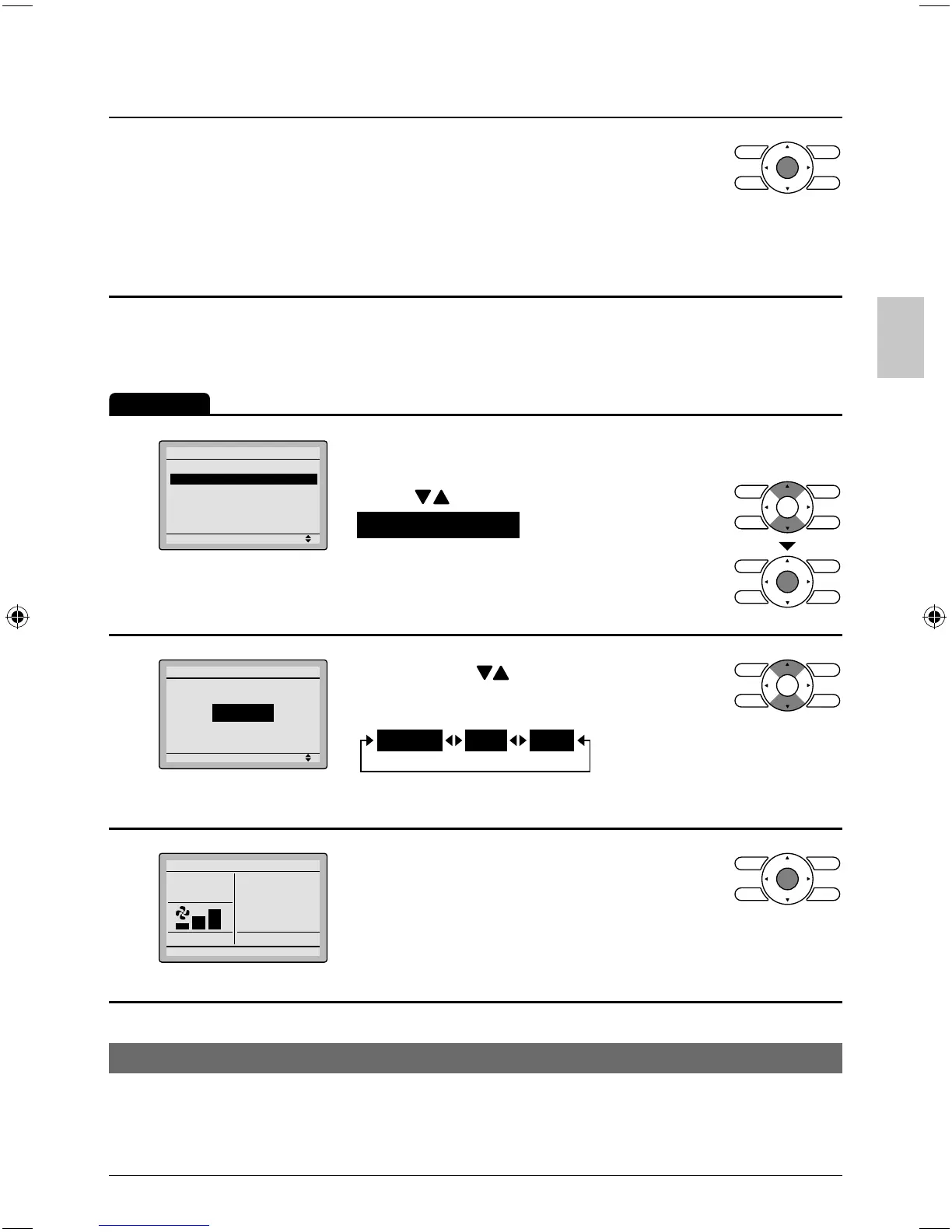
Changing the ventilation mode
Operation
1
Setting
Ventilation
Ventilation Rate
Ventilation Mode
Display the ventilation screen. ●
(See page 26.)
Press ● buttons to select
Ventilation Mode on the ventilation
screen.
Press Menu/OK button to display the
ventilation mode screen.
2
Setting
Ventilation Mode
Ventilation
Bypass
Pressing the ● buttons cycles through
the settings in the order shown below.
Bypass ERV Auto
Only modes that can be set are displayed.*
3
Cool
Return Setting
Set to
Cool
74F
Selecting and confi rming the desired ●
ventilation mode will take you back to
the basic screen.
(Pressing the Cancel button takes you back to the
previous screen without changing the ventilation
mode. )
Ventilation Mode
01_EN_3P243520-2C.indd 2701_EN_3P243520-2C.indd 27 8/27/2009 1:48:50 PM8/27/2009 1:48:50 PM



 To Next Page