6
OPERATION
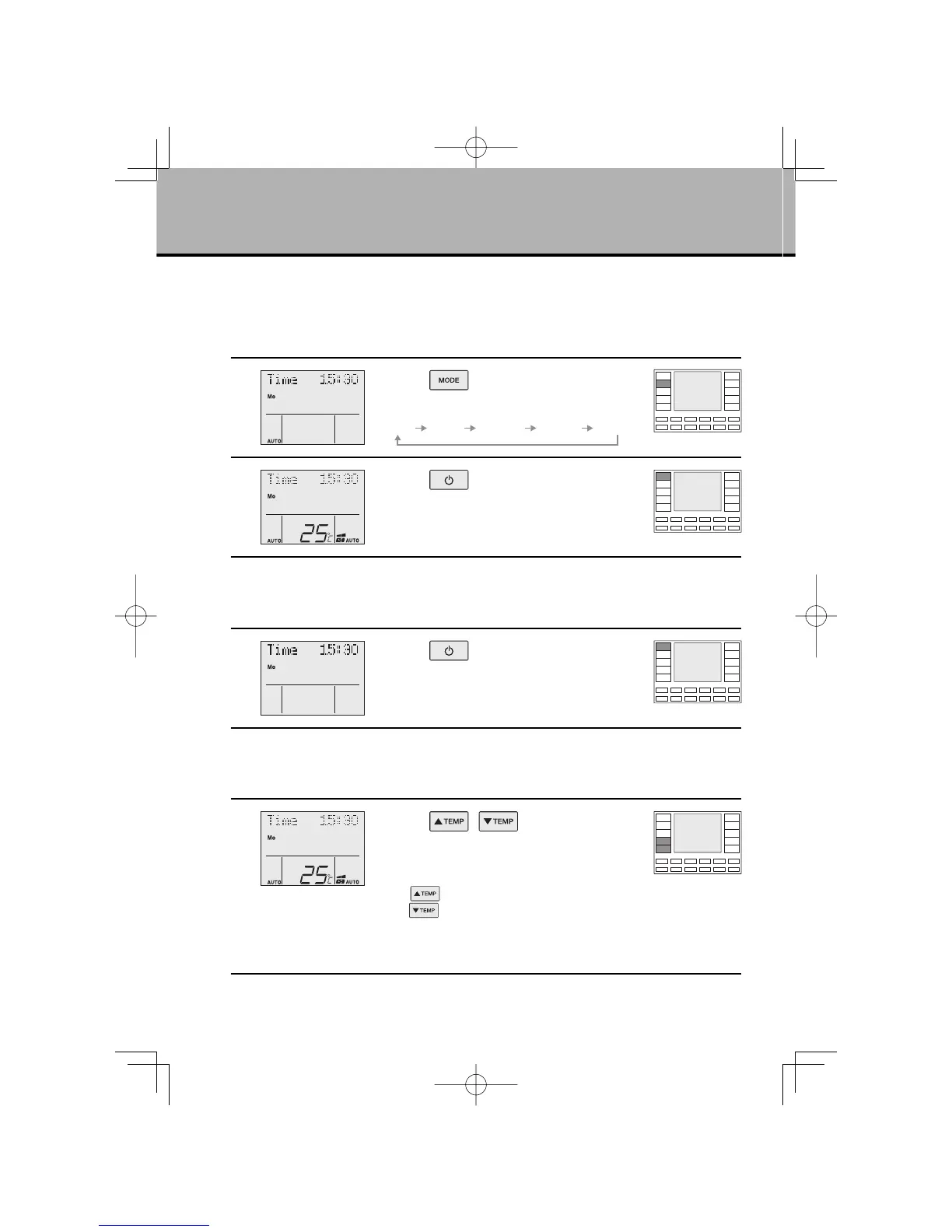
FAN · DRY · AUTO · COOL · HEAT Operation
The air conditioner operates with the operation mode of your choice.
From the next time on, the air conditioner will operate with the same operation mode.
■
To start operation
1
Press “ button” and select an
operation mode.
FAN DRY COOL HEATAUTO
2
Press “ button”.
●
The air conditioner starts operating in the selected
mode.
■
To stop operation
3
Press “ button” again.
●
The air conditioner comes to a stop.
■
To change the temperature setting
4
Press “ , button”.
DRY or FAN mode:
The temperature setting is not available.
AUTO or COOL or HEAT mode:
Press
“
button”
to raise the temperature and
press
“ button”
to lower the temperature.
Set to the temperature you like.
The temperature can be selected from a range of
16°C to 32°C.
01EN3P209820-1.inddSec1:801EN3P209820-1.inddSec1:8 2007/11/0612:05:182007/11/0612:05:18



 To Next Page