English 8
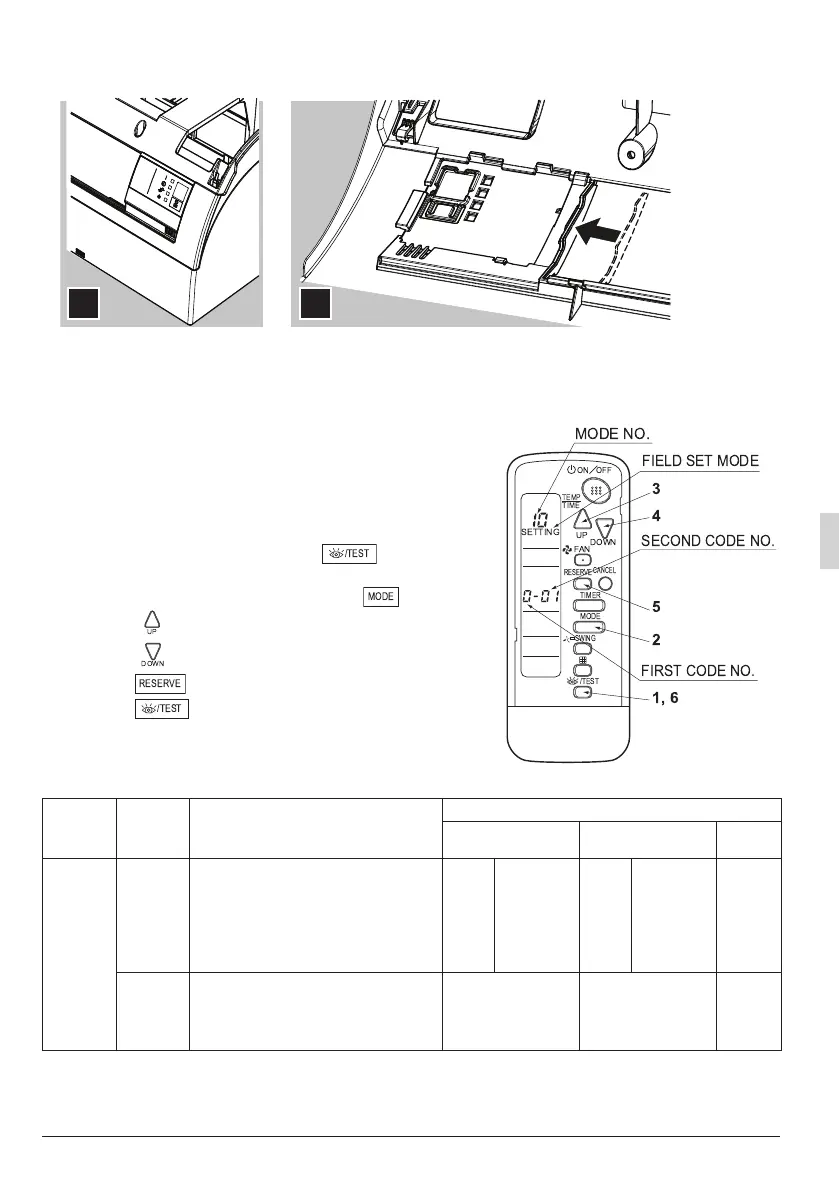
7. The control panel should be placed in the front grill as in the following figure.
8. Attach new sealing material in the original position (accessory (8)).
9. Attach the front grill and service cover to the indoor unit according to installation manual of the indoor
unit.
5. FIELD SETTING
If optional accessories are mounted on the indoor unit, the indoor
unit setting may have to be changed. Refer to the instruction man-
ual (optional hand book) for each optional accessory.
Procedure
1. When in the normal mode, press the button for a min-
imum of four seconds, and the FIELD SET MODE is entered.
2. Select the desired MODE number with the button.
3. Push the “” button and select the FIRST CODE number.
4.
Push the
“”
button and select the SECOND CODE number.
5. Push the button and the present settings are SET.
6. Push the button to return to the NORMAL MODE.
(Example)
If the time to clean air filter is set to “Filter Contamination-Heavy”,
set MODE number to “10”, FIRST CODE number to “0”, and SECOND CODE number to “02”.
MODE
number
FIRST
CODE
number
DESCRIPTION OF SETTING
SECOND CODE number NOTE)
01 02 03
10
0
Filter Contamination-Heavy/Light
(Setting for spacing time of display
time to clean air filter) (Setting for
when filter contamination is heavy,
and spacing time of display time to
clean air filter is to be halved)
Light
Approx.
200 hrs.
Heavy
Approx.
100 hrs.
–
3
Spacing time of display time to
clean air filter count
(Setting for when the filter sign is
not to be displayed)
Display Do not display –
DOWN
FAN
UP
MODE
TIMER
RESERVE
CANCEL
/TEST
SWING
ON OFF
SETTING
TIME
TEMP
MODE NO.
3
2
5
4
1, 6
FIELD SET MODE
FIRST CODE NO.
SECOND CODE NO.
3(1%ERRN3DJH:HGQHVGD\-DQXDU\30


 To Next Page