15
II. EMERGENCY STOP
When the air conditioner stops in emergency,
the OPERATING INDICATOR LAMP on the
indoor unit starts blinking.
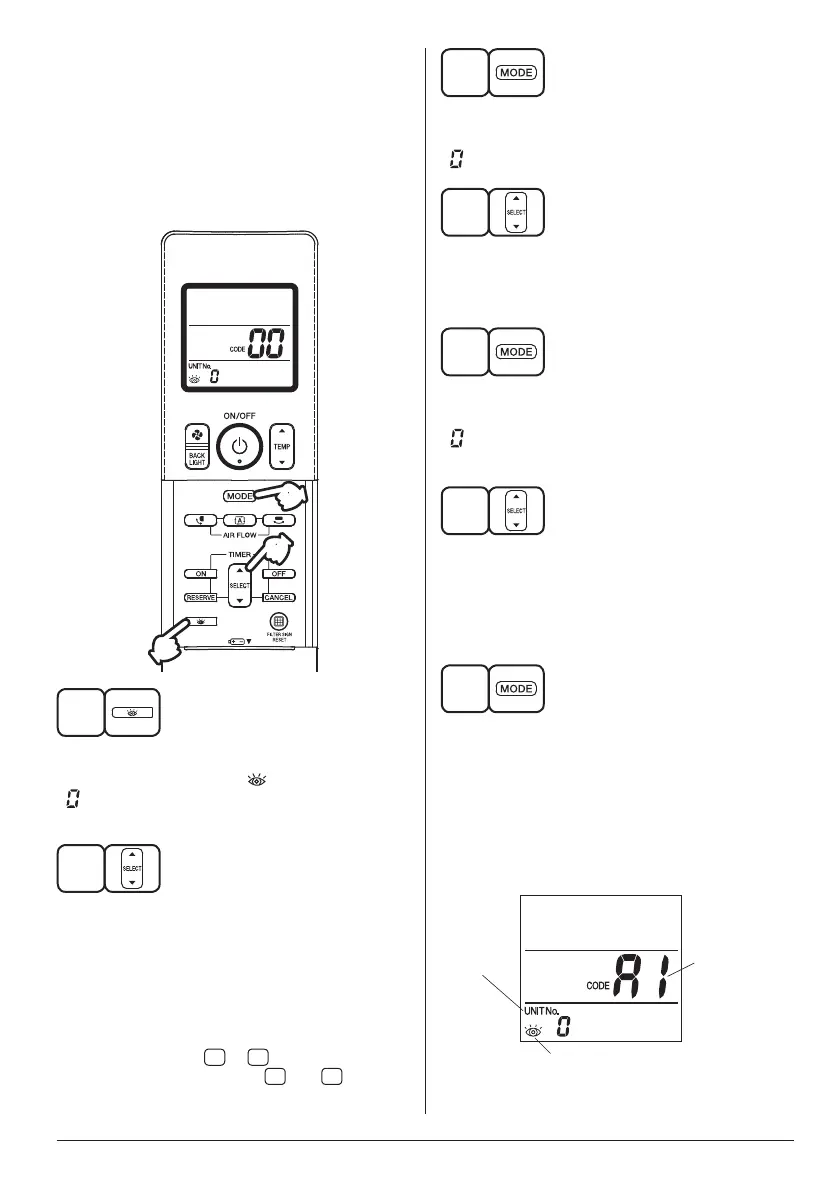
Take the following steps yourself to read the
malfunction code that appears on the display.
Contact your local dealer with this code. It will
help pinpoint the cause of the trouble,
speeding up the repair.
1
3 5
7
2 4
6
1
Press the INSPECTION button to select
the inspection mode “ ”.
“ ” appears on display and blinks.
“UNIT No.” appears.
2
Press PROGRAMMING TIMER button and
change the unit number.
Press to change the unit number until the indoor
unit beeps and perform the following operation
according to the number of beeps.
Number of beeps
3 short beeps ........... Perform all steps from
3
to
6
.
1 short beep ............ Perform
3
and
6
steps.
1 long beep .............. Normal state
3
Press OPERATION MODE SELECTOR
button.
“ ” on the left-hand of the malfunction code blinks.
4
Press PROGRAMMING TIMER button and
change the malfunction code.
Press until the indoor unit beeps twice.
5
Press OPERATION MODE SELECTOR
button.
“ ” on the right-hand of the malfunction code
blinks.
6
Press PROGRAMMING TIMER button and
change the malfunction code.
Press until the indoor unit makes a long beep.
Themalfunctioncodeisxedwhentheindoor
unit makes a long beep.
7
Reset of the display
Press the OPERATION MODE SELECTOR
button to get the display back to the
normal state.
[Trouble]
The OPERATING INDICATOR LAMP of the indoor
unitisashingandtheunitdoesnotworkatall.
(Refer to page 4)
Malfunction
Code
Unit No.
which
sensed
trouble
INSPECTION display
01_EN_4P457494-6L.indd 15 13/03/2019 11:07:46



 To Next Page