24
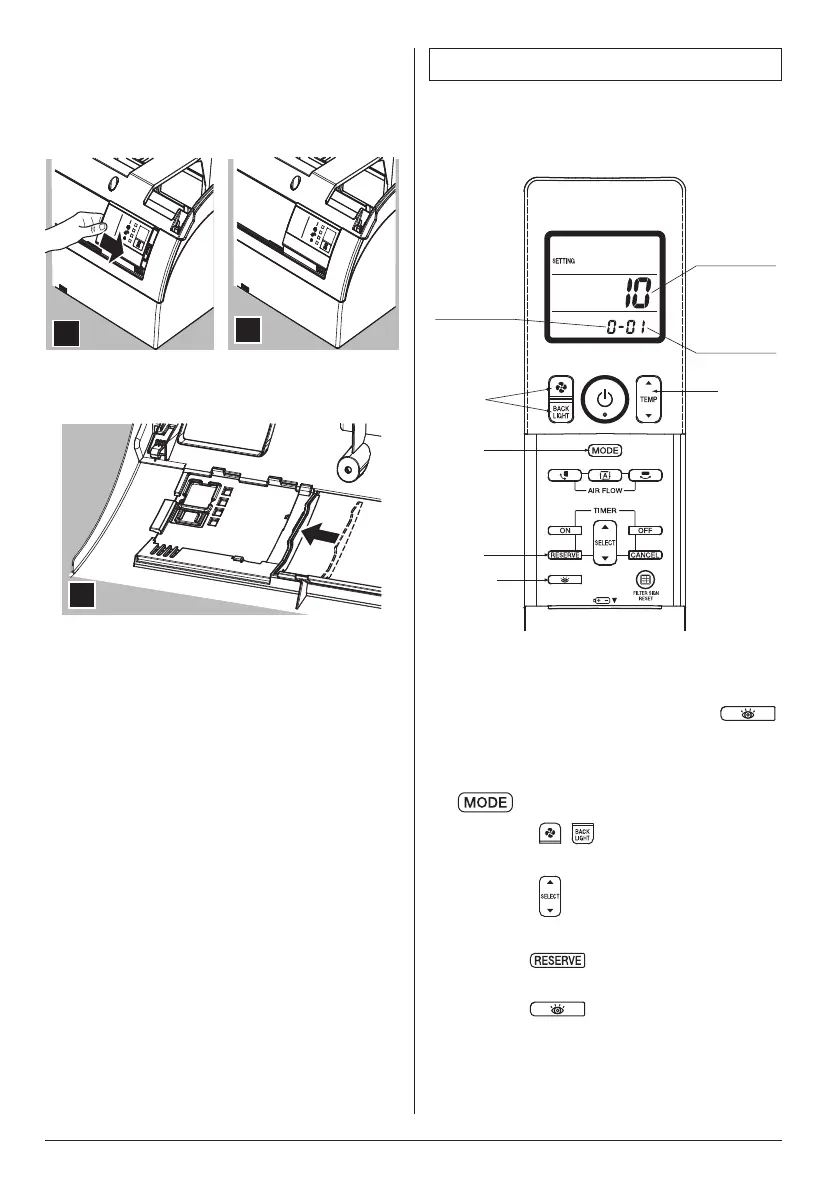
6. Slide the control panel as indicated to
attach hooks 1 and 2 to their correct
position.
7. The control panel should be placed in the
frontgrilleasinthefollowinggure.
6
7
8. Attach new sealing material in the original
position (accessory (8)).
8
9. Attach the front grille and service cover to
the indoor unit according to installation
manual of the indoor unit.
3. FIELD SETTING
If optional accessories are mounted on the indoor
unit, the indoor unit setting may have to be changed.
Refer to the instruction manual (optional hand book)
for each optional accessory.
5
2
1,6
4
3
MODE NO.
SECOND
CODE NO.
FIRST
CODE NO.
Fig. 5
Procedure
1. When in the normal mode, press the
button for four seconds or more, and the
FIELD SET MODE is entered.
2. Select the desired MODE NO. with the
button.
3. Press the “
, ” button and select the
FIRST CODE NO.
4. Press the “
” button and select the
SECOND CODE NO.
5. Press the
button and the present
settings are SET.
6. Press the
button to return to the
NORMAL MODE.
01_EN_4P457494-6L.indd 24 13/03/2019 11:07:55



 To Next Page