20
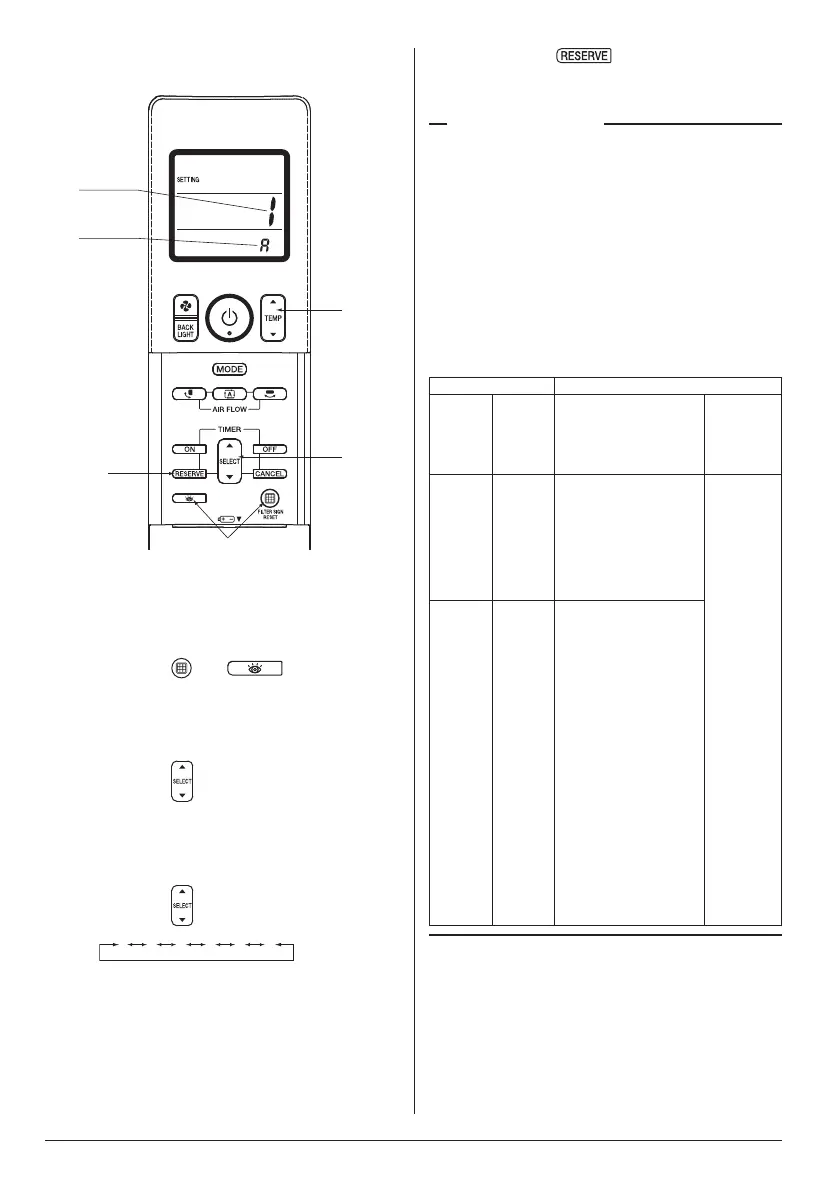
2. Setting the address of wireless remote
controller (It is factory set to “1”)
2
5
3
4
Address
Multiple
setting
Fig. 3
<Setting from the remote controller>
1. Open the cover on the display of the
wireless remote controller.
2. Press the
and buttons at the
same time for 4 seconds or more to go
into the FIELD SETTING mode.
(The liquid crystal display on the remote
controller is shown in Fig. 3.)
3. Press the
button and select the
multiple setting.
(A/b setting) (Refer to Table 3)
(Each time the button is pressed, the
display changes from “A” to “b”.)
4. Press the
buttons for set the address.
The address can be set from 1 to 6, but
set it from 1 to 3 to correspond with the
receiving part. (Transmission printed
circuit board (2)) (It does not work when it
is set from 4 to 6.)
5. When the button is pressed, the
settingisconrmedandtheusualdisplay
returns.
Multiple setting A/b
The command such as operation mode or temperature
setting by this remote controller will be rejected when
the target indoor unit operation is restricted as by an
external control such as centralized control.
Since the setting acceptance is hard to discriminate
with such circumstances there are two setting
options provided to enable discriminating by a
beeping sound according to the operation:
“A: Standard” or “b: Multi System”.
(Refer to Table 3)
Set the setting according to the customer’s intention.
Table 3
Remote Controller Indoor Unit
Multiple
setting
Display
on
remote
controller
Behavior to the remote
controller operation
when the functions are
restricted as by an
external control.
Other than
the left
A:
Standard
(factory
set)
All items
displayed.
Accepts the functions
except restricted.
(Sounds one long beep
or three short beeps)
There may be a
difference from the
indoor unit status with
remote controller display.
Accepts all
items
transmitted
(Sounds
two short
beeps)
The remote
controller
display
agrees with
the indoor
unit status.
b:
Multi
System
Display
only items
transmitted
for a while.
<When some
restricted functions
are included in the
transmitted items>
Accepts the functions
except restricted.
(Sounds one long beep
or three short beeps)
There may be a
difference from the
indoor unit status with
remote controller display.
<When no restricted
function is included>
Accepts all items
transmitted (Sounds two
short beeps)
The remote controller
display agrees with the
indoor unit status.
01_EN_4P457494-6L.indd 20 13/03/2019 11:07:49



 To Next Page