11
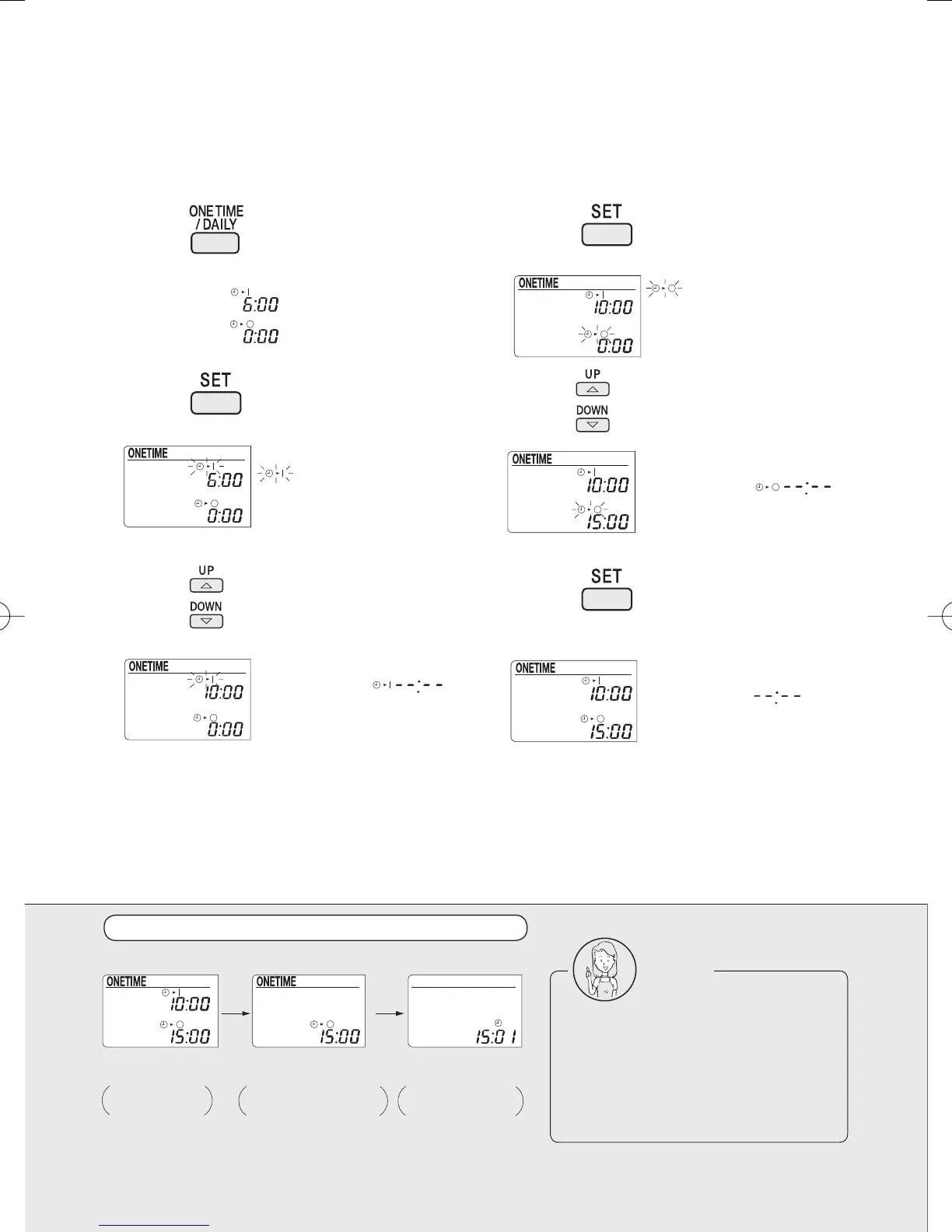
1 Press
to select the One time timer.
2 Press .
3 Press to make the ON timer setting.
What's on the display with the One time timer programmed
One time timer
Once the timer has been activated and deactivated, it gets in the OFF state.
The ON timer or OFF timer alone can also be programmed.
light up.
ONE TIME
blinks.
Each time the button is pressed,
the setting changes in a 10-
minute increment or decrement.
Hold down the button, and the
setting advances fast.
When the ON timer is not used,
save the setting as
4 Press .
5
Press
to make the OFF timer setting.
6 Press .
(The One time timer is now programmed.)
Both of the ON and OFF time
cannot be set as
blinks.
When the OFF timer is not used,
save the setting as .
One time timer
programmed.
The set time is
displayed.
ON timer activated,
and system started.
The ON timer setting
disappears.
OFF timer activated,
and system stopped.
The timer setting
disappears.
Notes
In the following cases, reset the
clock (the time setting is kept in the
memory).
The circuit breaker has been
activated.
The power fails.
3P202922-1A.indd113P202922-1A.indd11 2007/04/1616:14:472007/04/1616:14:47


 To Next Page