12
Timer Operation
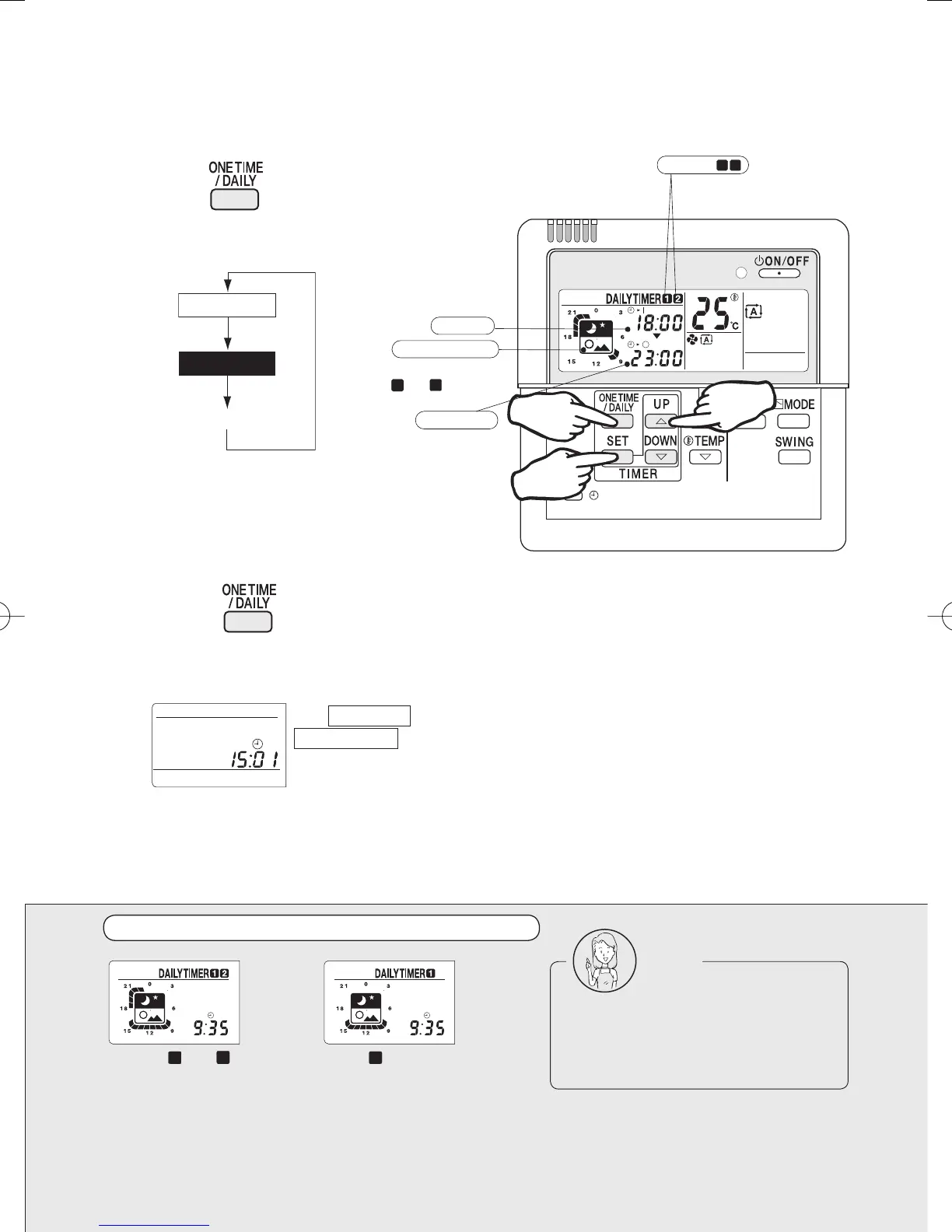
To select the daily timer mode:
1 Press
to select the daily timer mode.
Each time the button is pressed, the modes
change as follows.
To cancel the timer settings:
1 Press to get the timer settings out
of the display.
What's on the display with the daily timer programmed
One time timer
Daily timer
Timer off
The timer lamp lights up.
1 2
1 2
ON time
24-hour timer display
OFF time
Timers
The settings of timers
and can be seen
at a glance.
Two pairs of ON and OFF time
settings can be programmed.
(Timer settings displayed)
1
2·3
2
The ONE TIME or
DAILY TIMER disappears
from the display, and the
timer lamp goes out too.
Timers and
programmed.
Timer alone
programmed.
1 1
2
Note
The system starts and stops
repeatedly until the daily timer is set
off. Before you leave home for a long
time, set the daily timer off.
3P202922-1A.indd123P202922-1A.indd12 2007/04/1616:14:472007/04/1616:14:47


 To Next Page