10
Timer Operation
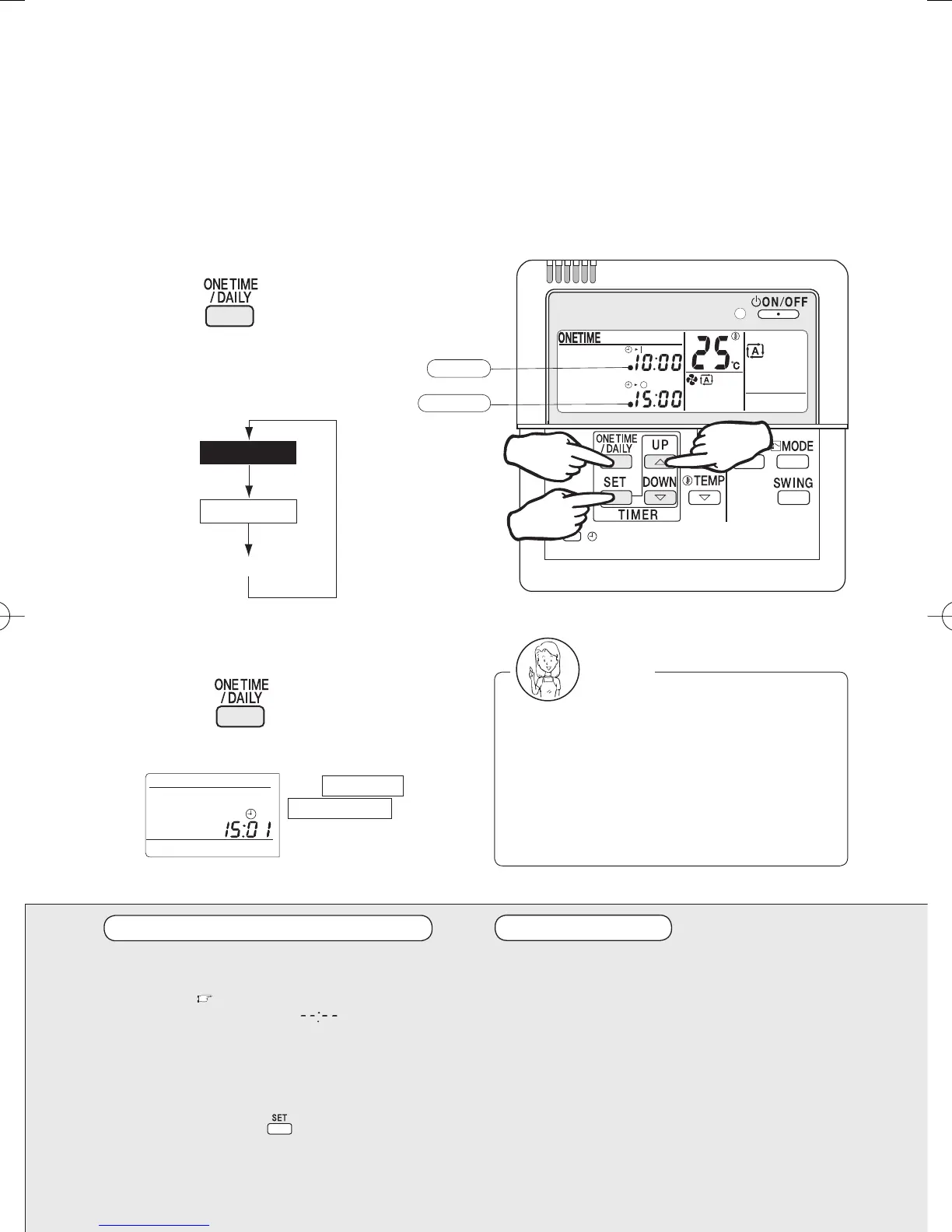
To select the One time timer
mode:
1 Press
to select the One time
timer mode.
Each time the button is pressed,
the modes change as follows.
This function automatically turns off the operation when you fall asleep and turning it on when you
wake up.
Use the daily timer mode on weekdays, and the One time timer mode on weekends for your
convenience.
To cancel the timer settings:
1 Press to get the timer settings
out of the display.
Precautions in setting the timer
Before starting the timer operation, make sure
the current time is correct. If not, set the clock
correctly. (
page 5)
In making time settings,
is displayed to
make it easy to disable the timer too.
If one minute has passed before making any
timer setting, the previous timer settings are
reintroduced and the timer is on standby. In
such case, use the
(time setting) button
and make your desired timer settings.
One time timer
Daily timer
Timer off
ON time
OFF time
(Timer settings displayed)
1
2·4·6
3·5
The timer lamp lights up.
The ONE TIME or
DAILY TIMER disappears
from the display, and the
timer lamp goes out too.
Notes
Even when the timer has been off, its
programmed settings are still in memory.
Suppose that the system is timer-controlled
but you have started it earlier than the ON
time and stopped it before the ON time
again with the ON/OFF button. Without the
timer off, the system gets itself restarted at
the ON time.
Timer operation
When the ON timer is programmed, the
system starts one hour (maximum) earlier
so that the temperature set by the remote
controller is reached just in time.
When the One time timer is programmed, the
current time disappears out of the display.
3P202922-1A.indd103P202922-1A.indd10 2007/04/1616:14:462007/04/1616:14:46


 To Next Page